Millipede (Japan)
0 1 0
Millipede (Japan) is a classic NES shoot ’em up known for its fast-paced, insect-themed action. It’s a port of the arcade game, keeping the intense, multi-directional shooting gameplay that made it popular. Players face off against waves of crawling and flying creatures, and success depends on quick reflexes and smart positioning. Its simple yet demanding mechanics make it memorable, especially for fans of arcade-style shooters.
Millipede: Gameplay Overview
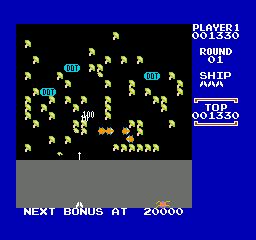
The main gameplay involves controlling a small bug at the bottom of the screen, aiming to shoot segments of a giant millipede as it moves downward. You also need to defend against other insects and flying enemies that come from the top and sides of the screen. Shooting the millipede’s segments causes it to split, leading to more chaos as the waves get tougher.
Movement is limited to a horizontal direction, but the variety of enemies and projectiles means you need to stay alert. The controls are simple, but quick targeting and precise shots are necessary to stop the millipede from reaching the bottom. Power-ups and strategic shooting can help clear the screen faster, but managing multiple threats and conserving ammo is key.
Modes, Levels and Progression
This NES version has a straightforward, arcade-style progression with levels that get harder as you go. Each wave introduces more insects, faster movement, and extra obstacles, keeping the challenge high. Instead of distinct game modes, it cycles through endless waves until all your lives are gone, encouraging repeated attempts to beat high scores.
The design focuses on survival and scoring rather than branching storylines or varied gameplay. The levels are similar but become more demanding, testing your reflexes and planning under pressure. With no branching paths or multiple modes, the game emphasizes mastering its core mechanics through practice and recognizing patterns.
Winning Strategies
To do well, focus on prioritizing threats and controlling the middle of the screen to stay safe. Moving around frequently and avoiding the edges can help manage incoming enemies. Using shots to split the millipede at key points helps control its movement and reduces the number of segments on screen.
- Shoot the millipede’s segments to break it into smaller, easier-to-handle pieces.
- Pay attention to flying enemies and take them out quickly to keep from being overwhelmed.
- Use the edges of the screen to trap enemies and limit their movement options.
- Be careful with your shots—aim well to make each one count.
- Keep moving to avoid getting trapped by insects or segments.
- Learn enemy patterns so you can anticipate their moves and react faster during tougher waves.
Common Questions About Millipede
How does the difficulty increase as I play?
Each wave adds more enemies, speeds up their movement, and introduces more aggressive attack patterns. The game gets tougher over time, requiring quicker reactions and better planning to stay alive longer.
Are there different modes or level types?
This version mainly features a continuous cycle of waves, without separate modes or levels. The goal is to survive as long as possible and rack up high scores across endless waves.
Is there replay value?
Definitely. The escalating difficulty and simple mechanics make it fun to try again and improve your score. Pattern recognition and skill development help you last longer each time.
Millipede remains a straightforward shooter that tests reflexes and tactical thinking. Its appeal lies in surviving wave after wave of insects and trying to score high, making it a memorable part of NES arcade-style games.
Related games: you can also try Mad City (Japan) (Beta) and Impossible Mission II (USA) (Unl), or browse all other games in the NES category.
How to Play Millipede (Japan)?
Move left or right to shoot and split the millipede while avoiding insects and flying enemies. Clear waves by destroying segments and survive as long as possible to beat your high score.
Game Controls
Arrow keys control movement; action buttons are mapped to keyboard keys for shooting and other actions.
You may be interested in:
-
![Zombie Hunter (Japan) [En by KingMike v1.01]](https://www.playf2p.com/wp-content/uploads/zombie-hunter-japan-en-by-kingmike-v1-01-200x120.png) NES
♥ 2
Zombie Hunter (Japan) [En by KingMike v1.01]
NES
♥ 2
Zombie Hunter (Japan) [En by KingMike v1.01] -
 NES
♥ 1
Zombie Hunter (Japan)
NES
♥ 1
Zombie Hunter (Japan) -
 NES
♥ 1
Zoids Mokushiroku (Japan)
NES
♥ 1
Zoids Mokushiroku (Japan) -
 NES
♥ 2
Zoids 2 – Zenebas no Gyakushuu (Japan)
NES
♥ 2
Zoids 2 – Zenebas no Gyakushuu (Japan) -
 NES
♥ 1
Zoids – Chuuou Tairiku no Tatakai (Japan)
NES
♥ 1
Zoids – Chuuou Tairiku no Tatakai (Japan) -
 NES
♥ 11
Zippy Race (Japan)
NES
♥ 11
Zippy Race (Japan) -
 NES
♥ 1
Zhen Ben Xi You Ji (Asia) (Unl)
NES
♥ 1
Zhen Ben Xi You Ji (Asia) (Unl) -
 NES
♥ 1
Zenbei!! Pro Basket (Japan)
NES
♥ 1
Zenbei!! Pro Basket (Japan)
Comments (0)
No comments yet. Be the first to comment!