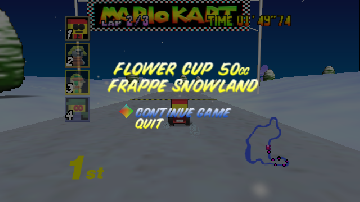
MK: Rusty Takeover 64 1.0
0 4 2
MK: Rusty Takeover 64 1.0 is a classic Nintendo 64 game that’s now playable right in your browser. Fans of vintage racing titles will find it simple and nostalgic, with easy controls and a straightforward gameplay style. If you’re into racing or vehicle combat games from the 90s, this one offers quick, enjoyable sessions without any hassle.
Getting Into MK: Rusty Takeover 64 1.0
The main idea behind MK: Rusty Takeover 64 1.0 is racing, focusing on vehicle control and timing. You pick from different cars, each with its own handling quirks, and race across a variety of tracks. You can play solo against the clock or AI opponents, trying to finish laps fast while dodging obstacles and rivals. Races tend to be short, just a few minutes, so jumping in and out doesn’t require much commitment.
The game moves quickly, demanding good maneuvering and memory of the tracks. Controls are easy enough—steering, accelerating, and braking—making it accessible if you’re new to racing games. The AI opponents provide a consistent challenge, especially on higher difficulty levels. As you keep playing, you unlock more vehicles and tracks, which encourages trying to improve your times and master different cars. Playing in your browser, you get a full race without waiting or downloading anything.
Standout Features
Visually, MK: Rusty Takeover 64 1.0 channels the look of late 90s racing games with blocky, colorful graphics and simple track designs. It doesn’t need fancy hardware but charms with its clarity and straightforwardness, perfect for quick pick-up-and-play fun. Completing races unlocks new cars and tracks, adding motivation to keep trying and getting better.
There’s good replay value thanks to the variety of tracks and vehicles, along with different AI difficulty settings. The mechanics are straightforward enough that you can focus on sharpening your skills and improving your times. Playing right in your browser means a consistent experience without any technical hassle. Whether you’re trying to beat your personal best or race for bragging rights, it offers enough depth to keep coming back for short bursts of fun.
Strategy and Tips
Getting better at MK: Rusty Takeover 64 1.0 involves understanding your car’s handling and learning each track. Here are some tips:
- Brake before tight turns to keep control and avoid skidding.
- Familiarize yourself with each track’s layout to spot obstacles and pick the best racing line.
- Select a car that matches your driving style—faster cars can be tricky but reward quick laps.
- Smooth steering helps conserve speed and maintain stability.
- Use the replay feature to review your runs and spot areas to improve.
- If options are available, tweak the difficulty to match your skill and challenge yourself gradually.
Quick Questions
How do I get started with MK: Rusty Takeover 64 1.0?
Just load the game in your browser, pick your vehicle and track, and start racing. No downloads needed.
What’s a common mistake beginners make?
Many tend to oversteer or brake too late when turning, which slows them down or leads to crashes. Practice smooth, early braking to keep control.
Can I play it on mobile or touch devices?
Yes, since it runs directly in your browser, it should work on most devices with a touchscreen. Controls might not be as precise as with a keyboard or controller, though.
MK: Rusty Takeover 64 1.0 offers a straightforward racing experience inspired by Nintendo 64 classics, with easy gameplay and enough variety to stay interesting. Playing here means instant, hassle-free fun that captures the essence of those vintage racing titles.
Related games: you can also try Human Grand Prix – The New Generation (Japan) and Mario's Typhoon Folly, or browse all other games in the Nintendo 64 category.
How to Play MK: Rusty Takeover 64 1.0?
Choose a car and race on different tracks, aiming to finish laps quickly while avoiding obstacles and rivals. Improve your times, unlock new vehicles, and master each course through practice.
Game Controls
Arrow keys control steering; accelerate and brake are mapped to other keys.
You may be interested in:
-
 Nintendo 64
♥ 3
Zool – Majuu Tsukai Densetsu (Japan)
Nintendo 64
♥ 3
Zool – Majuu Tsukai Densetsu (Japan) -
 Nintendo 64
♥ 3
Zero The Jackal 64
Nintendo 64
♥ 3
Zero The Jackal 64 -
 Nintendo 64
♥ 5
Zelda’s Birthday
Nintendo 64
♥ 5
Zelda’s Birthday -
 Nintendo 64
♥ 5
Zelda: The Sealed Palace 1.3
Nintendo 64
♥ 5
Zelda: The Sealed Palace 1.3 -
 Nintendo 64
♥ 6
Zelda Revival
Nintendo 64
♥ 6
Zelda Revival -
 Nintendo 64
♥ 3
Zelda Ocarina Of Time Indigo v0.1.10
Nintendo 64
♥ 3
Zelda Ocarina Of Time Indigo v0.1.10 -
 Nintendo 64
♥ 17
Zelda Ocarina Of Time Indigo v0.1.0
Nintendo 64
♥ 17
Zelda Ocarina Of Time Indigo v0.1.0 -
 Nintendo 64
♥ 10
Zelda Ocarina Of Time Indigo Chapter 2
Nintendo 64
♥ 10
Zelda Ocarina Of Time Indigo Chapter 2
Comments (0)
No comments yet. Be the first to comment!