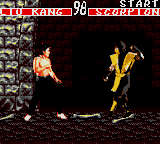
Mortal Kombat (Japan) (v3.3)
0 1 0
Mortal Kombat (Japan) (v3.3)
Mortal Kombat (Japan) (v3.3) is a portable version of the well-known fighting game series, adapted for the Game Gear. It captures the essence of the series with fast-paced one-on-one battles and the signature finishing moves, all within the hardware limits of the handheld console. The gameplay focuses on quick matches and simple mechanics, making it easy to pick up and play during short sessions.
Mortal Kombat: Gameplay Overview
This fighting game revolves around players choosing from a roster of fighters, each with their own moves and special attacks. Success depends on timing, positioning, and knowing how to use moves effectively. The goal is to deplete the opponent’s health bar before time runs out or to win rounds through smart play. Controls are straightforward, but mastering timing and move execution can really make a difference.
The mechanics involve punches, kicks, blocks, and special moves, all performed through button combinations. Given the hardware’s limitations, some inputs are simplified compared to arcade or console versions, but the core feel remains intact. Players can perform combos and throws, and execute special moves that often need specific button sequences. The game’s pace encourages quick reactions and strategic use of different moves to gain an edge in fights.
Modes, Levels and Progression
The main mode is single-player, where players face a series of AI-controlled fighters, each more challenging than the last. This setup mimics a tournament, giving a sense of progression and achievement as players win against tougher opponents. The game doesn’t feature a story mode or multiple difficulty settings, but the varied roster keeps things interesting.
Since it runs in a browser, the game is designed for quick, easy play sessions. There aren’t many levels or unlockables—focus is on mastering the fighting mechanics and improving against AI. Replaying helps refine timing, learn character moves, and develop strategies to beat different opponents. The simple progression system keeps each match meaningful, emphasizing skill over prolonged play.
Winning Strategies
Getting good at this game involves learning each fighter’s moves and timing your attacks well. Patience and paying attention to your opponent’s actions can create openings for counters and special moves.
- Practice blocking and countering to minimize damage.
- Use quick, light attacks to test your opponent’s defenses and set up bigger combos.
- Focus on mastering a few key special moves for each character rather than trying complicated sequences under pressure.
- Balance offense and defense—rushing in blindly often leaves you open to counterattacks.
- Watch for moments when your opponent is vulnerable after missing an attack or executing a move.
Common Questions About Mortal Kombat
Are there many fighters, or just a few characters?
The game offers a handful of fighters, each with their own moves, but the roster is smaller than in the arcade or console versions, focusing on the main characters for quick battles.
Can I play this offline, or do I need an internet connection?
Since it runs in your browser, you can play offline once it loads, with no internet needed during gameplay.
Is there a story mode or other game modes besides one-on-one fights?
This version sticks to straightforward fights without a dedicated story or extra modes, emphasizing quick matches and skill development.
Playing Mortal Kombat through a browser offers a faithful portable fighting experience rooted in the original arcade and console versions. Its simple controls and accessible gameplay make it a solid choice for fans looking to enjoy the game on the go or during short sessions.
Related games: you can also try Fantasy Zone Gear (USA, Europe) (Alt) and Kuni-chan no Game Tengoku Part 2 (Japan), or browse all other games in the Game Gear category.
How to Play Mortal Kombat (Japan) (v3.3)?
Choose a fighter, learn their moves, and defeat your opponent by depleting their health bar through quick attacks, combos, and blocks before time runs out.
Game Controls
Arrow keys act as the D-pad; action buttons are mapped to keyboard keys.
You may be interested in:
-
 Game Gear
♥ 2
Puzzle and Action Tanto-R (Japan)
Game Gear
♥ 2
Puzzle and Action Tanto-R (Japan) -
 Game Gear
♥ 2
Puyo Puyo 2 (Japan)
Game Gear
♥ 2
Puyo Puyo 2 (Japan) -
 Game Gear
♥ 3
Putt & Putter (USA, Europe)
Game Gear
♥ 3
Putt & Putter (USA, Europe) -
 Game Gear
♥ 1
Putt & Putter (Japan)
Game Gear
♥ 1
Putt & Putter (Japan) -
 Game Gear
♥ 1
Psychic World (USA, Europe) (v1.1)
Game Gear
♥ 1
Psychic World (USA, Europe) (v1.1) -
 Game Gear
♥ 1
Psychic World (USA, Europe)
Game Gear
♥ 1
Psychic World (USA, Europe) -
 Game Gear
♥ 1
Pro Yakyuu GG League (Japan)
Game Gear
♥ 1
Pro Yakyuu GG League (Japan) -
 Game Gear
♥ 1
Pro Yakyuu GG League ’94 (Japan)
Game Gear
♥ 1
Pro Yakyuu GG League ’94 (Japan)
Comments (0)
No comments yet. Be the first to comment!