My Boyfriend (Germany) (En,De)
0 1 0
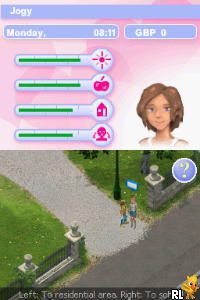
My Boyfriend (Germany) (En,De) is a classic Nintendo DS game that offers a simple slice-of-life simulation with minimal visuals and straightforward gameplay. It’s a nostalgic reminder of handheld gaming from the early 2000s, providing a relaxed experience focused on relationship management and casual interaction. If you want to see how a basic dating sim plays out on a beloved Nintendo console, this game provides a modest but charming encounter, now playable right in your browser without any hassle.
Why My Boyfriend Is Worth Playing
This Nintendo DS title uses minimal graphics and a limited color palette, yet it captures the feeling of a laid-back, character-driven experience. Its straightforward interface keeps you focused on the main mechanic—interacting with your virtual boyfriend through simple choices. The story isn’t complicated by elaborate plots or mechanics, making it accessible for anyone looking for a quick, uncomplicated digital relationship. Despite its simplicity, the game’s appeal comes from its honest portrayal of everyday moments and the light humor in its dialogue.
What keeps players coming back are the small differences in interactions and the subtle humor that appears with repeated playthroughs. Its relaxed pace and easy gameplay make it appealing for those seeking a brief, stress-free distraction. The nostalgic feel for gamers familiar with the Nintendo DS era makes it a cozy, no-pressure experience—great for casual gaming or quick breaks. While it doesn’t aim for depth or challenge, it offers enough to entertain without a big time investment, making it suitable for players of all ages interested in digital boyfriend companionship.
Tips to Get Ahead
Take your time with the game, and pick dialogue options that match your style of interaction to improve your relationship results.
- Try different responses to see small dialogue changes and find hidden humor.
- Pay attention to the character’s preferences based on past interactions to guide your choices.
- Don’t rush—spending a little extra time on each interaction can lead to better outcomes.
- Look for hints or cues from the game to understand what your virtual boyfriend responds to best.
- Repeat interactions to discover new dialogue options or unlock minor story segments.
Things to Know Before You Start
Is My Boyfriend difficult for new players?
The game is very straightforward, with no complicated mechanics or high difficulty. It’s designed for quick, casual play, making it suitable even if you’re new to dating sims or simulation games.
How long does a typical session last?
A single interaction or playthrough usually takes just a few minutes, perfect for quick breaks. If you want to explore different dialogue options, it might take a little longer, but it remains a light, easy experience overall.
Is this version in English or German?
This version includes both English and German options, so it’s accessible to a wider audience. The text is simple enough that switching languages doesn’t require previous knowledge of either, but it’s good to check which language you prefer before starting.
Jump in and see what your virtual boyfriend has to say. This classic offers a light, easygoing experience perfect for those interested in digital romance or nostalgic for simpler handheld games. Its straightforward gameplay means you can enjoy quick interactions without any fuss, making it a good choice for casual players or anyone looking for a brief break into a pixelated relationship.
Related games: you can also try Arashi no Yoru ni (Japan) (Rev 1) and Mugen no Frontier – Super Robot Taisen OG Saga (Japan), or browse all other games in the Nintendo DS category.
How to Play My Boyfriend (Germany) (En,De)?
Choose dialogue options to interact with your virtual boyfriend, aiming to build a positive relationship through simple choices and repeated interactions. Take your time to explore different responses and enjoy the casual story.
Game Controls
Arrow keys act as the D-pad; Enter is used for selecting options; other keys handle in-game actions.
You may be interested in:
-
 Nintendo DS
♥ 1
Casper’s Scare School – Classroom Capers (USA)
Nintendo DS
♥ 1
Casper’s Scare School – Classroom Capers (USA) -
 Nintendo DS
♥ 1
Zunou Nouryoku Koujou Machine – Touch de Zunoo DS (Japan)
Nintendo DS
♥ 1
Zunou Nouryoku Koujou Machine – Touch de Zunoo DS (Japan) -
 Nintendo DS
♥ 1
Zunou ni Asekaku Game Series! Vol. 1 – Cool 104 Joker & Setline (Japan)
Nintendo DS
♥ 1
Zunou ni Asekaku Game Series! Vol. 1 – Cool 104 Joker & Setline (Japan) -
 Nintendo DS
♥ 9
Zuma’s Revenge (USA)
Nintendo DS
♥ 9
Zuma’s Revenge (USA) -
 Nintendo DS
♥ 1
Zubo (USA) (En,Fr,Es)
Nintendo DS
♥ 1
Zubo (USA) (En,Fr,Es) -
 Nintendo DS
♥ 1
Zubo (Europe) (En,Fr,De,Es,It,Nl,Sv)
Nintendo DS
♥ 1
Zubo (Europe) (En,Fr,De,Es,It,Nl,Sv) -
 Nintendo DS
♥ 1
Zorro – Quest for Justice (USA) (En,Fr,De,Es,It)
Nintendo DS
♥ 1
Zorro – Quest for Justice (USA) (En,Fr,De,Es,It) -
 Nintendo DS
♥ 1
Zorro – Quest for Justice (Europe) (En,Fr,De,Es,It)
Nintendo DS
♥ 1
Zorro – Quest for Justice (Europe) (En,Fr,De,Es,It)
Comments (0)
No comments yet. Be the first to comment!