My Chinese Coach – Learn a New Language (USA)
0 2 1
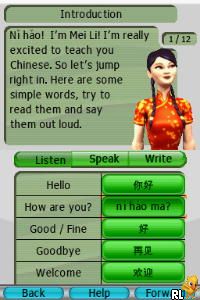
My Chinese Coach – Learn a New Language (USA) is a classic Nintendo DS game that introduces players to Mandarin Chinese through interactive lessons and exercises. It’s great for anyone curious about Chinese or trying to learn a new language. The game uses the familiar dual-screen setup and stylus controls, which makes it nostalgic yet easy to pick up. You can play it directly in your browser via an emulator, no downloads or installations needed.
Getting Into My Chinese Coach – Learn a New Language
The game offers a series of lessons covering vocabulary, pronunciation, and basic grammar. There are different modes, like tutorials, quizzes, and practice exercises, designed to build your confidence step by step. You’ll listen to native speakers, repeat phrases, and match characters to their meanings. As you progress, it offers review sections and new lessons, keeping things manageable and interesting.
The gameplay is interactive: you tap on the screen to choose options, repeat words aloud, and complete tasks. You can skip ahead or revisit previous lessons whenever you like. This flexibility makes it good for quick practice or longer study sessions, depending on what you’re aiming for. The repetition and reinforcement mirror classroom learning but in a relaxed, game-like setting.
Standout Features
The visuals are simple but functional, with clear menus and icons that make navigation easy. The stylus helps you select and practice characters naturally, reinforcing memory. The game’s structure is flexible, with lessons that gradually become more challenging. Completing units unlocks new vocabulary and review challenges, which helps keep motivation high.
You can replay exercises to improve pronunciation and recall. The game tracks your progress and gives feedback on pronunciation accuracy and quiz scores. That encourages revisiting lessons or trying harder exercises. Since lessons are modular, you can focus on specific skills like pronunciation or character recognition, customizing your learning. The straightforward design and step-by-step difficulty help keep you engaged over multiple sessions.
Strategy and Tips
Start with the basics and don’t rush. Repeating exercises helps solidify your knowledge of characters and sounds.
- Use the stylus to trace characters when practicing handwriting; it’s good for muscle memory.
- Take notes or repeat words aloud to improve pronunciation and memory.
- Getting pronunciation right early on makes a big difference in understanding and being understood.
- Review previous lessons regularly to keep things fresh and avoid forgetting.
- Set small goals for each session, like finishing one lesson or learning a new set of words.
- Don’t skip review exercises—they’re key for long-term retention and confidence.
Quick Questions
How do I get started with the game?
Just pick a lesson from the menu and follow the prompts. The game walks you through the basics to help you understand how everything works.
What’s a common mistake for beginners?
Trying to memorize characters without practicing pronunciation or handwriting can slow you down. It’s best to focus on reading and speaking from the start.
Can I play My Chinese Coach on mobile or touch devices?
The game runs in your browser, so if the emulator supports touch controls, you can practice quickly on the go.
My Chinese Coach – Learn a New Language offers a straightforward way to start learning Mandarin. Its simple lessons and interactive exercises make it a good choice for beginners who want to get a feel for the language right in their browser.
Related games: you can also try 1500 DS Spirits Vol. 1 – Mahjong (Japan) and Metal Fight Beyblade – Bakutan! Cyber Pegasis (Japan), or browse all other games in the Nintendo DS category.
How to Play My Chinese Coach – Learn a New Language (USA)?
Complete lessons and exercises to learn Chinese characters, pronunciation, and vocabulary. Use the keyboard to select options, repeat words, and practice writing characters, progressing through levels at your own pace.
Game Controls
Arrow keys for navigation; Enter to select; keyboard handles all game actions.
You may be interested in:
-
 Nintendo DS
♥ 1
Casper’s Scare School – Classroom Capers (USA)
Nintendo DS
♥ 1
Casper’s Scare School – Classroom Capers (USA) -
 Nintendo DS
♥ 1
Zunou Nouryoku Koujou Machine – Touch de Zunoo DS (Japan)
Nintendo DS
♥ 1
Zunou Nouryoku Koujou Machine – Touch de Zunoo DS (Japan) -
 Nintendo DS
♥ 1
Zunou ni Asekaku Game Series! Vol. 1 – Cool 104 Joker & Setline (Japan)
Nintendo DS
♥ 1
Zunou ni Asekaku Game Series! Vol. 1 – Cool 104 Joker & Setline (Japan) -
 Nintendo DS
♥ 9
Zuma’s Revenge (USA)
Nintendo DS
♥ 9
Zuma’s Revenge (USA) -
 Nintendo DS
♥ 1
Zubo (USA) (En,Fr,Es)
Nintendo DS
♥ 1
Zubo (USA) (En,Fr,Es) -
 Nintendo DS
♥ 1
Zubo (Europe) (En,Fr,De,Es,It,Nl,Sv)
Nintendo DS
♥ 1
Zubo (Europe) (En,Fr,De,Es,It,Nl,Sv) -
 Nintendo DS
♥ 1
Zorro – Quest for Justice (USA) (En,Fr,De,Es,It)
Nintendo DS
♥ 1
Zorro – Quest for Justice (USA) (En,Fr,De,Es,It) -
 Nintendo DS
♥ 1
Zorro – Quest for Justice (Europe) (En,Fr,De,Es,It)
Nintendo DS
♥ 1
Zorro – Quest for Justice (Europe) (En,Fr,De,Es,It)
Comments (0)
No comments yet. Be the first to comment!