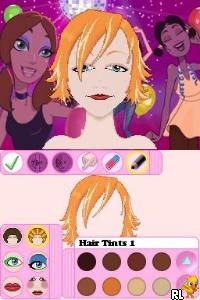
My Make-Up (USA)
0 1 0
My Make-Up (USA) is a charming Nintendo DS classic that mixes fashion simulation with creative expression. It’s designed for players who enjoy personal styling and casual gameplay, offering a simple but engaging experience that uses the handheld’s touch controls. The game stands out in its genre because it’s accessible and easy to pick up, making it suitable for a wide age range and anyone looking for a light, enjoyable browser-based activity.
My Make-Up: Gameplay Overview
The main idea is customizing characters with makeup and accessories. Players choose characters to prepare for different events or daily activities, selecting from items like lipstick, eyeshadow, blush, and more. The touch screen makes it easy to apply colors precisely and blend them, which adds to the fun of creating different looks. The game encourages experimenting with styles to match your mood or occasion.
The process involves picking a character, adding makeup and accessories, and then viewing the finished look. There are no complicated rules or timers, so the focus stays on trying out ideas rather than racing against the clock. You can also choose backgrounds and outfits to personalize your creations further. Once done, you can save your styles or start fresh, making it a relaxed experience perfect for casual play.
Modes, Levels and Progression
My Make-Up is straightforward, focusing on customizing individual characters rather than progressing through levels. Each scenario or theme offers different looks, such as casual outings or special occasions, keeping things interesting. Though it doesn’t have a traditional level system, there are plenty of characters and options to explore, which helps keep the game fresh.
Because the game offers many characters and themes, players can enjoy trying out different styles without feeling pressured to unlock new content. The simple setup means you can play in short bursts or spend more time refining your favorite looks. It’s easy to revisit and experiment whenever you want.
Winning Strategies
Experimenting with colors and styles makes the game more fun. Try mixing shades to find unique combinations.
- Use the touch screen carefully to apply makeup neatly, avoiding overdoing it for a polished look.
- Think about the character’s theme or event to choose suitable makeup and accessories.
- Save different styles for each character to compare and develop a collection of favorites.
- Match accessories and outfits to complement your makeup choices and create a cohesive look.
- Take your time exploring all the options—there’s no rush, and creativity thrives with patience.
Common Questions About My Make-Up
Can I switch between characters easily?
Yes, changing characters and scenarios is quick and straightforward, so you can try different styles without restarting or losing progress.
Are there limits to the makeup options?
The game provides a specific set of cosmetic items and accessories for each character. These are enough to create a wide range of looks. New options are unlocked through experimenting rather than through levels or story progression.
How long does the gameplay last?
The game is perfect for quick sessions, but you can easily spend hours trying out different styles and saving your favorites. The replay value comes from personal creativity, not from advancing through a story or levels.
This classic Nintendo DS game runs directly on this site, offering a simple and relaxing fashion simulation. Its focus on creative customization makes it a nice choice for anyone who enjoys personal expression without complicated mechanics or long commitments. My Make-Up encourages players to experiment freely, turning each session into a chance to craft unique, stylish looks right in their browser.
Related games: you can also try Blades of Thunder II (USA) and Motto! Stitch! DS – Rhythm de Rakugaki Daisakusen (Japan) [T-En by PrayashLand v0.5.1], or browse all other games in the Nintendo DS category.
How to Play My Make-Up (USA)?
Choose a character, then use your mouse or keyboard to apply makeup and accessories, creating different looks for various occasions. Save your favorite styles or start fresh to experiment with new combinations.
Game Controls
Arrow keys or WASD move the cursor; Enter or Space select options; mouse handles applying makeup and accessories.
You may be interested in:
-
 Nintendo DS
♥ 1
Casper’s Scare School – Classroom Capers (USA)
Nintendo DS
♥ 1
Casper’s Scare School – Classroom Capers (USA) -
 Nintendo DS
♥ 1
Zunou Nouryoku Koujou Machine – Touch de Zunoo DS (Japan)
Nintendo DS
♥ 1
Zunou Nouryoku Koujou Machine – Touch de Zunoo DS (Japan) -
 Nintendo DS
♥ 1
Zunou ni Asekaku Game Series! Vol. 1 – Cool 104 Joker & Setline (Japan)
Nintendo DS
♥ 1
Zunou ni Asekaku Game Series! Vol. 1 – Cool 104 Joker & Setline (Japan) -
 Nintendo DS
♥ 9
Zuma’s Revenge (USA)
Nintendo DS
♥ 9
Zuma’s Revenge (USA) -
 Nintendo DS
♥ 1
Zubo (USA) (En,Fr,Es)
Nintendo DS
♥ 1
Zubo (USA) (En,Fr,Es) -
 Nintendo DS
♥ 1
Zubo (Europe) (En,Fr,De,Es,It,Nl,Sv)
Nintendo DS
♥ 1
Zubo (Europe) (En,Fr,De,Es,It,Nl,Sv) -
 Nintendo DS
♥ 1
Zorro – Quest for Justice (USA) (En,Fr,De,Es,It)
Nintendo DS
♥ 1
Zorro – Quest for Justice (USA) (En,Fr,De,Es,It) -
 Nintendo DS
♥ 1
Zorro – Quest for Justice (Europe) (En,Fr,De,Es,It)
Nintendo DS
♥ 1
Zorro – Quest for Justice (Europe) (En,Fr,De,Es,It)
Comments (0)
No comments yet. Be the first to comment!