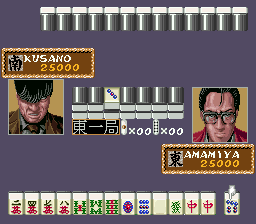
Naki no Ryuu – Mahjong Hishouden (Japan)
0 1 0
Naki no Ryuu – Mahjong Hishouden (Japan) is a classic SNES game that takes players into a traditional Japanese-style Mahjong experience. Its pixel art visuals and simple interface evoke a sense of nostalgia, reminiscent of the era when digital Mahjong was both a pastime and a puzzle of strategy. Now, you can enjoy it right in your browser—no downloads or setup needed.
Step Into the World of Naki no Ryuu – Mahjong Hishouden
The game’s visuals are inspired by Japanese culture, with clean, sharp tiles featuring classic symbols. The minimalistic interface keeps things straightforward, highlighting clarity over flash. The sound design is subtle—gentle chimes and traditional melodies create a calm, almost meditative mood, perfect for a quiet afternoon. The overall feeling is one of nostalgia, encouraging players to relax and test their skills in a simple, familiar setting.
Playing directly in your browser, the game responds instantly, feeling just like a genuine SNES title. The emulator faithfully reproduces the original graphics and chiptune soundtrack. Some menu options or instructions might be in Japanese, but the core gameplay stays accessible and easy to pick up. It focuses on classic Mahjong puzzles, with no unnecessary features—just pure Mahjong fun.
How the Gameplay Hooks You
This game centers on matching Mahjong tiles and making strategic discards. The pace is steady, giving you time to think about each move without feeling rushed. Its simple rules make it easy for newcomers to get started, but the game’s depth keeps it interesting over multiple rounds. As you get better at recognizing patterns and timing your moves, the challenge increases naturally.
The game encourages repeated play because each round presents a different layout, demanding careful observation and planning. It rewards patience and focus, making it suitable for quick sessions or longer play when you want to sharpen your Mahjong skills. The balance of accessibility and challenge keeps you coming back, with each victory feeling satisfying.
Pro Tips for Naki no Ryuu – Mahjong Hishouden
Take your time analyzing the tiles before making a move. Rushing often leads to mistakes or missed chances.
- Pay attention to what tiles have already been discarded—this can help predict what’s still hidden.
- Focus on completing sets efficiently; avoid holding onto tiles that won’t help form a winning hand.
- Discard tiles unlikely to match future draws, keeping your hand manageable.
- Recognize common tile combinations to make faster decisions as you play.
- Use the pause between rounds to review your strategy and learn from what worked or didn’t.
Frequently Asked Questions
Will Naki no Ryuu – Mahjong Hishouden work well for quick play sessions?
Absolutely. Its simple mechanics and short rounds make it perfect for a quick game in your browser.
Is the game good for beginners or better suited for experienced players?
It’s easy enough for newcomers to pick up, but mastering its strategy offers a satisfying challenge for seasoned Mahjong fans too.
Does the game stay interesting after multiple plays?
Yes. The different tile layouts keep each round feeling fresh, so it’s easy to keep coming back for more.
Playing Naki no Ryuu – Mahjong Hishouden in your browser gives you a taste of classic Mahjong gameplay, capturing the charm of a traditional Japanese game from the SNES era. Its straightforward design and strategic elements make it enjoyable whether you’re passing the time or sharpening your skills. The version here preserves the original’s spirit and is ready whenever you want to play, no downloads needed.
Related games: you can also try Honke Hanafuda (Japan) and Kuusou Kagaku Sekai Gulliver Boy (Japan) [En by Stealth v0.99], or browse all other games in the SNES category.
How to Play Naki no Ryuu – Mahjong Hishouden (Japan)?
Match and discard Mahjong tiles to complete winning hands. Carefully observe the layout, plan your moves, and aim for strategic discards to win rounds.
Game Controls
Arrow keys move the cursor; Enter confirms selections; other keys navigate and select tiles.








Comments (0)
No comments yet. Be the first to comment!