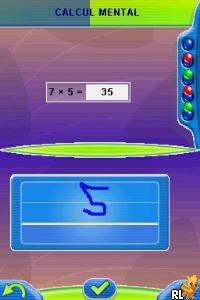
Nathan Entrainement CE2 (France)
0 1 0
Nathan Entrainement CE2 (France) is a classic Nintendo DS game that centers around early childhood education and skill development. It’s designed to be simple and accessible, so young learners can start practicing right away. As a game rooted in the educational style of the DS era, it offers a straightforward experience that doesn’t require prior gaming experience, making it a good option for parents and teachers looking for a fun, interactive learning tool.
What Is Nathan Entrainement CE2?
At its core, Nathan Entrainement CE2 is an educational game aimed at children in the CE2 level, roughly equivalent to second grade. The game features a series of exercises and activities that reinforce basic skills like reading, writing, and simple math, all within an easy-to-navigate interface designed for young players. Its goal is to create a playful environment where children can practice schoolwork without feeling overwhelmed or bored.
The gameplay involves completing simple tasks, each designed to improve specific skills. It’s not about high scores or competition; instead, it emphasizes steady progress and getting familiar with core concepts. This classic from the Nintendo DS era uses clear visuals and intuitive controls, making it accessible for different learning speeds and abilities.
What Keeps You Coming Back
What makes Nathan Entrainement CE2 appealing is its focus on educational reinforcement through repetition and variety. It offers different types of exercises that keep children engaged, with immediate feedback helping them understand their mistakes and improve. The structure encourages regular practice, which can help reinforce learning outside the classroom.
Plus, the game’s simple design and lack of complicated mechanics mean it’s easy to pick up and put down as needed. The variety of activities, along with a gentle progression system, motivates young players to return for more practice. Since it runs directly in your browser and doesn’t require installation, players can access it anytime for quick, educational play sessions.
Handy Tips
Starting with Nathan Entrainement CE2? Here are some tips to get the most out of it:
- Allow children to explore each activity at their own pace; most exercises don’t have a time limit.
- Use the feedback to guide learning; repeat exercises if needed to build confidence.
- Encourage trying different activities to develop a well-rounded skill set.
- Set aside regular sessions to create a routine and help skills stick over time.
- Watch progress without putting pressure on; the aim is steady improvement, not perfection.
Player FAQ
Is Nathan Entrainement CE2 easy enough for young children to start without help?
Yes, the game has simple controls and clear instructions, making it accessible for children in CE2 and younger.
Can I play Nathan Entrainement CE2 offline, or does it need an internet connection?
This classic Nintendo DS experience runs directly in your browser, so it doesn’t need an internet connection once loaded, making it easy to play anywhere.
Is Nathan Entrainement CE2 suitable for children just starting to learn these skills?
Absolutely, it’s designed for beginners and encourages gradual learning, so it’s a good choice for early learners or kids needing extra practice.
Nathan Entrainement CE2 provides a simple, educational experience that works well for young learners and teachers alike. Its focus on core skills, combined with easy access through the browser emulator, makes it a practical choice for anyone interested in a straightforward, engaging educational game from the Nintendo DS era.
Related games: you can also try 1500 DS Spirits Vol. 2 – Shougi (Japan) and Germany's Next Topmodel – Das Offizielle Spiel zur Staffel 2010 (Germany) (NDSi Enhanced), or browse all other games in the Nintendo DS category.
How to Play Nathan Entrainement CE2 (France)?
Complete simple reading, writing, and math activities to reinforce skills. Use the keyboard to select answers and navigate through exercises at your own pace.
Game Controls
Arrow keys move selection; Enter confirms choices; other keys may be used for specific actions.
You may be interested in:
-
 Nintendo DS
♥ 1
Casper’s Scare School – Classroom Capers (USA)
Nintendo DS
♥ 1
Casper’s Scare School – Classroom Capers (USA) -
 Nintendo DS
♥ 1
Zunou Nouryoku Koujou Machine – Touch de Zunoo DS (Japan)
Nintendo DS
♥ 1
Zunou Nouryoku Koujou Machine – Touch de Zunoo DS (Japan) -
 Nintendo DS
♥ 1
Zunou ni Asekaku Game Series! Vol. 1 – Cool 104 Joker & Setline (Japan)
Nintendo DS
♥ 1
Zunou ni Asekaku Game Series! Vol. 1 – Cool 104 Joker & Setline (Japan) -
 Nintendo DS
♥ 9
Zuma’s Revenge (USA)
Nintendo DS
♥ 9
Zuma’s Revenge (USA) -
 Nintendo DS
♥ 1
Zubo (USA) (En,Fr,Es)
Nintendo DS
♥ 1
Zubo (USA) (En,Fr,Es) -
 Nintendo DS
♥ 1
Zubo (Europe) (En,Fr,De,Es,It,Nl,Sv)
Nintendo DS
♥ 1
Zubo (Europe) (En,Fr,De,Es,It,Nl,Sv) -
 Nintendo DS
♥ 1
Zorro – Quest for Justice (USA) (En,Fr,De,Es,It)
Nintendo DS
♥ 1
Zorro – Quest for Justice (USA) (En,Fr,De,Es,It) -
 Nintendo DS
♥ 1
Zorro – Quest for Justice (Europe) (En,Fr,De,Es,It)
Nintendo DS
♥ 1
Zorro – Quest for Justice (Europe) (En,Fr,De,Es,It)
Comments (0)
No comments yet. Be the first to comment!