New 3D Golf Simulation Devil’s Course (Japan)
0 1 0
New 3D Golf Simulation Devil’s Course (Japan) is a classic Genesis game that provides a straightforward golf experience you can play right in your browser. If you enjoy retro sports titles with simple controls and gameplay that focuses on the game rather than flashy graphics, this game gives a nostalgic nod to early 3D golf simulations. It’s a good choice for a quick round or for those curious about how sports games on the Sega Genesis evolved.
Getting Into New 3D Golf Simulation Devil’s Course
The game centers around basic golf mechanics where your goal is to finish holes with minimal fuss. You choose a club, set the shot’s power, and aim to get the ball into the hole in as few strokes as possible. Unlike more complex modern golf games, it sticks to simple controls and direct gameplay, making it easy for players of all skill levels to pick up.
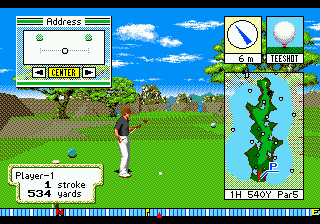
Most rounds start at a menu where you select your course or hole, then adjust your shot. The game offers a simple view of the course, showing the terrain and obstacles from a perspective that’s easy to follow. After setting your shot, it animates your swing and shows the ball’s path. Success depends on understanding the terrain and controlling your shot power — there are no complicated modes or options to worry about. It’s designed for quick, repeatable rounds that test your accuracy and judgment.
Standout Features
The visuals are typical of early 3D graphics on the Genesis, with blocky terrain and simple textures. They clearly show each hole’s layout and obstacles without much detail, keeping things straightforward. The design avoids clutter and focuses on delivering a clean golf experience.
Progression is simple — complete holes and aim for better scores. There are no complex levels or unlocks, so replay value comes from trying to beat your previous scores or mastering different courses. Its minimal setup encourages experimenting with shot power and angles, giving you a reason to keep practicing. Short rounds mean you can finish a game in just a few minutes, fitting easily into quick gaming sessions or casual play.
Strategy and Tips
Getting a feel for the terrain and wind helps improve your game. Practice adjusting your shot power for different distances to prevent overshooting or falling short.
- Watch the slope near the hole; it often influences where the ball lands.
- Use the preview option to see how your shot might go before committing.
- Learn the power levels for each club to keep your shots consistent—guesswork can lead to mistakes.
- Prioritize accuracy over power; good placement can save strokes.
- Try different angles to see how the terrain affects the ball’s roll and bounce.
Quick Questions
Can I start playing immediately without setup?
Yes, the game runs directly in your browser. Just load the page and start playing.
What’s a common mistake beginners make?
Many overshoot the power or forget to consider the slope, which can cause missed putts or shots going out of bounds.
Is it playable on mobile or touch devices?
Since it runs in your browser, you can play it on mobile devices with a touchscreen. Controls might feel a bit less precise than on a desktop, but it works.
New 3D Golf Simulation Devil’s Course offers a simple yet challenging look at early 3D golf gaming on the Genesis. Its quick rounds and easy mechanics make it a good pick for fans of vintage sports titles or casual golf games.
Related games: you can also try Gynoug (Japan) and Immortal, The (USA, Europe), or browse all other games in the Genesis category.
How to Play New 3D Golf Simulation Devil’s Course (Japan)?
Choose a club, set the shot power and aim to hit the ball into the hole with as few strokes as possible. Complete holes quickly while adjusting for terrain and wind to improve your score.
Game Controls
Arrow keys navigate menus and aim; Enter confirms your choices; use on-screen controls to swing and adjust shot power.
You may be interested in:
-
 Genesis
♥ 3
Zou! Zou! Zou! Rescue Daisakusen (Japan)
Genesis
♥ 3
Zou! Zou! Zou! Rescue Daisakusen (Japan) -
 Genesis
♥ 6
Zoom! (World)
Genesis
♥ 6
Zoom! (World) -
 Genesis
♥ 9
Zool – Ninja of the ‘Nth’ Dimension (USA)
Genesis
♥ 9
Zool – Ninja of the ‘Nth’ Dimension (USA) -
 Genesis
♥ 11
Zombies Ate My Neighbors (USA)
Genesis
♥ 11
Zombies Ate My Neighbors (USA) -
 Genesis
♥ 9
Zombies (Europe)
Genesis
♥ 9
Zombies (Europe) -
 Genesis
♥ 1
Zombie High (USA) (Proto)
Genesis
♥ 1
Zombie High (USA) (Proto) -
 Genesis
♥ 1
Zhuagui Dashi – Ghost Hunter (China) (Unl)
Genesis
♥ 1
Zhuagui Dashi – Ghost Hunter (China) (Unl) -
 Genesis
♥ 1
Zero Wing (Japan)
Genesis
♥ 1
Zero Wing (Japan)
Comments (0)
No comments yet. Be the first to comment!