Nolan Ryan’s Baseball (USA)
0 1 0
Nolan Ryan’s Baseball (USA) gives a nostalgic look at what sports gaming was like on the SNES. This classic captures the feel of early 90s baseball simulations, with straightforward gameplay and a focus on authentic presentation. If you’re familiar with the SNES library, it’s a familiar experience, but it’s also easy for new players to jump into via the browser emulator here.
Step Into the World of Nolan Ryan’s Baseball
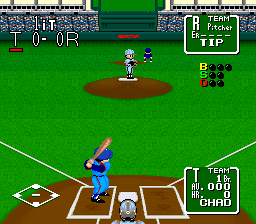
The visuals reflect the pixel art style typical of the SNES era — colorful team uniforms and simple player sprites that are easy to recognize. The stadium backgrounds are minimal but do a good job of evoking a lively ballpark, with animated crowds and scoreboard details that add to the atmosphere. The sound effects mimic the crack of the bat, crowd cheers, and umpire calls, which help create a feeling of being at a real game. While the graphics aren’t flashy, they focus on clarity and gameplay, making every pitch and swing easy to follow.
The soundtrack has upbeat chiptune-style music that keeps the energy high, complemented by sound effects that reinforce the baseball vibe. It’s not complex, but it fits the simple, no-frills style of the game. Playing directly in your browser offers a smooth, instant-on experience that keeps the original charm of this SNES classic without any hassle of setup or installation, making it a quick way to enjoy a nostalgic sports game.
How the Gameplay Hooks You
Nolan Ryan’s Baseball sticks to realistic baseball mechanics, focusing on pitching, batting, and fielding. The pacing is steady, with each inning offering chances to plan and make plays. Its controls are simple enough for newcomers but have enough depth for more experienced players to appreciate tactical choices like pitch placement and batting timing.
The game follows a typical flow, with players managing their team through innings and trying to outscore the opponent. It doesn’t have complex story modes or unlockables. Instead, its replay value comes from playing against the AI or local multiplayer if it’s supported. Matches are short enough for quick sessions but can be extended if you want to practice or experiment with strategies. That simplicity makes Nolan Ryan’s Baseball great for quick pick-up-and-play sessions that deliver authentic baseball action without extra fluff.
Pro Tips for Nolan Ryan’s Baseball
Pay attention to pitch placement and timing to keep control of the game. Getting the hang of the pitching interface can give you an advantage.
- Practice your batting timing to make contact more consistently, especially under pressure.
- Watch the batter’s stance and tendencies to better anticipate pitches.
- Adjust your fielding positions based on the batter’s contact habits to improve your chances of getting outs.
- Try different pitching styles to catch opponents off guard and keep them guessing.
- Keep an eye on the game clock and inning so you can manage your team’s stamina and strategy.
Frequently Asked Questions
Can I play Nolan Ryan’s Baseball in short sessions?
Definitely. The game is designed to be quick enough for a few innings or a full match depending on how you want to play.
Does it support multiplayer?
It mainly focuses on single-player, but you can play against AI or local multiplayer if the emulator setup allows.
Is Nolan Ryan’s Baseball hard for beginners?
The controls are simple and familiar, making it accessible. Still, mastering timing and strategy might take some practice to get the most out of it.
Nolan Ryan’s Baseball is a solid example of early SNES sports games, offering a clean and authentic baseball experience that’s easy to enjoy right in your browser. Its straightforward design and focus on core gameplay make it a good pick for fans of vintage sports titles or anyone looking for a quick, nostalgic baseball game.
Related games: you can also try Champions World Class Soccer (USA) (En,Fr,De,Es) and Doomsday Warrior (USA), or browse all other games in the SNES category.
How to Play Nolan Ryan’s Baseball (USA)?
Choose your team, pitch, bat, and field to outscore the opponent across innings. Focus on timing and placement for successful plays and winning the game.
Game Controls
Use keyboard keys to pitch, swing, and field; arrow keys or designated buttons control gameplay actions.








Comments (0)
No comments yet. Be the first to comment!