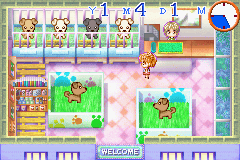
Petz Vet (U)(Rising Sun)
0 7 0
Petz Vet (U)(Rising Sun) is a classic Game Boy Advance game where players take on the role of a veterinarian caring for a variety of pets. It’s designed with a younger audience in mind or anyone looking for a gentle caregiving simulation. The gameplay is straightforward, focusing on pet health and happiness. Since it’s a nostalgic GBA title, you can play it smoothly in your browser without needing downloads or installations.
Getting Into Petz Vet
The main part of Petz Vet involves diagnosing and treating different pets that visit the clinic. You’ll work through a series of cases, each requiring actions like examining, cleaning, feeding, or giving medicine. The game guides you through simple tasks that mimic a veterinarian’s work, with each pet needing a slightly different approach. Usually, a pet arrives at the clinic, and you choose the right treatment based on visual clues and prompts.
As you play, you’ll manage multiple pets and their needs, switching between cases. The game keeps things gentle and steady, with clear goals that help you move step by step. The interface is easy to use, and the pace makes it perfect for short, casual play sessions. There’s no complicated scoring or time limits, so you can focus on caring for the pets and getting familiar with veterinary basics.
Standout Features
Petz Vet has colorful, simple graphics that create a friendly, inviting vibe perfect for a pet care simulation. The visuals are clean and easy to understand, with pets and tools clearly shown to avoid confusion. While it doesn’t have fancy animations, its charm lies in the straightforward, functional design that keeps the gameplay accessible. Progress depends on successfully finishing pet cases, encouraging you to learn and improve your care skills along the way.
The game offers replay value through a variety of pets and cases, inviting you to try different approaches and revisit it for some relaxing fun. Since it’s designed to be gentle and doesn’t penalize mistakes, you can experiment without stress. This makes Petz Vet a calming experience that rewards careful attention and patience. Its simple focus on caring makes it suitable for players of all ages who enjoy nurturing and simulation games.
Strategy and Tips
If you’re just starting, take time to understand what each pet needs before you begin treatment. Paying close attention to visual cues will help you diagnose issues faster.
- Care for pets step by step, being gentle to catch important details.
- Use the pets’ reactions and appearances to figure out what treatment they need.
- Don’t rush; taking your time leads to better results and fewer mistakes.
- Try repeating cases to get better at them and discover different ways to help pets.
- Remember, the game doesn’t punish mistakes, so feel free to experiment and see what works best.
Quick Questions
How do I get started with Petz Vet?
Just open the game in your browser, and you’ll be guided through initial pet cases that teach you the basics of caring for each animal.
What’s a common mistake beginners make?
Trying to rush through treatments without closely observing the pet’s cues can cause errors; patience makes a difference.
Can I play Petz Vet on mobile or touchscreen devices?
Yes, since it runs right in your browser, it works well on phones and tablets, with touch controls making play easy without extra setup.
Petz Vet offers a straightforward, calming pet care experience perfect for quick gaming sessions. Its simple style makes it accessible for newcomers and anyone looking for a relaxing simulation of veterinary work. Playing in your browser makes it hassle-free to enjoy a nostalgic GBA classic focused on caring for pets.
Related games: you can also try Oshare Princess 3 (J)(Rising Sun) and Codename – Kids Next Door – Operation S.O.D.A. (U)(Rising Sun), or browse all other games in the Game Boy Advance category.
How to Play Petz Vet (U)(Rising Sun)?
Diagnose and treat pets by examining, cleaning, feeding, and giving medicine. Complete each case carefully to keep pets happy and healthy.
Game Controls
Arrow keys move; action buttons select options and perform tasks.
You may be interested in:
-
 Game Boy Advance
♥ 2
Zooo (J)(Rising Sun)
Game Boy Advance
♥ 2
Zooo (J)(Rising Sun) -
 Game Boy Advance
♥ 4
Zooo (E)(Trashman)
Game Boy Advance
♥ 4
Zooo (E)(Trashman) -
 Game Boy Advance
♥ 2
ZooCube (U)(Mode7)
Game Boy Advance
♥ 2
ZooCube (U)(Mode7) -
 Game Boy Advance
♥ 1
ZooCube (E)(Blizzard)
Game Boy Advance
♥ 1
ZooCube (E)(Blizzard) -
 Game Boy Advance
♥ 1
Zone of the Enders – The Fist of Mars (U)(Mode7)
Game Boy Advance
♥ 1
Zone of the Enders – The Fist of Mars (U)(Mode7) -
 Game Boy Advance
♥ 1
Zone of the Enders – The Fist of Mars (E)(Cezar)
Game Boy Advance
♥ 1
Zone of the Enders – The Fist of Mars (E)(Cezar) -
 Game Boy Advance
♥ 1
Zoku Bokura no Taiyou – Taiyou Shounen Django (J)(Independent)
Game Boy Advance
♥ 1
Zoku Bokura no Taiyou – Taiyou Shounen Django (J)(Independent) -
 Game Boy Advance
♥ 7
Zoku Bokura no Taiyou – Taiyou Shounen Django (J)(Caravan)
Game Boy Advance
♥ 7
Zoku Bokura no Taiyou – Taiyou Shounen Django (J)(Caravan)
Comments (0)
No comments yet. Be the first to comment!