Phineas and Ferb
0 4 1
Phineas and Ferb is a classic NES game that runs right in your browser on this site. As a platformer inspired by the animated series, it appeals to fans of the show and players who enjoy simple, action-focused gameplay from the NES era. The game captures the cartoon’s charm and offers a nostalgic trip for those familiar with early 90s gaming styles.
Getting Into Phineas and Ferb
This NES game is built around straightforward platforming mechanics that focus on timing and exploration. You control either Phineas or Ferb as they move through different levels filled with obstacles, enemies, and puzzles. The main goal involves running, jumping, and avoiding hazards while collecting items or completing tasks to move forward. Usually, you go through multiple stages, each with its own layout and challenges, aiming to finish before time runs out or lives are lost.
The game progresses in a linear way but encourages replaying levels to improve scores or find hidden secrets. Since it’s based on a licensed show, the levels reflect settings and themes from the series, making each stage feel familiar. While there aren’t complex modes or multiplayer options, its simple design makes it easy to pick up for quick sessions or longer playthroughs for those who want to complete everything.
Standout Features
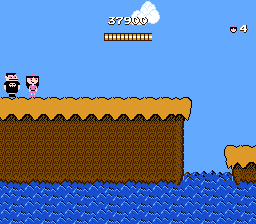
The graphics use bright, cartoony visuals similar to the series, with character sprites and backgrounds that match the show’s style. Despite the NES hardware limits, animations are smooth and expressive, showing off the personalities of Phineas and Ferb. The levels are diverse enough to keep things visually interesting, from backyard scenes to science labs, which helps keep players engaged.
Progress depends on completing levels and earning points, with some replay value coming from trying to beat high scores or find hidden items. The game doesn’t have a sprawling map or branching paths, but the challenge is in mastering each stage’s layout and timing. Collectibles and secret areas encourage revisiting levels, adding to replayability even after finishing the main game. This makes it suitable for quick play sessions or longer ones, especially for fans of classic NES platformers.
Strategy and Tips
Getting started is simple, but paying attention to enemy patterns and timing your jumps will help you succeed. Here are some helpful tips:
- Learn enemy movement patterns to avoid taking damage.
- Time your jumps carefully to cross gaps and dodge hazards.
- Explore each level fully to find hidden items and secret routes.
- Save lives early by avoiding risky moves; this helps during tougher sections later on.
- If you get stuck, replay a section to better understand enemy placement and timing.
- Finish levels efficiently to boost your score, especially if aiming for high scores or 100% completion.
Quick Questions
How do I start playing Phineas and Ferb?
Just select the game on this site, and it loads instantly in your browser. Use the arrow keys to move and jump, following the prompts on screen.
What common mistake do beginners make?
Many rush through levels without paying attention to enemy patterns, which often leads to losing lives. Take your time to observe and plan your moves.
Can I play Phineas and Ferb on a mobile device?
Yes, since it runs directly in your browser, you can play on mobile phones and tablets with touch controls. For the best experience, using a keyboard or controller helps.
This version of Phineas and Ferb offers a fun, straightforward experience rooted in the classic NES platforming style. Its colorful visuals and simple gameplay make it a good pick for fans of the series and retro gaming, all available for free right in your browser.
Related games: you can also try Palamedes (Japan) and Castlevania (USA) (Rev A) [Hack by Redrum v1.0] (~Castlevania – Blood Moon), or browse all other games in the NES category.
How to Play Phineas and Ferb?
Control Phineas or Ferb to run, jump, and avoid obstacles through levels, collecting items and completing tasks before time runs out or lives are lost.
Game Controls
Arrow keys act as the D-pad; Enter is Start; action buttons are mapped to other keyboard keys.
You may be interested in:
-
![Zombie Hunter (Japan) [En by KingMike v1.01]](https://www.playf2p.com/wp-content/uploads/zombie-hunter-japan-en-by-kingmike-v1-01-200x120.png) NES
♥ 2
Zombie Hunter (Japan) [En by KingMike v1.01]
NES
♥ 2
Zombie Hunter (Japan) [En by KingMike v1.01] -
 NES
♥ 1
Zombie Hunter (Japan)
NES
♥ 1
Zombie Hunter (Japan) -
 NES
♥ 1
Zoids Mokushiroku (Japan)
NES
♥ 1
Zoids Mokushiroku (Japan) -
 NES
♥ 2
Zoids 2 – Zenebas no Gyakushuu (Japan)
NES
♥ 2
Zoids 2 – Zenebas no Gyakushuu (Japan) -
 NES
♥ 1
Zoids – Chuuou Tairiku no Tatakai (Japan)
NES
♥ 1
Zoids – Chuuou Tairiku no Tatakai (Japan) -
 NES
♥ 11
Zippy Race (Japan)
NES
♥ 11
Zippy Race (Japan) -
 NES
♥ 1
Zhen Ben Xi You Ji (Asia) (Unl)
NES
♥ 1
Zhen Ben Xi You Ji (Asia) (Unl) -
 NES
♥ 1
Zenbei!! Pro Basket (Japan)
NES
♥ 1
Zenbei!! Pro Basket (Japan)
Comments (0)
No comments yet. Be the first to comment!