Pinball Tycoon (E)(Independent)
0 1 0
Getting Into Pinball Tycoon
Pinball Tycoon is a classic Game Boy Advance game you can play in your browser, giving you a simple pinball experience centered on scoring. The gameplay keeps things familiar: launch the ball, aim for targets, and try to keep the ball in play as long as possible. You launch the ball onto the table and use the flippers to hit bumpers, ramps, and other targets to rack up points.
Games tend to be quick but addictive, so it’s easy to start a new one whenever you want. There’s no story mode or complicated objectives—just a focus on timing and precision to beat your high scores. Each game feels fresh, offering a chance to improve your skills and beat your last best score. The key is understanding how the ball reacts and positioning your flippers just right.
Playing involves paying attention to how the ball moves across different parts of the table and staying in control during chaotic moments. The interface is simple, with a clear view of the table layout, making it accessible for players of all skill levels. It’s great for short bursts of play or practicing your high-score runs without needing a long-term commitment.
Standout Features
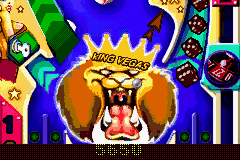
Visually, Pinball Tycoon stays true to the pixel art style of the Game Boy Advance, with colorful, easy-to-read graphics that clearly show the table and targets. The animations are sharp, helping you see how the ball interacts with bumpers and ramps. While it doesn’t push graphical boundaries, it offers a clean, familiar pinball look that’s easy on the eyes and easy to follow during fast-paced play.
Progress in the game depends on beating your own high scores rather than unlocking new tables or storylines. There are no complicated unlocks—just the challenge of improving your technique and beating your best. It’s perfect for trying different strategies or pushing for higher scores, making it a good choice for quick, focused sessions.
Because it’s simple and browser-based, you can jump right in without waiting. The straightforward design makes it easy for players of all ages to enjoy immediately. If you like classic pinball, this version offers a straightforward experience that encourages repeated tries and score chasing.
Strategy and Tips
While the game is mainly about timing and reflexes, a few pointers can help you get better scores.
- Try to hit high-value targets early to boost your points right from the start.
- Manage your flippers carefully to keep the ball in play longer, especially when multiple targets are lit.
- Learn the layout of the table so you can predict where the ball will go based on its current position.
- Use gentle taps on the flippers—aggressive presses can send the ball flying unpredictably.
- Pay attention to ramp and bumper patterns; knowing how they send the ball can help you set up better shots.
- Practice aiming for specific targets to develop consistent timing, especially when aiming for high scores.
Quick Questions
How do I start a new game quickly?
Just press start or the equivalent button, and it will reset the table for a fresh round.
What’s a common mistake for beginners?
Trying to control the ball with too much force, which makes it bounce unpredictably. Gentle flipper taps are usually better.
Does it work well on mobile or touch screens?
Since it runs in your browser, it adapts nicely to touch controls. Tapping the flippers and launching the ball feels just like playing on a real table.
This version of Pinball Tycoon offers a straightforward, score-focused pinball experience that’s quick to pick up. Its simple mechanics and clear visuals make it easy to jump in and start improving your high scores right away.
Related games: you can also try Kao the Kangaroo (U)(Paracox) and Ace Combat Advance (U)(Venom), or browse all other games in the Game Boy Advance category.
How to Play Pinball Tycoon (E)(Independent)?
Launch the ball and use the flippers to hit targets, aiming to keep the ball in play and score as many points as possible. Focus on timing and precision to beat your high score in quick, repetitive sessions.
Game Controls
Arrow keys control the flippers; spacebar or a specific key launches the ball.
You may be interested in:
-
 Game Boy Advance
♥ 2
Zooo (J)(Rising Sun)
Game Boy Advance
♥ 2
Zooo (J)(Rising Sun) -
 Game Boy Advance
♥ 4
Zooo (E)(Trashman)
Game Boy Advance
♥ 4
Zooo (E)(Trashman) -
 Game Boy Advance
♥ 2
ZooCube (U)(Mode7)
Game Boy Advance
♥ 2
ZooCube (U)(Mode7) -
 Game Boy Advance
♥ 1
ZooCube (E)(Blizzard)
Game Boy Advance
♥ 1
ZooCube (E)(Blizzard) -
 Game Boy Advance
♥ 1
Zone of the Enders – The Fist of Mars (U)(Mode7)
Game Boy Advance
♥ 1
Zone of the Enders – The Fist of Mars (U)(Mode7) -
 Game Boy Advance
♥ 1
Zone of the Enders – The Fist of Mars (E)(Cezar)
Game Boy Advance
♥ 1
Zone of the Enders – The Fist of Mars (E)(Cezar) -
 Game Boy Advance
♥ 1
Zoku Bokura no Taiyou – Taiyou Shounen Django (J)(Independent)
Game Boy Advance
♥ 1
Zoku Bokura no Taiyou – Taiyou Shounen Django (J)(Independent) -
 Game Boy Advance
♥ 7
Zoku Bokura no Taiyou – Taiyou Shounen Django (J)(Caravan)
Game Boy Advance
♥ 7
Zoku Bokura no Taiyou – Taiyou Shounen Django (J)(Caravan)
Comments (0)
No comments yet. Be the first to comment!