Pitfall – The Lost Expedition (E)(Menace)
0 1 0
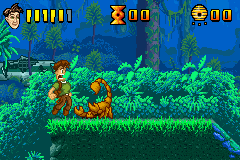
Pitfall – The Lost Expedition (E)(Menace) is a well-loved title from the Game Boy Advance era, blending action, adventure, and platforming into a small, portable package. Originally made for the GBA, it offers a simple yet engaging experience where players guide their explorer through jungle ruins and tricky terrains. Its pixel art and straightforward controls make it easy for both long-time fans and newcomers to jump in for a quick round of platforming in their browser.
The game’s style is rooted in traditional platformers, focusing on timed jumps, avoiding obstacles, and exploring. Its difficulty feels balanced, making it appealing to players who enjoy precise movements and well-timed actions. The environments are full of colorful sprite-based graphics that evoke a sense of adventure and discovery. Despite its age, the visuals are clear and easy to interpret, helping players spot hazards and pathways quickly. The main goal is to finish levels while dodging dangers, encouraging players to beat their best times or find hidden routes.
Why Pitfall – The Lost Expedition Is Worth Playing
This game stands out because of its tight platforming controls and straightforward level design. It’s not about complex storylines or deep character arcs but about mastering the levels and timing your jumps just right. The pixel art, bright colors, and animated backgrounds give it a nostalgic feel that still appeals. The atmosphere captures the excitement of jungle exploration, with sound effects and visuals that reinforce the sense of adventure without overwhelming the player.
What keeps players coming back is its simple yet challenging gameplay. The levels test timing and reflexes, rewarding patience and precision. It strikes a good balance—challenging enough to hold the interest of dedicated players but not so difficult that casual players get discouraged. Since it runs smoothly right in your browser, with no downloads needed, you can jump in for a quick session whenever you have a few minutes. It’s a solid pick for anyone after a compact, classic-style platformer experience.
Tips to Get Ahead
If you’re looking to do better in Pitfall – The Lost Expedition, here are some tips:
- Watch enemy patterns before moving forward—patience keeps you safe.
- Use jumps wisely to cross gaps and avoid traps.
- Take your time in tricky spots; rushing often leads to mistakes.
- Practice sections to memorize safe routes and timing.
- Collect items that might unlock secrets or give extra points.
- Focus on smooth, deliberate movements rather than frantic button mashing.
Things to Know Before You Start
Question?
How tough is Pitfall – The Lost Expedition for newcomers?
It offers a moderate challenge typical of classic platformers, with some parts requiring precise timing but generally manageable with practice.
Question?
How long does a typical game session last?
Most levels take only a few minutes, making it good for quick gameplay or casual sessions in your browser.
Question?
Is it suitable for all ages?
Yes, with simple mechanics and cartoonish visuals, it’s accessible and appropriate for players of different ages who enjoy classic platforming.
Question?
Can I expect a long-lasting experience in this browser version?
As a compact game, it’s designed for shorter sessions, but finding all secrets and mastering levels can keep you playing for a while.
Jump into Pitfall – The Lost Expedition and see how far you can go. Its straightforward gameplay and nostalgic visuals make it a charming choice for fans of classic platformers, and it’s all available for free in your browser without any hassle.
Related games: you can also try 2 in 1 – Insect Monster & Suchai Labyrinth (J)(Independent) and Major League Baseball 2K7 (U)(OMGba), or browse all other games in the Game Boy Advance category.
How to Play Pitfall – The Lost Expedition (E)(Menace)?
Guide the explorer through levels by jumping over obstacles, avoiding enemies, and collecting items to finish each stage as quickly as possible.
Game Controls
Arrow keys move; jump and action keys perform necessary actions.
You may be interested in:
-
 Game Boy Advance
♥ 2
Zooo (J)(Rising Sun)
Game Boy Advance
♥ 2
Zooo (J)(Rising Sun) -
 Game Boy Advance
♥ 4
Zooo (E)(Trashman)
Game Boy Advance
♥ 4
Zooo (E)(Trashman) -
 Game Boy Advance
♥ 2
ZooCube (U)(Mode7)
Game Boy Advance
♥ 2
ZooCube (U)(Mode7) -
 Game Boy Advance
♥ 1
ZooCube (E)(Blizzard)
Game Boy Advance
♥ 1
ZooCube (E)(Blizzard) -
 Game Boy Advance
♥ 1
Zone of the Enders – The Fist of Mars (U)(Mode7)
Game Boy Advance
♥ 1
Zone of the Enders – The Fist of Mars (U)(Mode7) -
 Game Boy Advance
♥ 1
Zone of the Enders – The Fist of Mars (E)(Cezar)
Game Boy Advance
♥ 1
Zone of the Enders – The Fist of Mars (E)(Cezar) -
 Game Boy Advance
♥ 1
Zoku Bokura no Taiyou – Taiyou Shounen Django (J)(Independent)
Game Boy Advance
♥ 1
Zoku Bokura no Taiyou – Taiyou Shounen Django (J)(Independent) -
 Game Boy Advance
♥ 7
Zoku Bokura no Taiyou – Taiyou Shounen Django (J)(Caravan)
Game Boy Advance
♥ 7
Zoku Bokura no Taiyou – Taiyou Shounen Django (J)(Caravan)
Comments (0)
No comments yet. Be the first to comment!