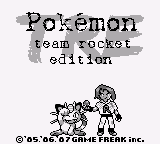
Pokemon TRE: Team Rocket Edition
0 5 1
Pokemon TRE: Team Rocket Edition is a classic Game Boy game that runs right in your browser, making it easy for fans of Pokémon and retro gaming to enjoy. This version puts you in the shoes of Team Rocket instead of the usual Pokémon trainers, offering a different look at the familiar universe. If you’re after a simple, nostalgic experience that harks back to the early days of handheld gaming, this game fits the bill.
Getting Into Pokemon TRE: Team Rocket Edition
The game is a straightforward role-playing experience typical of Game Boy titles. You control members of Team Rocket, navigating various screens, talking to characters, and completing missions that fit the villainous team’s goals. The story moves along in a linear fashion, with new areas opening up as you complete tasks and battle enemies.
During a session, you’ll explore different environments, make strategic choices, and engage in turn-based battles that test your knowledge of type advantages and move selection. As you play, new challenges and encounters pop up, encouraging you to adjust your tactics. The gameplay involves selecting commands for your characters, turning each battle into a strategic puzzle. Its simplicity makes it easy to pick up and enjoy, especially during short breaks or quick gaming moments, since it runs directly in your browser.
Standout Features
The game’s visuals stick to the pixel art style of the original Game Boy, with clear sprites and menus that evoke nostalgia. While the graphics are simple, they do a good job of showing characters and environments, making exploration easy and intuitive. Progression feels natural, with each new area bringing fresh characters and story elements that add depth without overwhelming new players.
Replay value comes from the variety of missions and different ways to approach encounters. Because the game emphasizes strategy over randomness, you might find yourself trying out different tactics in battles or exploring alternative dialogue options. Its straightforward nature means you can easily start and stop, making it perfect for short gaming sessions during breaks or commutes, especially since it works right in your browser at any time.
Strategy and Tips
To get started well, focus on understanding your team’s strengths and weaknesses. Planning your approach to battles can really help you move forward smoothly.
- Keep an eye on the environment and dialogue hints for tips on strategies or hidden items.
- If possible, save often before tough battles or decision points.
- Try out different choices to see how they change the story or battles.
- Explore each area carefully to find optional objectives or useful items.
- Complete missions efficiently to unlock new areas and features more quickly.
- Use battles as a chance to learn—experiment with move combinations to find what works best.
Quick Questions
Is Pokemon TRE: Team Rocket Edition suitable for newcomers?
Yes, its simple turn-based gameplay makes it easy for players new to Pokémon or RPGs to pick up.
How long does a typical session last?
The game is linear, so a session can be as quick as 15 minutes or longer if you want to explore more, with no fixed time needed.
Can I play this on mobile or touch devices?
Since it runs directly in your browser, it works well on mobile devices with touchscreens, making gaming on the go simple and convenient.
Pokemon TRE: Team Rocket Edition offers a fresh take on the classic Game Boy style, giving players a different perspective inside the Pokémon universe. Its simple controls, nostalgic visuals, and strategic gameplay make it a good pick for fans of retro games and Pokémon alike. Playing here means instant access to a fun browser-based adventure without any downloads or setups.
Related games: you can also try Daedalian Opus (USA) and Legend of Prince Valiant, The (Europe) (En,Fr,De), or browse all other games in the Game Boy category.
How to Play Pokemon TRE: Team Rocket Edition?
Control Team Rocket members to explore areas, talk to characters, and battle enemies using turn-based commands. Complete missions and strategize to advance through the story.
Game Controls
Arrow keys move; Enter selects; other keys handle actions and menu navigation.








Comments (0)
No comments yet. Be the first to comment!