Pop Idol (E)(EvlStar)
0 5 0
Pop Idol (E)(EvlStar) is a classic Game Boy Advance game that you can play right in your browser. It offers a straightforward rhythm and performance challenge, appealing to those who enjoy music-based gameplay and light simulation. Fans of casual titles that focus on timing and pattern recognition might find it especially fun. Its vintage GBA style adds a nostalgic touch for anyone who remembers handheld gaming from earlier days.
Getting Into Pop Idol
Pop Idol revolves around rhythmic gameplay where you press buttons in sync with musical cues and visual prompts. The main idea is to choose a song and then time your button presses to match the beat. Doing so gives a satisfying sense of rhythm and progress. There are different modes to explore, like quick play for jumping straight into a song, and a progression mode that unlocks new tracks or difficulty levels as you get better. Sessions are usually short, making it easy to play during a quick break or whenever you want a quick challenge.
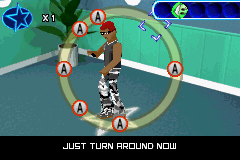
While playing, you’ll hear the background music as icons or prompts appear on-screen to guide your inputs. Hitting the right notes at the right time boosts your score, and keeping a streak can unlock bonuses or new songs. The interface is simple, with clear indicators showing when to press buttons, making it accessible even for beginners. The focus is on enjoying the music and improving your timing through repeated tries—there aren’t complicated mechanics or storylines to worry about.
Standout Features
The visuals are minimal but functional, with colorful icons and straightforward menus that match the handheld’s style. The layout is easy to recognize, with musical notes and prompts clearly visible. Progression is about unlocking new songs and difficulty options, which encourages repeated play and skill improvement. The game’s replay value comes from trying to beat your best scores and mastering more challenging tracks, each with its own rhythm quirks.
Despite its simplicity, Pop Idol offers enough variety to keep you coming back. Different difficulty levels change the speed and complexity of prompts, helping you build your rhythm skills over time. Its clean design makes it a good entry point for new players, while more experienced gamers can aim for perfect timing and high scores. Since it’s a classic GBA game playable right in your browser, it’s easy to pick up whenever nostalgia hits.
Strategy and Tips
To get the most out of Pop Idol, focus on timing and stay relaxed. Here are some helpful tips:
- Start with the easiest difficulty to get comfortable with the rhythm before trying harder levels.
- Pay attention to visual cues; icons give you a heads-up before you need to press.
- Keep your inputs smooth and steady to build streaks and boost your scores.
- Practice with different songs to get used to various rhythms and tempos.
- Don’t rush—accuracy beats speed, especially on tougher levels.
- If you feel overwhelmed, take a short break and come back refreshed.
Quick Questions
How do I start playing Pop Idol?
Just load the game in your browser, pick a mode or song, and follow the on-screen prompts to press the buttons in time with the music.
What’s a common beginner mistake?
Many new players press the buttons too early or too late, losing sync with the rhythm. Focusing on timing rather than speed helps improve your accuracy.
Can I play Pop Idol on a mobile device or touchscreen?
Yes, since it runs in your browser, you can play on a touchscreen device. Just tap the prompts, but keep in mind that using a physical button or keyboard might give you better control.
Pop Idol offers a simple, engaging way to enjoy a music rhythm game directly in your browser. Its easy access and nostalgic design make it a fun choice for quick musical challenges or casual play sessions.
Related games: you can also try Kelly Slater's Pro Surfer (U)(Mode7) and Castlevania – Aria of Sorrow – Future Alucard Hack, or browse all other games in the Game Boy Advance category.
How to Play Pop Idol (E)(EvlStar)?
Choose a song and press the correct buttons in time with the on-screen prompts to score points and unlock new tracks. Focus on timing and rhythm to improve your performance.
Game Controls
Arrow keys or keyboard buttons act as the game controls; follow on-screen prompts for actions.
You may be interested in:
-
 Game Boy Advance
♥ 2
Zooo (J)(Rising Sun)
Game Boy Advance
♥ 2
Zooo (J)(Rising Sun) -
 Game Boy Advance
♥ 4
Zooo (E)(Trashman)
Game Boy Advance
♥ 4
Zooo (E)(Trashman) -
 Game Boy Advance
♥ 2
ZooCube (U)(Mode7)
Game Boy Advance
♥ 2
ZooCube (U)(Mode7) -
 Game Boy Advance
♥ 1
ZooCube (E)(Blizzard)
Game Boy Advance
♥ 1
ZooCube (E)(Blizzard) -
 Game Boy Advance
♥ 1
Zone of the Enders – The Fist of Mars (U)(Mode7)
Game Boy Advance
♥ 1
Zone of the Enders – The Fist of Mars (U)(Mode7) -
 Game Boy Advance
♥ 1
Zone of the Enders – The Fist of Mars (E)(Cezar)
Game Boy Advance
♥ 1
Zone of the Enders – The Fist of Mars (E)(Cezar) -
 Game Boy Advance
♥ 1
Zoku Bokura no Taiyou – Taiyou Shounen Django (J)(Independent)
Game Boy Advance
♥ 1
Zoku Bokura no Taiyou – Taiyou Shounen Django (J)(Independent) -
 Game Boy Advance
♥ 7
Zoku Bokura no Taiyou – Taiyou Shounen Django (J)(Caravan)
Game Boy Advance
♥ 7
Zoku Bokura no Taiyou – Taiyou Shounen Django (J)(Caravan)
Comments (0)
No comments yet. Be the first to comment!