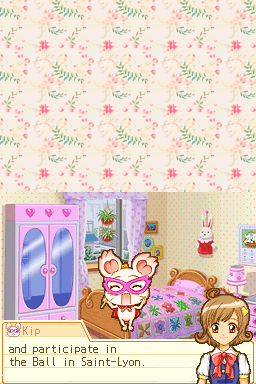
Princess Debut (USA)
0 171 15
INTRO
Princess Debut (USA) is a charming Nintendo DS game that blends romance, fashion, and a bit of fantasy into a playful simulation. It invites players to step into the shoes of a young girl who finds herself in a royal setting where she attends social events, dances, and navigates courtship. With its visual novel-style storytelling and focus on character interactions, it offers a distinct kind of handheld gaming that’s light on action and rich in personality.
Designed for fans of casual simulation games, Princess Debut captures a fairy-tale vibe set against a regal background. The gameplay centers around dance lessons, choosing outfits, and forming relationships with princes, all presented through bright, anime-inspired visuals. If you enjoy stories with a gentle pace, this game provides a charming escape that’s free in your browser, so you can try it out without downloads or installations.
Why Princess Debut Is Worth Playing
What makes Princess Debut stand out is its elegant art style and easy-to-understand gameplay. The visuals resemble a storybook, with colorful character sprites and detailed backgrounds that evoke a sense of fairy-tale magic. The music and sound effects add to the atmosphere, creating a relaxing yet engaging setting. The game’s simple premise—attend dance classes, pick outfits, and build bonds—is brought to life with enough charm to keep players coming back for more interactions and romantic routes.
The real appeal lies in how characters interact and the choices you make. Every decision affects how relationships develop, encouraging multiple playthroughs to see different endings. Even though the gameplay is straightforward, there’s enough variety in dialogue and responses to make it feel rewarding. It’s a game that rewards patience and curiosity, making it perfect for those who enjoy a gentle, story-rich experience on their Nintendo DS or through a browser emulator.
Tips to Get Ahead
To enjoy your time with Princess Debut, here are some useful tips:
- Attend dance lessons regularly to improve your skills and unlock new interaction options.
- Try different outfit combinations to see how they influence your relationships and outcomes at events.
- Pay attention to dialogue choices during social moments; they can impact your romantic prospects.
- Save your progress often before big events or decisions so you can explore different paths without losing progress.
- Balance socializing with princes and practicing dance to develop both areas evenly.
- Listen to character conversations to learn what each prince values or prefers.
Things to Know Before You Start
Question?
How accessible is Princess Debut for newcomers?
The game is pretty easy to pick up; it’s designed for casual players and doesn’t require fast reflexes or complicated mechanics. The focus is on story and choices, with a gentle learning curve.
Question?
How long does a typical play session last?
Depending on how much you explore and how many events you want to see, sessions can take between 15 and 30 minutes. It’s good for quick breaks or longer play if you want to see all endings.
Question?
Is Princess Debut suitable for all ages?
Yes. It’s family-friendly, centered around friendship, dancing, and romance without anything mature. It’s perfect for those who enjoy story-driven simulations and gentle gameplay.
CLOSING
If you’re after a sweet, story-focused experience, Princess Debut offers a lovely journey into a royal fantasy. Its simple gameplay and charming visuals make it a great choice for anyone interested in princess-themed romance and casual simulation. Give it a try—playing in your browser today can be just the start of a fun, relaxing adventure.
Related games: you can also try Brain Challenge (USA) (En,Fr,Es) and Cars – Race-O-Rama (Europe) (En,Es,It), or browse all other games in the Nintendo DS category.
How to Play Princess Debut (USA)?
Attend dance lessons, choose outfits, and interact with princes to build relationships and unlock romantic endings in a charming storybook setting.
Game Controls
Arrow keys move characters; Enter or space select options; mouse can be used for navigation and choices.
You may be interested in:
-
 Nintendo DS
♥ 1
Casper’s Scare School – Classroom Capers (USA)
Nintendo DS
♥ 1
Casper’s Scare School – Classroom Capers (USA) -
 Nintendo DS
♥ 1
Zunou Nouryoku Koujou Machine – Touch de Zunoo DS (Japan)
Nintendo DS
♥ 1
Zunou Nouryoku Koujou Machine – Touch de Zunoo DS (Japan) -
 Nintendo DS
♥ 1
Zunou ni Asekaku Game Series! Vol. 1 – Cool 104 Joker & Setline (Japan)
Nintendo DS
♥ 1
Zunou ni Asekaku Game Series! Vol. 1 – Cool 104 Joker & Setline (Japan) -
 Nintendo DS
♥ 9
Zuma’s Revenge (USA)
Nintendo DS
♥ 9
Zuma’s Revenge (USA) -
 Nintendo DS
♥ 1
Zubo (USA) (En,Fr,Es)
Nintendo DS
♥ 1
Zubo (USA) (En,Fr,Es) -
 Nintendo DS
♥ 1
Zubo (Europe) (En,Fr,De,Es,It,Nl,Sv)
Nintendo DS
♥ 1
Zubo (Europe) (En,Fr,De,Es,It,Nl,Sv) -
 Nintendo DS
♥ 1
Zorro – Quest for Justice (USA) (En,Fr,De,Es,It)
Nintendo DS
♥ 1
Zorro – Quest for Justice (USA) (En,Fr,De,Es,It) -
 Nintendo DS
♥ 1
Zorro – Quest for Justice (Europe) (En,Fr,De,Es,It)
Nintendo DS
♥ 1
Zorro – Quest for Justice (Europe) (En,Fr,De,Es,It)
Comments (0)
No comments yet. Be the first to comment!