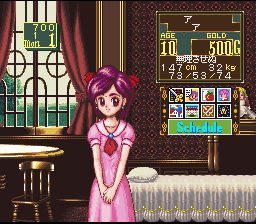
Princess Maker – Legend of Another World (Japan)
0 1 0
Princess Maker – Legend of Another World (Japan) is a classic SNES game that combines role-playing and simulation elements into a single, engaging package. You can play it directly in your browser without needing downloads or setup, which makes jumping in simple. Its straightforward mechanics and nostalgic feel make it accessible whether you’re new to this kind of game or have played similar titles before.
What Is Princess Maker – Legend of Another World?
At its core, Princess Maker – Legend of Another World is a role-playing simulation where you manage a character’s journey through a fantasy setting. The game focuses on decision-making, resource management, and character development, blending story-driven gameplay with strategic planning. It’s easy to pick up thanks to simple controls and clear goals, but it offers enough depth to keep you interested over multiple sessions.
The game’s structure involves guiding the protagonist through quests, interactions, and choices that shape their growth. Your decisions impact the story and the character’s abilities, so each playthrough can feel different. This mix of RPG elements and life simulation creates a unique experience that balances storytelling with strategic management.
What Keeps You Coming Back
Replayability comes from its branching stories and decision points. Your choices influence how the story develops and what endings you might see, encouraging you to try different routes. The variety of character development options and outcomes based on your management style makes exploring alternate possibilities appealing.
There are also various activities and interactions to explore across different sessions. You might focus on combat, crafting, social connections, or resource gathering, depending on what you enjoy most. This variety makes the game appealing for those who like experimenting with different strategies and seeing how their choices affect the story.
Handy Tips
If you’re new to Princess Maker – Legend of Another World, here are some tips to help you get started:
- Balance your character’s growth with resource management to prevent feeling overwhelmed later.
- Pay attention to story cues and dialogue options, as they influence future choices and endings.
- Try different decision paths to see a variety of storylines and results.
- Save often if the game allows, so you can revisit important moments without losing progress.
- Focus on activities that boost your character’s skills aligned with your preferred style of play.
Player FAQ
Is Princess Maker – Legend of Another World beginner-friendly?
Yes. Its simple interface and clear goals make it easy for players who are new to RPGs or simulation games.
Can kids enjoy Princess Maker – Legend of Another World?
The content is generally suitable for a wide age range, but its themes and mechanics might be better appreciated by older players because of decision complexity. It runs smoothly in your browser without needing an internet connection.
Is this game available in multiple languages?
This version is based on the Japanese release, so it might be in Japanese. While understanding some of the language helps, the visuals and mechanics are simple enough to enjoy even without fluent Japanese.
This browser-based version of Princess Maker – Legend of Another World offers a classic role-playing and simulation experience that’s easy to start and has plenty of replay value. Its blend of storytelling and strategic management makes it a nostalgic choice for anyone looking for an engaging adventure.
Related games: you can also try Mazinger Z (Japan) [7144] and NBA Live '96 (Europe), or browse all other games in the SNES category.
How to Play Princess Maker – Legend of Another World (Japan)?
Manage the character's growth by making choices, completing quests, and balancing resources to see different story outcomes and reach various endings.
Game Controls
Arrow keys or WASD move; Enter or space confirm; other keys handle actions and menu navigation.








Comments (0)
No comments yet. Be the first to comment!