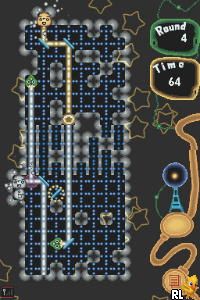
Prism – Light the Way (USA) (En,Fr,De,Es,It)
0 1 0
Prism – Light the Way (USA) (En,Fr,De,Es,It) is a puzzle game originally made for the Nintendo DS, now playable right in your browser through emulation. If you enjoy challenges that involve guiding light and working with colors, this game provides a thoughtful experience. Its simple mechanics and vibrant visuals make it accessible for players of different ages and skill levels.
Getting Into Prism – Light the Way
The main idea in Prism – Light the Way is to direct beams of light through puzzles by rotating and placing reflective surfaces. Each level shows a setup of mirrors, prisms, and obstacles that you arrange to get the light to a specific target. The early levels usually start with a quick tutorial or example, then get more complex as you go. The mechanics are easy to learn but require planning to solve the later puzzles.
You interact by clicking or tapping to select and rotate pieces. Every level has a goal: get the light from its source to a target point, often with restrictions like limited pieces or multiple beams. The game encourages trying different solutions but rewards careful placement and timing. Taking breaks after finishing a puzzle or returning later with fresh eyes makes it good for casual play or longer problem-solving sessions.
Standout Features
The visuals are simple and colorful, making it easy to tell apart light sources, mirrors, and obstacles. Its clean style helps you follow the light paths and plan your moves. The game gradually introduces new mechanics and puzzle types, helping players develop their skills without feeling overwhelmed.
Replay value comes from the increasing difficulty and the satisfaction of solving each stage. Many levels have multiple solutions, encouraging experimentation. The game also tracks your progress, motivating you to revisit earlier levels with new ideas or to improve your times. Since it’s a puzzle game, you can get more out of it by trying different approaches or optimizing solutions across multiple playthroughs.
Strategy and Tips
If you’re just starting with Prism – Light the Way, focus on understanding how each piece affects the light before moving onto harder puzzles. Try different setups and take your time to analyze the layout. Remember, there’s often more than one way to solve a puzzle, so don’t hesitate to experiment if you get stuck.
- Begin with simple configurations to see how each piece influences the light path.
- Use the undo button often to test solutions without penalty.
- Pay attention to the direction of the light source and where you place mirrors for efficient routing.
- Take breaks if a puzzle becomes frustrating; a fresh perspective can help.
- Visualize the light’s path before rotating or moving pieces to avoid unnecessary moves.
Quick Questions
How do I get started on this game?
Select a level from the menu and use your mouse or touchscreen to rotate and position the pieces, guiding the light to its target.
What’s a common mistake beginners make?
Many try to solve puzzles randomly. It helps to analyze the layout first and plan your route before making adjustments.
Can I play Prism – Light the Way on mobile or touch devices?
Yes, the game works in your browser on touchscreens, so you can interact directly with the pieces without extra controls.
Prism – Light the Way offers a calming yet engaging puzzle experience rooted in classic Nintendo DS gameplay. Its simple mechanics and vibrant visuals make it easy to pick up and enjoy, whether you’re solving puzzles in a few minutes or working through more challenging levels. It’s a good choice for puzzle fans who enjoy logical thinking and visual problem-solving right in your browser.
Related games: you can also try Picross DS (Japan) and Momotarou Dentetsu – World (Japan), or browse all other games in the Nintendo DS category.
How to Play Prism – Light the Way (USA) (En,Fr,De,Es,It)?
Arrange mirrors and prisms to direct light from the source to the target, rotating and placing pieces to solve each puzzle. Experiment with different setups to find the best solution for each level.
Game Controls
Use the mouse or tap to select and rotate pieces; keyboard controls emulate the Nintendo DS buttons.
You may be interested in:
-
 Nintendo DS
♥ 1
Casper’s Scare School – Classroom Capers (USA)
Nintendo DS
♥ 1
Casper’s Scare School – Classroom Capers (USA) -
 Nintendo DS
♥ 1
Zunou Nouryoku Koujou Machine – Touch de Zunoo DS (Japan)
Nintendo DS
♥ 1
Zunou Nouryoku Koujou Machine – Touch de Zunoo DS (Japan) -
 Nintendo DS
♥ 1
Zunou ni Asekaku Game Series! Vol. 1 – Cool 104 Joker & Setline (Japan)
Nintendo DS
♥ 1
Zunou ni Asekaku Game Series! Vol. 1 – Cool 104 Joker & Setline (Japan) -
 Nintendo DS
♥ 9
Zuma’s Revenge (USA)
Nintendo DS
♥ 9
Zuma’s Revenge (USA) -
 Nintendo DS
♥ 1
Zubo (USA) (En,Fr,Es)
Nintendo DS
♥ 1
Zubo (USA) (En,Fr,Es) -
 Nintendo DS
♥ 1
Zubo (Europe) (En,Fr,De,Es,It,Nl,Sv)
Nintendo DS
♥ 1
Zubo (Europe) (En,Fr,De,Es,It,Nl,Sv) -
 Nintendo DS
♥ 1
Zorro – Quest for Justice (USA) (En,Fr,De,Es,It)
Nintendo DS
♥ 1
Zorro – Quest for Justice (USA) (En,Fr,De,Es,It) -
 Nintendo DS
♥ 1
Zorro – Quest for Justice (Europe) (En,Fr,De,Es,It)
Nintendo DS
♥ 1
Zorro – Quest for Justice (Europe) (En,Fr,De,Es,It)
Comments (0)
No comments yet. Be the first to comment!