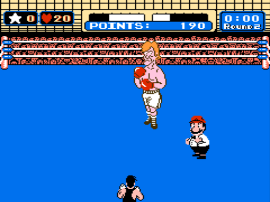
Punch-Out!! (USA)
0 48 6
Punch-Out!! (USA) is a beloved NES boxing game that still appeals to fans of retro gaming. Its simple gameplay and memorable characters make it a good pick for anyone interested in a challenge that relies on timing and strategy. Since it runs directly in your browser, there’s no need to download anything, which adds to its convenience.
Getting Into Punch-Out!!
The main idea in Punch-Out!! is controlling a boxer as you face a series of opponents, each tougher than the last. Every fight is a one-on-one match where your goal is to land punches and dodge your opponent’s strikes. The game is built around a sequence of bouts, with each opponent showing unique attack patterns and signals. Picking up on these cues is key to progressing.
A typical game session involves watching your opponent’s moves, timing your punches, and avoiding attacks. When you see an opening, you strike to lower their health. As you win fights, you’ll face more difficult opponents with more complex routines. The game rewards players who pay attention to patterns and timing, making each victory satisfying. It works well for quick play sessions or longer sessions if you’re trying to master all the fighters.
Standout Features
The visuals in Punch-Out!! are simple but expressive, capturing the cartoonish charm of its characters and fight arenas. The pixel art style is memorable, with each boxer designed to be easily recognizable. The game moves along in a straightforward way: win fights, face tougher opponents, and climb the ranks. This clear structure encourages repeated attempts, as players try to perfect their timing and learn each fighter’s quirks.
Replaying the game is rewarding because of the challenge of memorizing attack patterns and reacting quickly. Each opponent’s routine is different, so players often come back to improve their scores or reactions. The pacing and increasing difficulty push players to sharpen their skills with every fight, making it enjoyable for those who like mastering classic arcade-style boxing.
Strategy and Tips
At first, the game might feel a bit overwhelming, but focusing on recognizing attack cues helps you improve faster. Patience pays off; rushing punches can leave you open to counters.
- Watch your opponent carefully to spot their attack signals before you strike.
- Use the dodge button to avoid attacks, then punch during moments when they’re vulnerable.
- If you get knocked down, stay calm, observe your opponent’s moves, and recover quickly.
- Practice specific fights to learn their attack patterns and timing.
- Find a steady rhythm instead of spamming punches—timing beats speed here.
- If you’re stuck, try baiting attacks and hitting during their recovery phase for safety.
Quick Questions
How do I get started if I’ve never played Punch-Out!! before?
Begin with the first opponents to learn their attack patterns, then gradually move on to tougher fighters as your reaction skills improve.
What’s a common mistake beginners make?
Many players try to spam punches without paying attention to cues, which leaves them open to counters and knockdowns.
Can I play Punch-Out!! on a mobile device or touch screen?
Yes, since the game runs directly in your browser, it can be played on mobile devices. However, controlling it with a keyboard or gamepad may help with timing accuracy.
Punch-Out!! remains a classic boxing game that rewards patience and recognizing patterns. Its simple mechanics and charming visuals make it a good choice for anyone interested in testing their reaction skills on this NES platform, now accessible right in your browser.
Related games: you can also try Darkwing Duck (Europe) and Magician (USA) (Beta), or browse all other games in the NES category.
How to Play Punch-Out!! (USA)?
Control your boxer to dodge and punch opponents by watching their attack signals, aiming to land hits while avoiding counters. Win fights to face tougher enemies and climb the ranks.
Game Controls
Arrow keys act as the D-pad; Enter is Start; action buttons are on-screen mapped keys.
You may be interested in:
-
![Zombie Hunter (Japan) [En by KingMike v1.01]](https://www.playf2p.com/wp-content/uploads/zombie-hunter-japan-en-by-kingmike-v1-01-200x120.png) NES
♥ 2
Zombie Hunter (Japan) [En by KingMike v1.01]
NES
♥ 2
Zombie Hunter (Japan) [En by KingMike v1.01] -
 NES
♥ 1
Zombie Hunter (Japan)
NES
♥ 1
Zombie Hunter (Japan) -
 NES
♥ 1
Zoids Mokushiroku (Japan)
NES
♥ 1
Zoids Mokushiroku (Japan) -
 NES
♥ 2
Zoids 2 – Zenebas no Gyakushuu (Japan)
NES
♥ 2
Zoids 2 – Zenebas no Gyakushuu (Japan) -
 NES
♥ 1
Zoids – Chuuou Tairiku no Tatakai (Japan)
NES
♥ 1
Zoids – Chuuou Tairiku no Tatakai (Japan) -
 NES
♥ 11
Zippy Race (Japan)
NES
♥ 11
Zippy Race (Japan) -
 NES
♥ 1
Zhen Ben Xi You Ji (Asia) (Unl)
NES
♥ 1
Zhen Ben Xi You Ji (Asia) (Unl) -
 NES
♥ 1
Zenbei!! Pro Basket (Japan)
NES
♥ 1
Zenbei!! Pro Basket (Japan)
Comments (0)
No comments yet. Be the first to comment!