Racing Gears Advance (E)(Rising Sun)
0 2 0
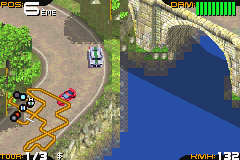
Racing Gears Advance (E)(Rising Sun) is a classic Game Boy Advance racing game that captures the thrill of high-speed competitions on a handheld from the early 2000s. Its pixel art visuals and chiptune soundtrack evoke a nostalgic feeling, transporting players into a retro racing universe where every lap counts. As a port of a genre-defining era, this game combines straightforward controls with fast-paced action, making it a must-try for fans of classic driving games.
Step Into the World of Racing Gears Advance
This classic from the Game Boy Advance era offers a top-down perspective that emphasizes quick reflexes and tight control. The visuals are characterized by colorful, pixel-art cars and detailed tracks, each designed with a distinct theme, from city streets to rural circuits. The sound design features energetic tunes and simple sound effects that enhance the sense of speed and competition. Its atmosphere is one of pure arcade racing, focused on immediate fun rather than simulation depth.
Racing Gears Advance runs smoothly in your browser via the emulator, providing instant access to the game’s nostalgic charm. The interface is straightforward, with menus and race selections easy to navigate. While the graphics are modest by modern standards, they fit well with the handheld’s hardware capabilities, giving each race a lively, pixel-perfect presentation. It’s an accessible experience suitable for quick bursts of racing action, perfect for casual play or short gaming sessions.
How the Gameplay Hooks You
The game revolves around choosing a vehicle, picking a track, and then racing against AI opponents or the clock. Races are short but intense, requiring precise steering and smart use of power-ups or boosts. Progression unlocks new vehicles and tracks, encouraging you to improve your skills as you go. The pacing keeps things engaging with simple objectives and a steady increase in difficulty, so victories feel satisfying without feeling punishing.
Racing Gears Advance offers replay value through its easy mechanics and variety of tracks. The challenge is in mastering each course’s layout and finding the best racing line to beat opponents or beat your best time. The gameplay is straightforward but addictive, making it perfect for quick sessions or longer play when you want to sharpen your reflexes and enjoy some classic arcade racing.
Pro Tips for Racing Gears Advance
Maintain a steady speed and avoid collisions to conserve your boost for the final stretch.
- Learn each track’s layout to anticipate turns and hazards.
- Use power-ups wisely—save them for tricky sections or overtaking opponents.
- Practice drifting around corners to improve your lap times.
- Select vehicles that match your racing style; some handle better on sharp turns.
- Keep an eye on your rivals’ positions to plan overtakes or defensive moves.
Frequently Asked Questions
Can I play Racing Gears Advance in short gaming sessions?
Yes, races are designed to be quick, making it easy to jump in and play for a little while.
Does the game get repetitive after a while?
The variety of tracks and vehicles, along with a steady difficulty curve, helps keep things fresh over multiple sessions.
Is Racing Gears Advance suitable for players of all ages?
Yes, its simple controls and arcade style make it accessible to a wide range of players, with no mature themes involved.
Playing Racing Gears Advance on this site gives you a taste of retro racing, all in your browser with no downloads needed. Its straightforward gameplay and nostalgic visuals make it a fun pick whether you’re revisiting old favorites or exploring the genre for the first time.
Related games: you can also try 2 in 1 – Sonic Advance & Chu Chu Rocket (E)(Independent) and Disney's Girls Pack (F)(TRSI), or browse all other games in the Game Boy Advance category.
How to Play Racing Gears Advance (E)(Rising Sun)?
Choose a car and track, then race against AI or the clock. Use steering and boosts to finish quickly and improve your best times across different courses.
Game Controls
Arrow keys control steering; other keys handle acceleration, braking, and power-ups.
You may be interested in:
-
 Game Boy Advance
♥ 2
Zooo (J)(Rising Sun)
Game Boy Advance
♥ 2
Zooo (J)(Rising Sun) -
 Game Boy Advance
♥ 4
Zooo (E)(Trashman)
Game Boy Advance
♥ 4
Zooo (E)(Trashman) -
 Game Boy Advance
♥ 2
ZooCube (U)(Mode7)
Game Boy Advance
♥ 2
ZooCube (U)(Mode7) -
 Game Boy Advance
♥ 1
ZooCube (E)(Blizzard)
Game Boy Advance
♥ 1
ZooCube (E)(Blizzard) -
 Game Boy Advance
♥ 1
Zone of the Enders – The Fist of Mars (U)(Mode7)
Game Boy Advance
♥ 1
Zone of the Enders – The Fist of Mars (U)(Mode7) -
 Game Boy Advance
♥ 1
Zone of the Enders – The Fist of Mars (E)(Cezar)
Game Boy Advance
♥ 1
Zone of the Enders – The Fist of Mars (E)(Cezar) -
 Game Boy Advance
♥ 1
Zoku Bokura no Taiyou – Taiyou Shounen Django (J)(Independent)
Game Boy Advance
♥ 1
Zoku Bokura no Taiyou – Taiyou Shounen Django (J)(Independent) -
 Game Boy Advance
♥ 7
Zoku Bokura no Taiyou – Taiyou Shounen Django (J)(Caravan)
Game Boy Advance
♥ 7
Zoku Bokura no Taiyou – Taiyou Shounen Django (J)(Caravan)
Comments (0)
No comments yet. Be the first to comment!