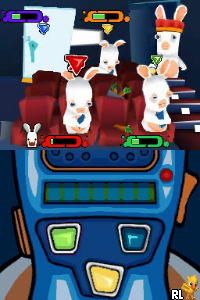
Rayman – Raving Rabbids 2 (USA) (En,Fr,Es)
0 4 1
Rayman – Raving Rabbids 2 (USA) (En,Fr,Es) is a classic Nintendo DS game that captures the goofy humor of the Rabbids in a portable format. If you liked the wild, silly antics of the Rabbids on other systems, this game offers a series of mini-games and challenges that work well for quick sessions or longer playthroughs. Its simple gameplay makes it accessible for players of all ages, especially those who enjoy lighthearted multiplayer fun and puzzles.
Getting Into Rayman – Raving Rabbids 2
The game revolves around completing various mini-games that test timing, reflexes, and problem-solving skills. You pick a mini-game, read the brief instructions, and then jump right in. Many of the mini-games are designed for quick play, often taking just a few minutes, which makes it easy to pick up and pause. There’s also a mode that allows players to compete against friends, either locally or turn-by-turn, adding a social element. The Nintendo DS uses its dual screens to add to the gameplay, sometimes showing the mini-game on the top screen while controls or instructions appear below.
Standout Features
This game’s bright, cartoonish visuals stand out. The art style is lively and exaggerated, perfectly matching the silly spirit of the Rabbids. As you progress, you unlock new mini-games and features, which helps keep things interesting after multiple plays. The variety of challenges and the chance to compete with friends boost its replay value, especially since quick, repeated plays are encouraged.
Plus, the game is built for quick, accessible gameplay that can be enjoyed in short bursts or longer sessions. The mini-games cover a range of puzzles and reflex tasks, keeping things fresh. The touchscreen and dual screens are used cleverly, adding a tactile element that enhances the playful chaos. It’s a good pick for casual gamers seeking light entertainment or for anyone wanting a fun party game.
Strategy and Tips
To get the most from the game, it helps to understand how fast-paced the mini-games are. Here are some tips:
- Read the instructions carefully before starting each mini-game to avoid simple mistakes.
- Use the stylus for better precision in touchscreen mini-games; it can improve your reaction times.
- Practice the mini-games that seem tricky to boost your scores and unlock more content faster.
- Play with friends to enjoy the multiplayer features and add a competitive twist.
- Focus on timing and quick reactions, especially in reflex-based mini-games, for better results.
- Keep initial sessions short to avoid feeling overwhelmed or tired, especially with the game’s quick pace.
Quick Questions
How do I start a mini-game in Rayman – Raving Rabbids 2?
Pick a mini-game from the menu, read the instructions, and tap to begin. It starts right away, so there’s no complicated setup.
What’s a common mistake beginners make?
Not reading the instructions can lead to simple errors or failing, especially since controls differ between touchscreen and button-based mini-games.
Can I play Rayman – Raving Rabbids 2 on mobile or touch devices?
Yes, the game can be played directly in your browser and works smoothly on mobile devices with touchscreen support, making it easy to enjoy anywhere.
Rayman – Raving Rabbids 2 delivers straightforward, chaotic fun that’s simple to pick up and play in your browser. Its vibrant visuals and quick mini-games make it a good choice for casual players looking for a lighthearted challenge.
Related games: you can also try Beat City (USA) and Lingo met Lucille Werner (Netherlands), or browse all other games in the Nintendo DS category.
How to Play Rayman – Raving Rabbids 2 (USA) (En,Fr,Es)?
Select mini-games, follow instructions, and use the keyboard or touchscreen to complete tasks quickly and accurately. Aim for high scores by improving your timing and reflexes across various challenges.
Game Controls
Arrow keys for navigation; space or Enter for actions; mouse or keyboard used for input.
You may be interested in:
-
 Nintendo DS
♥ 1
Casper’s Scare School – Classroom Capers (USA)
Nintendo DS
♥ 1
Casper’s Scare School – Classroom Capers (USA) -
 Nintendo DS
♥ 1
Zunou Nouryoku Koujou Machine – Touch de Zunoo DS (Japan)
Nintendo DS
♥ 1
Zunou Nouryoku Koujou Machine – Touch de Zunoo DS (Japan) -
 Nintendo DS
♥ 1
Zunou ni Asekaku Game Series! Vol. 1 – Cool 104 Joker & Setline (Japan)
Nintendo DS
♥ 1
Zunou ni Asekaku Game Series! Vol. 1 – Cool 104 Joker & Setline (Japan) -
 Nintendo DS
♥ 9
Zuma’s Revenge (USA)
Nintendo DS
♥ 9
Zuma’s Revenge (USA) -
 Nintendo DS
♥ 1
Zubo (USA) (En,Fr,Es)
Nintendo DS
♥ 1
Zubo (USA) (En,Fr,Es) -
 Nintendo DS
♥ 1
Zubo (Europe) (En,Fr,De,Es,It,Nl,Sv)
Nintendo DS
♥ 1
Zubo (Europe) (En,Fr,De,Es,It,Nl,Sv) -
 Nintendo DS
♥ 1
Zorro – Quest for Justice (USA) (En,Fr,De,Es,It)
Nintendo DS
♥ 1
Zorro – Quest for Justice (USA) (En,Fr,De,Es,It) -
 Nintendo DS
♥ 1
Zorro – Quest for Justice (Europe) (En,Fr,De,Es,It)
Nintendo DS
♥ 1
Zorro – Quest for Justice (Europe) (En,Fr,De,Es,It)
Comments (0)
No comments yet. Be the first to comment!