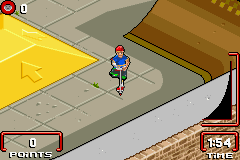
Razor Freestyle Scooter (U)(Lightforce)
0 1 0
Razor Freestyle Scooter (U)(Lightforce) is a classic Game Boy Advance title that captures the simple thrill of skateboarding games, but with a focus on scooter tricks instead. Its controls are straightforward, and the gameplay is accessible, making it easy for newcomers to jump right in. The game runs directly in your browser, giving players a quick taste of retro gaming without any downloads or fuss. Whether you’re into old-school handheld titles or just curious about scooter stunt games, Razor Freestyle Scooter offers a nostalgic yet fresh experience that’s easy to enjoy.
What Is Razor Freestyle Scooter?
This game falls into the sports and stunt genre, emphasizing performing tricks and combos on a virtual scooter. The main goal is to complete levels or challenges by executing tricks like grinds, flips, and jumps with good timing. The gameplay focuses on chaining tricks smoothly and earning points based on the complexity and execution of each stunt. Its design keeps the action fast and satisfying, making it perfect for quick bursts of fun or casual gaming on the go.
The visual style is simple but effective, with clear sprites and minimal backgrounds that keep the focus on gameplay. The controls are easy to pick up — with just a few buttons, players can perform a variety of tricks and maneuvers. This simplicity makes it accessible for new players, while still offering enough depth for those who want to master more complex combos. The level progression provides a steady challenge that encourages trying new tricks without feeling overwhelming, making it suitable for a wide age range.
What Keeps You Coming Back
One of the main attractions is the variety of tricks and the chance to improve your scores through practice. Razor Freestyle Scooter rewards players who learn timing and develop their combos, giving a satisfying sense of mastery. Different levels and challenges keep things interesting, pushing you to beat your previous bests or discover new trick sequences. The scoring system is simple to understand, making it easy to see your progress and stay motivated.
Replayability comes from the casual, pick-up-and-play style. You can jump in for a few minutes to try a new trick or spend more time refining your routines. Its straightforward design means there’s no pressure to master everything right away; instead, you can enjoy experimenting with different stunt combinations. The relaxed yet engaging environment makes it good for quick gaming sessions or friendly competitions.
Handy Tips
Getting started is simple, but a few pointers can help you improve more quickly and have more fun:
- Practice timing your tricks to chain combos smoothly for better scores.
- Experiment with different trick combinations to find what works best for each level.
- Keep your momentum going; stopping abruptly can break your streak.
- Use ramps and rails to set up for more advanced tricks.
- Don’t hesitate to try tricky maneuvers — some may take a few attempts to get right.
- Watch your score to track progress and set goals for improvement.
Player FAQ
Is Razor Freestyle Scooter suitable for younger players?
Absolutely. The controls are simple, and the gameplay is straightforward, making it friendly for kids or anyone new to stunt games.
Can I play Razor Freestyle Scooter offline or in my browser without an internet connection?
Yes. The game runs directly in your browser, so once it loads, you can play offline without needing an internet connection.
Is this a quick game, or does it have long campaigns?
The game is designed for short sessions—no long campaigns here, just quick tricks and challenges that fit into a busy schedule.
Related games: you can also try Disneys Magical Quest 2 (J)(Eurasia) and 2 in 1 – Titeuf Ze Gagmachine & Titeuf Mega Compet (F)(Eternity), or browse all other games in the Game Boy Advance category.
How to Play Razor Freestyle Scooter (U)(Lightforce)?
Perform tricks and combos on your scooter to complete levels and earn points. Chain jumps, flips, and grinds with good timing to improve your score and progress through challenges.
Game Controls
Arrow keys control movement; action buttons are mapped to keyboard keys for tricks and jumps.
You may be interested in:
-
 Game Boy Advance
♥ 2
Zooo (J)(Rising Sun)
Game Boy Advance
♥ 2
Zooo (J)(Rising Sun) -
 Game Boy Advance
♥ 4
Zooo (E)(Trashman)
Game Boy Advance
♥ 4
Zooo (E)(Trashman) -
 Game Boy Advance
♥ 2
ZooCube (U)(Mode7)
Game Boy Advance
♥ 2
ZooCube (U)(Mode7) -
 Game Boy Advance
♥ 1
ZooCube (E)(Blizzard)
Game Boy Advance
♥ 1
ZooCube (E)(Blizzard) -
 Game Boy Advance
♥ 1
Zone of the Enders – The Fist of Mars (U)(Mode7)
Game Boy Advance
♥ 1
Zone of the Enders – The Fist of Mars (U)(Mode7) -
 Game Boy Advance
♥ 1
Zone of the Enders – The Fist of Mars (E)(Cezar)
Game Boy Advance
♥ 1
Zone of the Enders – The Fist of Mars (E)(Cezar) -
 Game Boy Advance
♥ 1
Zoku Bokura no Taiyou – Taiyou Shounen Django (J)(Independent)
Game Boy Advance
♥ 1
Zoku Bokura no Taiyou – Taiyou Shounen Django (J)(Independent) -
 Game Boy Advance
♥ 7
Zoku Bokura no Taiyou – Taiyou Shounen Django (J)(Caravan)
Game Boy Advance
♥ 7
Zoku Bokura no Taiyou – Taiyou Shounen Django (J)(Caravan)
Comments (0)
No comments yet. Be the first to comment!