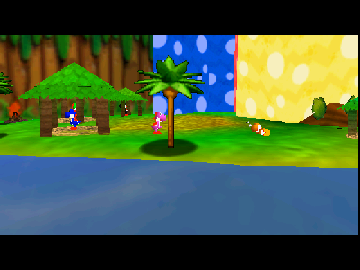
Return to Yoshi’s Island 64 DEMO
0 34 7
Return to Yoshi’s Island 64 DEMO is a faithful recreation of a classic Nintendo 64 platformer, giving players a chance to experience this beloved game right in their browser. It’s great for fans of retro gaming or anyone curious about early 3D platform adventures. The demo provides a slice of Nintendo’s 64-bit era without needing downloads or installations. It captures the spirit of the original game, whether for quick sessions or longer explorations to revisit familiar mechanics.
Getting Into Return to Yoshi’s Island 64 DEMO
The gameplay centers on guiding Yoshi through levels packed with obstacles, enemies, and collectibles. As a platformer, timing jumps and using items well are key to progressing. Players pick a level from a map screen and then navigate through it, avoiding dangers, defeating enemies, and gathering items. The demo highlights the core gameplay without unlocking extra modes or content.
You’ll find yourself jumping onto platforms, using Yoshi’s ability to swallow enemies and turn them into eggs, which can be thrown at targets or obstacles. The pacing promotes exploration and trying different approaches. While the demo might include just a few levels, it offers enough variety to get a good sense of the gameplay loop. Play sessions are usually short but engaging, emphasizing precision and timing.
Standout Features
This Nintendo 64 classic features colorful, cartoony visuals that reflect the charm of the original, with textures and character designs that capture the playful spirit of the franchise. The demo runs smoothly in the browser, so players can enjoy the visuals without lag. Levels are designed with multiple routes and secrets, encouraging replay and exploration for hidden items or alternate paths.
Progression is simple—complete levels to unlock new sections or just enjoy a self-contained experience. Even in this limited version, replay value comes from trying different strategies, perfecting jumps, or collecting everything. The mechanics stay fun even in a short session, making it a worthwhile browser experience for both newcomers and longtime fans wanting to revisit a nostalgic platformer from their childhood.
Strategy and Tips
If you’re new to the game, focus on mastering Yoshi’s jumping and egg-throwing to get through levels safely. Collecting all items can be tricky, so plan your route to increase your chances of gathering everything.
- Learn enemy patterns to avoid damage and save eggs for tough spots.
- Use Yoshi’s tongue to reach higher platforms or grab distant items more efficiently.
- Explore levels carefully for hidden areas or alternate paths that might hold extra collectibles.
- Look for safe spots where you can pause and plan your next move, especially in tricky sections.
- Take your time with jumps; good timing makes a big difference in avoiding falls or unexpected hits.
Quick Questions
How do I get started with the demo?
Just load the game in your browser and pick a level from the menu — no downloads needed, it starts right away.
What’s a common mistake for beginners?
Trying to rush through levels without paying attention to enemy positions or jump timing often causes mistakes or losing lives.
Can I play this on mobile or touch devices?
Yes, you can play on mobile browsers, though a keyboard or controller makes for more precise control.
Exploring the Return to Yoshi’s Island 64 demo offers a simple taste of this classic platformer, perfect for quick nostalgic moments or testing out the mechanics. Its browser-based setup makes it easy to access and enjoy, giving players a chance to experience a piece of Nintendo history whenever they like.
Related games: you can also try All Star Tennis '99 (Europe) (En,Fr,De,Es,It) and Hexen (USA), or browse all other games in the Nintendo 64 category.
How to Play Return to Yoshi’s Island 64 DEMO?
Guide Yoshi through levels by jumping, swallowing enemies, and collecting items. Use timing and strategy to avoid dangers and find hidden routes in this classic platformer.
Game Controls
Arrow keys control movement; action buttons are mapped to keyboard keys for jumping and throwing eggs.
You may be interested in:
-
 Nintendo 64
♥ 2
Rush 2 – Extreme Racing USA (Europe) (En,Fr,De,Es,It,Nl)
Nintendo 64
♥ 2
Rush 2 – Extreme Racing USA (Europe) (En,Fr,De,Es,It,Nl) -
 Nintendo 64
♥ 17
Ruinous Shards
Nintendo 64
♥ 17
Ruinous Shards -
 Nintendo 64
♥ 3
Rugrats in Paris – The Movie (Europe)
Nintendo 64
♥ 3
Rugrats in Paris – The Movie (Europe) -
 Nintendo 64
♥ 3
Rugrats – Treasure Hunt (Europe)
Nintendo 64
♥ 3
Rugrats – Treasure Hunt (Europe) -
 Nintendo 64
♥ 5
Rugrats – Scavenger Hunt (USA)
Nintendo 64
♥ 5
Rugrats – Scavenger Hunt (USA) -
 Nintendo 64
♥ 1
Rugrats – Die grosse Schatzsuche (Germany)
Nintendo 64
♥ 1
Rugrats – Die grosse Schatzsuche (Germany) -
 Nintendo 64
♥ 2
RTL World League Soccer 2000 (Germany)
Nintendo 64
♥ 2
RTL World League Soccer 2000 (Germany) -
 Nintendo 64
♥ 8
RR64 – Ridge Racer 64 (USA)
Nintendo 64
♥ 8
RR64 – Ridge Racer 64 (USA)
Comments (0)
No comments yet. Be the first to comment!