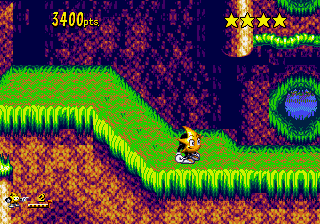
Ristar (Jul 1, 1994 prototype)
0 4 2
Ristar (Jul 1, 1994 prototype) is a classic Genesis game that’s easy to pick up and fun to master. This platformer puts you in the paws of a star-shaped hero with a stretchy arm, making it accessible for players of all skill levels. Its straightforward controls and charming visuals make it a perfect choice for retro gaming fans looking for a quick, engaging experience right in their browser.
What Is Ristar?
Ristar is a side-scrolling platformer from the Genesis era, centered around guiding the titular character through colorful levels filled with enemies and obstacles. The game emphasizes jumping, stretching its arms to grab onto objects or enemies, and timing your moves to avoid hazards. Its simple mechanics and bright, cartoon-like graphics make it inviting for newcomers while offering enough challenge to keep seasoned players engaged.
The objective is to navigate through various stages, defeating enemies and reaching the end of each level. The game’s design encourages exploration and clever use of Ristar’s stretching abilities, which can be used to solve puzzles or reach hidden areas. The gameplay flows smoothly, with a focus on timing and precision, making each level feel rewarding as you master its layout.
What Keeps You Coming Back
What makes Ristar stand out is its tight control scheme and inventive use of the stretching arm mechanic. Each level introduces new platforming challenges that require quick thinking and dexterity. The game’s vibrant visuals and cheerful soundtrack add to its charm, creating a delightful atmosphere that’s hard to resist replaying.
Replayability comes from the game’s varied level design and the satisfaction of improving your run times or discovering secret paths. While it’s not overly long, the game’s layered challenges and hidden collectibles encourage multiple playthroughs. Plus, the straightforward gameplay makes it easy to jump in and enjoy a quick session whenever the mood strikes.
Handy Tips
Getting the most out of Ristar involves understanding its core mechanics and level flow. Here are some quick tips:
- Use Ristar’s stretching arm to grab onto enemies to both attack and avoid hazards.
- Timing your jumps to coincide with your arm’s reach ensures safer navigation through tricky sections.
- Look for opportunities to bounce off enemies to reach higher platforms or avoid danger.
- Pay attention to hidden pathways; some levels contain secret areas that reward exploration.
- Don’t rush—patience and precision will help you clear levels faster and with fewer mistakes.
Player FAQ
Is Ristar easy for beginners to pick up?
Yes, its simple controls and intuitive mechanics make Ristar accessible for new players, especially on this browser version. It’s a good starting point for those new to platformers.
Can younger players enjoy Ristar?
Absolutely. Its bright visuals and straightforward gameplay suit younger audiences, although some levels may pose a challenge for very young children.
Do I need an internet connection to play Ristar here?
Since the game runs directly in your browser on this site, no internet connection is needed after the page loads. It’s instant and hassle-free for quick gaming sessions.
Ristar remains a charming and accessible platformer that’s worth revisiting for its inventive mechanics and cheerful design. Its nostalgic appeal, combined with straightforward gameplay, makes it a good choice for casual players and fans alike. Playing it here gives you a genuine taste of the Genesis era, all in your browser, ready whenever you want a quick dose of retro fun.
Related games: you can also try Jelly Boy (Europe) (Proto) and Mega Games 6 Vol. 2 (Europe), or browse all other games in the Genesis category.
How to Play Ristar (Jul 1, 1994 prototype)?
Guide Ristar through colorful levels by jumping, stretching his arm to grab objects and enemies, avoiding hazards, and reaching the end of each stage. Use timing and exploration to overcome challenges and find secrets.
Game Controls
Arrow keys control movement; action buttons are mapped to specific keys for jumping and stretching.
You may be interested in:
-
 Genesis
♥ 2
Rolling Thunder 2 (Japan)
Genesis
♥ 2
Rolling Thunder 2 (Japan) -
 Genesis
♥ 1
Rolling Thunder 2 (Europe)
Genesis
♥ 1
Rolling Thunder 2 (Europe) -
 Genesis
♥ 2
Roger Clements MVP Baseball (USA)
Genesis
♥ 2
Roger Clements MVP Baseball (USA) -
 Genesis
♥ 1
Rockman Mega World Fixer Upper
Genesis
♥ 1
Rockman Mega World Fixer Upper -
 Genesis
♥ 3
Rockman Mega World (Japan) (Alt)
Genesis
♥ 3
Rockman Mega World (Japan) (Alt) -
 Genesis
♥ 14
Rockman Mega World (Japan)
Genesis
♥ 14
Rockman Mega World (Japan) -
 Genesis
♥ 46
Rocket Knight Adventures (USA)
Genesis
♥ 46
Rocket Knight Adventures (USA) -
 Genesis
♥ 3
Rocket Knight Adventures (Japan)
Genesis
♥ 3
Rocket Knight Adventures (Japan)
Comments (0)
No comments yet. Be the first to comment!