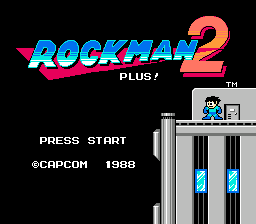
Rockman 2: Plus!
0 2 2
Rockman 2: Plus! is a classic NES game that takes players into a pixelated world filled with robotic enemies and tricky platforming. This NES title, now playable directly in your browser, keeps the tight controls and iconic design that made it a staple of 8-bit gaming. Its pixel art and chiptune soundtrack evoke nostalgia, yet the game’s tough difficulty and strategic weapon choices stay engaging for both newcomers and veterans.
Step Into the World of Rockman 2: Plus!
When you start playing Rockman 2: Plus!, you’re greeted with bright, blocky visuals typical of the NES era, along with catchy, looping tunes that boost the game’s energetic vibe. The environments include futuristic cities, underground tunnels, and industrial complexes, each rendered with simple yet memorable sprite work. As you move through these stages, the pixel art and sound design create a sense of urgency and old-school arcade challenge.
The soundtrack features chiptune melodies that heighten tension during boss fights and celebrate moments of victory. The atmosphere balances the feeling of a heroic quest against a robot-filled backdrop, with each level offering distinct visual themes that keep things fresh despite its straightforward design. Playing in your browser makes it easy to jump into this vintage universe whenever you feel like it, without any setup fuss.
How the Gameplay Hooks You
Rockman 2: Plus! offers a fast-paced loop where each stage calls for precise platforming and smart use of the weapons you pick up. Players learn to adapt to different enemy patterns while managing limited resources, which encourages planning and quick reflexes. The game allows you to choose different routes and fight bosses in different orders, adding replay value.
The difficulty gradually increases, requiring memorization of enemy placements and timing. The reward comes from mastering each stage’s quirks and choosing the best weapon for each boss. Its pacing provides a satisfying rhythm—quick respawns and constant action keep you engaged, with a real sense of achievement after taking down each robotic foe. The challenge is balanced enough to keep you coming back, whether for short sessions or longer ones.
Pro Tips for Rockman 2: Plus!
To get the most out of the game, focus on strategic weapon use and memorization. Here are some helpful tips:
- Learn each boss’s attack pattern to find the best moments to attack.
- Save powerful weapons for the final bosses—they work better than basic attacks.
- Explore different routes in each stage to find hidden upgrades or easier paths.
- Practice precise jumps to avoid damage and conserve lives in tough spots.
- Pause when needed to analyze enemy patterns and plan your next move.
Frequently Asked Questions
Is Rockman 2: Plus! good for quick gaming sessions?
Yes, each stage is designed to be completed in just a few minutes, so you can jump in for a quick try or practice specific sections.
Does the game get repetitive over time?
The variety of enemies, stages, and bosses helps keep things interesting, though the core gameplay remains consistent. It’s typical NES platforming, with a focus on memorization and skill.
Can I enjoy this game if I haven’t played retro platformers before?
Absolutely. While it can be tough, it rewards patience and learning. It’s accessible to newcomers willing to study enemy behaviors and stage layouts, especially during casual online play.
Rockman 2: Plus! delivers a true taste of NES-era challenge and design, all accessible directly in your browser. Its nostalgic pixel art and tough gameplay offer a satisfying experience for fans of classic platformers looking for a quick, rewarding challenge.
Related games: you can also try Paperboy 2 (Europe) and Racer Mini Yonku – Japan Cup (Japan), or browse all other games in the NES category.
How to Play Rockman 2: Plus!?
Move through levels, jump over enemies, and defeat bosses using strategic weapon choices. Collect power-ups and learn enemy patterns to progress and complete each stage.
Game Controls
Arrow keys control movement; action buttons are mapped to keyboard keys for jumping and shooting.
You may be interested in:
-
![Zombie Hunter (Japan) [En by KingMike v1.01]](https://www.playf2p.com/wp-content/uploads/zombie-hunter-japan-en-by-kingmike-v1-01-200x120.png) NES
♥ 2
Zombie Hunter (Japan) [En by KingMike v1.01]
NES
♥ 2
Zombie Hunter (Japan) [En by KingMike v1.01] -
 NES
♥ 1
Zombie Hunter (Japan)
NES
♥ 1
Zombie Hunter (Japan) -
 NES
♥ 1
Zoids Mokushiroku (Japan)
NES
♥ 1
Zoids Mokushiroku (Japan) -
 NES
♥ 2
Zoids 2 – Zenebas no Gyakushuu (Japan)
NES
♥ 2
Zoids 2 – Zenebas no Gyakushuu (Japan) -
 NES
♥ 1
Zoids – Chuuou Tairiku no Tatakai (Japan)
NES
♥ 1
Zoids – Chuuou Tairiku no Tatakai (Japan) -
 NES
♥ 11
Zippy Race (Japan)
NES
♥ 11
Zippy Race (Japan) -
 NES
♥ 1
Zhen Ben Xi You Ji (Asia) (Unl)
NES
♥ 1
Zhen Ben Xi You Ji (Asia) (Unl) -
 NES
♥ 1
Zenbei!! Pro Basket (Japan)
NES
♥ 1
Zenbei!! Pro Basket (Japan)
Comments (0)
No comments yet. Be the first to comment!