Rodland (Europe)
0 1 1
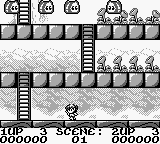
Rodland (Europe) is a classic Game Boy platformer that combines straightforward puzzle mechanics with visuals that reflect its era. This game stands out within the handheld’s library thanks to its engaging level design and a gameplay loop that keeps things interesting without overcomplicating things. Originally released for the Game Boy, it offers a nostalgic experience for players looking for a mix of puzzle-solving and platforming on a portable device. Playing it in your browser means you can enjoy this vintage title without any downloads or setup, making it easy to jump in for quick sessions or longer playtime alike.
Rodland: Gameplay Overview
The main mechanic in Rodland involves controlling characters who move through levels filled with enemies and obstacles. The gameplay revolves around bouncing or jumping to interact with the environment and foes, with the goal of clearing the screen by defeating enemies or completing specific tasks. Timing and positioning are key, as players need to plan their moves carefully to avoid hazards and make the most of their attacks.
Levels mix static platforms with moving parts, so players have to adjust their approach as difficulty ramps up. The control scheme is simple, reflecting its Game Boy roots, but mastering the timing of jumps and attacks is where the real challenge lies. As players progress, they face more complex enemy arrangements and environmental puzzles, requiring quick reflexes and strategic thinking.
Modes, Levels and Progression
Rodland takes players through a series of levels that increase in difficulty as they go. There aren’t multiple modes—just a straightforward progression that encourages learning the mechanics. Each new level offers a different layout with its own challenges, so players need to adapt their strategies to move forward efficiently.
While the gameplay remains fairly simple, the variety of enemy placements and environmental setups keeps things interesting. The levels tend to get more complex over time, demanding better timing and accuracy. Many players return to improve their scores or complete levels faster, which adds to the replay value.
Winning Strategies
Success depends on good timing and positioning. Here are some tips:
- Watch enemy patterns before acting to avoid unnecessary mistakes.
- Clear levels quickly to reduce the chance of enemies or hazards piling up.
- Use bounce mechanics wisely to reach tricky spots or trap enemies against walls.
- Plan your jumps and attacks ahead, especially in tougher levels.
- Focus on one enemy at a time to stay safe from multiple threats.
- Practice levels to memorize layouts and enemy placements, helping you finish faster.
Common Questions About Rodland
How does the difficulty change as I go further?
It ramps up gradually. Enemy placement and level layouts become more complex, requiring better timing and planning. Early levels act as tutorials, while later ones need quick reactions and strategic moves.
Are there different modes or level variations?
The game mainly follows a linear path through levels with no extra modes. Each stage presents a new challenge, keeping the gameplay fresh within its core loop.
Is there much replay value? How long does it take to finish?
You can replay levels to improve your score or finish faster. Most players can complete the main levels in a few hours, but returning to beat your best times keeps the game interesting.
Playing rodland here gives you a faithful taste of this classic Game Boy title, highlighting its simple mechanics and gradually increasing difficulty. It’s a solid pick for fans of vintage platformers and puzzle-action games, offering a compact challenge that rewards repeated tries.
Related games: you can also try FIFA Road to the World Cup '98 (Europe) and Goukaku Boy Series – Z Kai Kyuukyoku no Eijukugo 1017 (Japan), or browse all other games in the Game Boy category.
How to Play Rodland (Europe)?
Move your character to jump and bounce on enemies to clear levels. Avoid hazards and plan your moves to defeat enemies and complete each stage efficiently.
Game Controls
Arrow keys control movement; action buttons are mapped to keyboard keys for jumping and attacking.








Comments (0)
No comments yet. Be the first to comment!