Rygar (USA)
0 8 5
Rygar (USA) is a classic NES game that has drawn the attention of retro gamers since its original release. Its simple gameplay and unique mix of action and exploration make it easy to pick up and enjoy, even if you’re new to the era. Now you can play it directly in your browser, offering a nostalgic experience without any hassle of downloads, so you can jump straight into its pixelated adventure.
What Is Rygar?
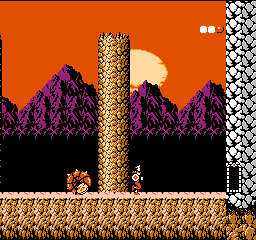
Rygar is an action-adventure game with role-playing elements, set in a mythic landscape filled with enemies and obstacles. The main idea is exploring levels, fighting foes, and gathering items to improve your character. The gameplay focuses on timing and precision, with players controlling a hero armed with a disk-throwing weapon to defeat enemies and move forward. The goal is to get through increasingly tough stages, defeat bosses, and bring peace back to the land.
The game combines platforming, combat, and puzzle-solving. While the levels are fairly linear, it rewards careful exploration and smart use of your equipment. Its difficulty reflects the NES era—challenging but fair, requiring patience and practice. The visuals and sound effects evoke the style of that time, pulling players into a pixel-art world that’s nostalgic and engaging.
What Keeps You Coming Back
One reason players keep returning to Rygar is its simple but satisfying gameplay loop. Timing your disk throws well and understanding enemy patterns keeps things interesting. The game features a variety of enemies and bosses, each needing different strategies, which adds to its replay value. Collecting power-ups and exploring levels thoroughly can uncover hidden secrets and improve your chances in tougher parts, giving extra motivation to push further.
Plus, the open-ended exploration—despite the mostly linear levels—encourages players to experiment with different tactics and optimize their approach. Its straightforward mechanics combined with the challenge of defeating tough enemies give a real sense of achievement. Since you can play it directly in your browser, you can pick it up whenever you have some free time, whether for quick sessions or longer adventures. It’s a great choice for both casual players and those looking for a bit of a challenge.
Handy Tips
To get the most out of Rygar, here are some simple strategies:
- Time your disk throws carefully to save energy and deal more damage.
- Observe enemy attack patterns to avoid unnecessary hits.
- Grab power-ups whenever you see them—they can upgrade your disk or restore health.
- Explore every part of the levels to find hidden items and shortcuts.
- Save your strongest attacks for bosses, especially after certain moves leave them vulnerable.
- Be patient; rushing often leads to mistakes and lost lives.
Player FAQ
Is Rygar suitable for younger players or beginners?
The controls are simple, making it accessible for younger players, but the difficulty can challenge newcomers to patience and persistence.
Do I need an internet connection to play Rygar here?
No, once the game loads, you can play it directly in your browser without needing to download anything or be connected online.
Can I play Rygar for quick fun or longer sessions?
The stages can be finished in a reasonable amount of time, so it works well for both short bursts or longer gaming sessions, especially if you’re aiming for high scores or exploring every detail.
Rygar remains a solid choice for fans of NES action-adventure games. Its mix of exploration, combat, and puzzles keeps things interesting, whether you’re revisiting old favorites or trying it for the first time. Playing in your browser makes it easy to enjoy this piece of gaming history whenever the mood strikes.
Related games: you can also try Chinese Checkers (Asia) (Unl) (Famicom) and Ghost'n Goblins (Europe) [Hack by Plimoth Legaue v1.0] (~All Hallows Eve), or browse all other games in the NES category.
How to Play Rygar (USA)?
Control the hero to explore levels, defeat enemies with disk throws, and collect power-ups to progress through challenging stages and bosses.
Game Controls
Arrow keys move the character; action buttons are mapped to keyboard keys for attacking and using items.
You may be interested in:
-
![Zombie Hunter (Japan) [En by KingMike v1.01]](https://www.playf2p.com/wp-content/uploads/zombie-hunter-japan-en-by-kingmike-v1-01-200x120.png) NES
♥ 2
Zombie Hunter (Japan) [En by KingMike v1.01]
NES
♥ 2
Zombie Hunter (Japan) [En by KingMike v1.01] -
 NES
♥ 1
Zombie Hunter (Japan)
NES
♥ 1
Zombie Hunter (Japan) -
 NES
♥ 1
Zoids Mokushiroku (Japan)
NES
♥ 1
Zoids Mokushiroku (Japan) -
 NES
♥ 2
Zoids 2 – Zenebas no Gyakushuu (Japan)
NES
♥ 2
Zoids 2 – Zenebas no Gyakushuu (Japan) -
 NES
♥ 1
Zoids – Chuuou Tairiku no Tatakai (Japan)
NES
♥ 1
Zoids – Chuuou Tairiku no Tatakai (Japan) -
 NES
♥ 11
Zippy Race (Japan)
NES
♥ 11
Zippy Race (Japan) -
 NES
♥ 1
Zhen Ben Xi You Ji (Asia) (Unl)
NES
♥ 1
Zhen Ben Xi You Ji (Asia) (Unl) -
 NES
♥ 1
Zenbei!! Pro Basket (Japan)
NES
♥ 1
Zenbei!! Pro Basket (Japan)
Comments (0)
No comments yet. Be the first to comment!