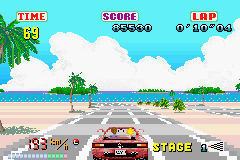
Sega Arcade Gallery (E)(Patience)
0 1 0
Sega Arcade Gallery (E)(Patience) is a classic Game Boy Advance collection that brings together some of Sega’s most memorable arcade titles into one portable package. This small set captures the feel of arcade action, sports, and driving games from Sega, all playable right in your browser without downloads or emulators. Its pixel art, chiptune soundtracks, and simple gameplay evoke the early 2000s gaming scene, making it a great little experience for fans of vintage gaming.
Step Into the World of Sega Arcade Gallery
When you start Sega Arcade Gallery, a pixelated menu welcomes you into a universe filled with Sega’s arcade classics. The visuals stay true to their original arcade origins, with bold sprites and simple backgrounds that remind you of classic arcade cabinets. The sound design leans on chiptune melodies and punchy sound effects, creating an energetic arcade atmosphere. Playing on the Game Boy Advance, this collection offers a nostalgic way to enjoy these timeless titles, all with the pixel-perfect style of handheld gaming.
As you browse the game selection, the interface remains straightforward, with menus that are easy to navigate so you can jump right in. The sound effects—whether engines roaring or metal clanging—combine with visual cues to keep the arcade vibe alive. Though simple, it feels authentic, like a quick trip back to the arcade, where every second counts and high scores drive you to keep playing.
How the Gameplay Hooks You
The main appeal here is how quick and easy it is to pick up and play. The games are designed for short sessions, fitting into busy schedules or quick gaming breaks. Controls are responsive, and the gameplay is immediate, so you stay engaged without frustration. Improving your scores or mastering each game encourages multiple tries and skill development over time.
The variety—action, sports, and driving—keeps things interesting. Whether dodging obstacles in a fast-paced game or racing against the clock, each title has its own rhythm and challenge level. The mechanics are simple enough that you’re able to jump in and start competing right away, making it great for casual players or those looking for a quick dose of Sega arcade fun.
Pro Tips for Sega Arcade Gallery
To make the most of this collection, a little strategy helps.
- Get comfortable with the controls for each game to react faster and aim higher scores.
- Practice timing for obstacles and enemies to stay alive longer and rack up points.
- Use high-score attempts to learn each game’s mechanics and develop smarter strategies.
- Take short breaks between rounds to stay sharp and avoid fatigue.
- Watch for visual cues and listen to sound effects that warn you of upcoming challenges or chances.
- Try different game modes or difficulty settings if available to keep things fresh.
Frequently Asked Questions
Does Sega Arcade Gallery run smoothly in your browser?
Yes, the collection is emulated directly in your browser, providing smooth gameplay without lag or stuttering on most devices.
Are the games repetitive or do they offer enough variety?
The mix of genres—action, sports, and driving—keeps things interesting, and each game offers unique challenges that keep it fresh.
Is this collection suitable for quick sessions or longer play?
It’s perfect for short bursts, but if you aim for high scores and mastering each game, you can play longer and keep pushing your limits.
Playing Sega Arcade Gallery in your browser gives you a quick taste of classic Sega arcade fun. Its simple gameplay and nostalgic feel make it a good choice for short, satisfying gaming sessions.
Related games: you can also try Need for Speed Underground 2 (U)(Venom) and Mortal Kombat Advance (U)(Venom), or browse all other games in the Game Boy Advance category.
How to Play Sega Arcade Gallery (E)(Patience)?
Choose a game from the menu, then use the keyboard to control characters or vehicles, aiming to beat high scores or complete objectives in short, fast-paced sessions.
Game Controls
Arrow keys move; other keys handle actions like start, select, or in-game controls.
You may be interested in:
-
 Game Boy Advance
♥ 2
Zooo (J)(Rising Sun)
Game Boy Advance
♥ 2
Zooo (J)(Rising Sun) -
 Game Boy Advance
♥ 4
Zooo (E)(Trashman)
Game Boy Advance
♥ 4
Zooo (E)(Trashman) -
 Game Boy Advance
♥ 2
ZooCube (U)(Mode7)
Game Boy Advance
♥ 2
ZooCube (U)(Mode7) -
 Game Boy Advance
♥ 1
ZooCube (E)(Blizzard)
Game Boy Advance
♥ 1
ZooCube (E)(Blizzard) -
 Game Boy Advance
♥ 1
Zone of the Enders – The Fist of Mars (U)(Mode7)
Game Boy Advance
♥ 1
Zone of the Enders – The Fist of Mars (U)(Mode7) -
 Game Boy Advance
♥ 1
Zone of the Enders – The Fist of Mars (E)(Cezar)
Game Boy Advance
♥ 1
Zone of the Enders – The Fist of Mars (E)(Cezar) -
 Game Boy Advance
♥ 1
Zoku Bokura no Taiyou – Taiyou Shounen Django (J)(Independent)
Game Boy Advance
♥ 1
Zoku Bokura no Taiyou – Taiyou Shounen Django (J)(Independent) -
 Game Boy Advance
♥ 7
Zoku Bokura no Taiyou – Taiyou Shounen Django (J)(Caravan)
Game Boy Advance
♥ 7
Zoku Bokura no Taiyou – Taiyou Shounen Django (J)(Caravan)
Comments (0)
No comments yet. Be the first to comment!