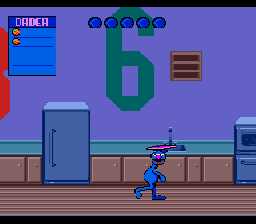
Sesame Street Counting Cafe (USA)
0 3 1
Sesame Street Counting Cafe (USA) is a charming educational game originally made for the Genesis, now playable right in your browser through an emulator. This classic from the Genesis era offers simple yet engaging gameplay aimed at young children learning to count. With familiar Sesame Street characters and straightforward mechanics, it’s a nostalgic option for parents and kids who want to combine fun with early math skills.
As an educational game, Sesame Street Counting Cafe features bright visuals and cheerful sounds, creating a welcoming environment for preschoolers. Its design focuses on clarity and ease of use, with large icons and gentle narration guiding players through counting exercises. The pacing is relaxed, avoiding overwhelming difficulty and encouraging repeated play that reinforces learning. The friendly characters and familiar interface help keep children engaged without frustration, making it a common choice in early childhood educational gaming on the Genesis.
Why Sesame Street Counting Cafe Is Worth Playing
This game stands out thanks to its simple presentation and focus on basic skills. The visuals are colorful yet uncomplicated, with Sesame Street characters acting as guides, adding a sense of familiarity that helps children feel comfortable while learning. The atmosphere is warm and inviting, with a clean layout that emphasizes clear, easy-to-understand tasks. It’s a safe, educational option for parents who want a smooth experience in a browser, no downloads required.
The gameplay centers around simple counting activities set in a playful café. Kids tap on objects to count and match numbers, and the game offers positive feedback for correct answers. The interface is intuitive, and the pacing allows young players to go at their own speed. Repetition helps reinforce counting skills without feeling dull. While it doesn’t introduce complex concepts, that simplicity is part of its charm, making Sesame Street Counting Cafe a dependable choice for early learners.
Tips to Get Started
If you’re guiding a young player through Sesame Street Counting Cafe, keep these pointers in mind:
- Encourage taking time with each task to build confidence.
- Use the game’s feedback to praise correct answers and gently correct mistakes.
- Repeat activities to help internalize number sequences and counting skills.
- Focus on the process rather than speed; patience can lead to better learning.
- Play together to motivate and offer verbal encouragement during gameplay.
- If a child finds a task tricky, try breaking it into smaller steps or counting aloud together.
What to Know Before You Play
Question?
How challenging is Sesame Street Counting Cafe for young children?
It’s designed to be accessible for preschoolers, with simple tasks and gentle guidance, so early learners shouldn’t find it frustrating.
Question?
How long does a typical session last?
The activities are short, often just a few minutes each, making it easy to fit into quick learning moments or casual play.
Question?
Is Sesame Street Counting Cafe suitable for older children or adults?
It’s mainly aimed at preschoolers and early learners; older kids might find it too simple, but it works well for its intended audience.
Now that you know what Sesame Street Counting Cafe offers, it’s clear why it remains a worthwhile educational game. Its gentle approach to teaching counting makes it a timeless choice for introducing children to numbers and basic math. You can try it directly in your browser—learning has never been easier or more enjoyable.
Related games: you can also try Bare Knuckle II – Shitou heno Chingonka ~ Streets of Rage II (Japan, Europe) and Justice League Task Force (World), or browse all other games in the Genesis category.
How to Play Sesame Street Counting Cafe (USA)?
Tap objects to count and match numbers in the café. Correct answers earn positive feedback, helping children practice basic counting skills at their own pace.
Game Controls
Arrow keys navigate; Enter or space to select; other keys for actions as shown on screen.
You may be interested in:
-
 Genesis
♥ 2
Time Killers (Europe)
Genesis
♥ 2
Time Killers (Europe) -
 Genesis
♥ 1
Time Dominator 1st (Japan)
Genesis
♥ 1
Time Dominator 1st (Japan) -
 Genesis
♥ 1
Thunder Pro Wrestling Retsuden (Japan)
Genesis
♥ 1
Thunder Pro Wrestling Retsuden (Japan) -
 Genesis
♥ 5
Thunder Fox (USA)
Genesis
♥ 5
Thunder Fox (USA) -
 Genesis
♥ 2
Thunder Fox (Japan)
Genesis
♥ 2
Thunder Fox (Japan) -
 Genesis
♥ 7
Thunder Force IV (Japan)
Genesis
♥ 7
Thunder Force IV (Japan) -
 Genesis
♥ 5
Thunder Force IV (Europe)
Genesis
♥ 5
Thunder Force IV (Europe) -
 Genesis
♥ 18
Thunder Force III (Japan, USA)
Genesis
♥ 18
Thunder Force III (Japan, USA)
Comments (0)
No comments yet. Be the first to comment!