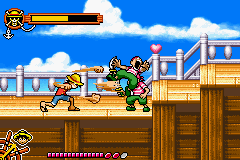
Shonen Jump’s – One Piece (U)(Trashman)
0 132 13
Shonen Jump’s – One Piece (U)(Trashman) is a classic Game Boy Advance game that brings the beloved manga series to handheld screens. It’s easy to pick up, with straightforward controls and familiar characters, making it accessible for newcomers and fans alike. The game runs directly in your browser, so you can enjoy this nostalgic title without any downloads or setups.
What Is Shonen Jump’s – One Piece?
This game is a side-scrolling action platformer based on the popular manga and anime series. Its core gameplay involves navigating levels, defeating enemies, and overcoming obstacles, all while capturing the adventurous spirit of the original story. It offers a simple yet engaging experience that emphasizes movement, combat, and exploration suited for players of all skill levels.
The objective centers around progressing through stages that feature various environments and enemies, with the goal of defeating bosses and advancing the plot. The gameplay is designed to be approachable, with easy-to-understand mechanics that allow players to jump right in and start battling. Its focus on straightforward combat and stage progression makes it a reliable choice for quick gaming sessions or longer playthroughs.
What Keeps You Coming Back
One of the key features of the game is its faithful adaptation of the series’ characters and themes, which fans will appreciate. The game’s levels are concise but packed with enemy encounters and platforming challenges that keep the pace lively. While it doesn’t feature complex mechanics, the simple controls and familiar setting encourage replay to master each stage or improve your run times.
Replayability also comes from its stage design and the challenge of defeating bosses efficiently. The game’s straightforward nature allows players to experiment with different approaches, and its quick load times help keep the momentum going. Since it’s a classic from the Game Boy Advance era, it carries that nostalgic charm that makes players want to revisit it, whether for a quick session or a full run.
Handy Tips
Getting the most out of Shonen Jump’s – One Piece involves understanding a few key strategies.
- Pay attention to enemy patterns to avoid taking unnecessary hits during platforming sections.
- Use character abilities wisely to deal more damage and stay alive against tougher enemies.
- Explore each stage thoroughly for hidden items or shortcuts that can speed up your progress.
- Save power-ups for boss fights to give yourself an edge.
- Practice timing your jumps and attacks for more precise combat and movement.
Player FAQ
Is Shonen Jump’s – One Piece easy enough for younger players?
Yes, the game features simple mechanics and controls, making it suitable for younger players or those new to platformers. Its challenge level is moderate, focusing on fun rather than difficulty.
Can I play Shonen Jump’s – One Piece offline or without an internet connection?
Absolutely. Since it runs directly in your browser as a classic Game Boy Advance game, no internet connection is needed once it loads. It’s perfect for quick, casual sessions anywhere.
Is this game suitable for players unfamiliar with the series?
Yes, the gameplay stands on its own, with no prior knowledge of the manga or anime necessary. It’s accessible to anyone interested in classic platformers or straightforward action.
Shonen Jump’s – One Piece offers a nostalgic look back at the GBA era, with gameplay that’s easy to learn but fun enough to keep returning to. Its faithful adaptation and simple mechanics make it a good pick for fans of the series and retro gaming alike.
Related games: you can also try Lemony Snicket's A Series of Unfortunate Events (E)(Rising Sun) and Iridion II (U)(Mugs), or browse all other games in the Game Boy Advance category.
How to Play Shonen Jump’s – One Piece (U)(Trashman)?
Move through levels, defeat enemies, and overcome obstacles to progress and defeat bosses, experiencing the adventures of One Piece in a side-scrolling platformer.
Game Controls
Arrow keys act as the D-pad; Enter is Start; action buttons are mapped to other keys.
You may be interested in:
-
 Game Boy Advance
♥ 2
Zooo (J)(Rising Sun)
Game Boy Advance
♥ 2
Zooo (J)(Rising Sun) -
 Game Boy Advance
♥ 4
Zooo (E)(Trashman)
Game Boy Advance
♥ 4
Zooo (E)(Trashman) -
 Game Boy Advance
♥ 2
ZooCube (U)(Mode7)
Game Boy Advance
♥ 2
ZooCube (U)(Mode7) -
 Game Boy Advance
♥ 1
ZooCube (E)(Blizzard)
Game Boy Advance
♥ 1
ZooCube (E)(Blizzard) -
 Game Boy Advance
♥ 1
Zone of the Enders – The Fist of Mars (U)(Mode7)
Game Boy Advance
♥ 1
Zone of the Enders – The Fist of Mars (U)(Mode7) -
 Game Boy Advance
♥ 1
Zone of the Enders – The Fist of Mars (E)(Cezar)
Game Boy Advance
♥ 1
Zone of the Enders – The Fist of Mars (E)(Cezar) -
 Game Boy Advance
♥ 1
Zoku Bokura no Taiyou – Taiyou Shounen Django (J)(Independent)
Game Boy Advance
♥ 1
Zoku Bokura no Taiyou – Taiyou Shounen Django (J)(Independent) -
 Game Boy Advance
♥ 7
Zoku Bokura no Taiyou – Taiyou Shounen Django (J)(Caravan)
Game Boy Advance
♥ 7
Zoku Bokura no Taiyou – Taiyou Shounen Django (J)(Caravan)
Comments (0)
No comments yet. Be the first to comment!