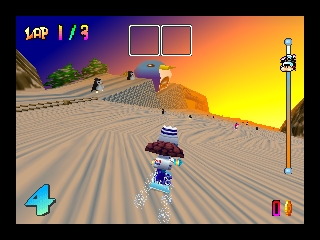
Snowboard Kids (USA)
0 5 1
Snowboard Kids (USA) offers a fresh take on racing games, mixing snowboarding with arcade-style action and quirky characters. This Nintendo 64 classic is lively and fun, standing out among sports titles from its time. Its blend of racing, item use, and character customization rewards skill while keeping things light and accessible for players of different levels.
Snowboard Kids: Gameplay Overview
The main idea is to race down snowy courses, aiming to finish first. Unlike typical racing games, it uses item mechanics similar to kart racers—players can pick up power-ups to slow others down or boost their own speed. The game focuses on momentum, sharp turns, and clever use of items, making each race a mix of skill and strategy.
You control a cast of characters, each with their own handling traits. The controls are simple enough to pick up but allow for tricks and jumps that earn extra points and speed boosts. The gameplay involves racing, unlocking new characters and tracks, and mastering each course to improve your times. The focus on both racing and tricks makes Snowboard Kids a lively challenge that rewards quick reflexes and smart planning.
Modes, Levels and Progression
There are different courses with themes like icy slopes and snowy villages, each with their own obstacles and shortcuts. You can play alone against AI in cups or tournaments, unlocking new content as you go. The tracks get trickier as you progress, testing your navigation and timing skills.
Multiplayer modes let friends race locally, adding social fun. Progression comes from doing well in races and meeting specific goals, unlocking characters and courses along the way. This setup encourages replaying to improve your skills and keeps things fresh with a variety of tracks and characters.
Winning Strategies
Using shortcuts can save valuable seconds, so keep an eye out for hidden paths. Timing tricks well can earn extra points without losing speed. Managing your items to disrupt opponents or defend your position can turn a race around. Practice controlling your character through tight corners to keep your momentum. Watching where your opponents are helps you decide when to use power-ups or defensive moves.
- Learn shortcuts early on each track to gain an advantage.
- Use tricks wisely to rack up points without losing control during crucial moments.
- Watch opponents’ item meters to anticipate attacks and defend when needed.
- Refine your turning and braking to handle tricky sections better.
- Try different characters to find one that matches your racing style.
Common Questions About Snowboard Kids
How does the difficulty change as I go along?
The game gets tougher with smarter AI and more complex tracks with sharper turns and obstacles. Getting comfortable with early tracks helps when tackling later ones, which often need advanced tricks and smart item use.
Are there different game modes or levels to explore?
Yes, beyond standard races, there are tournaments and multiplayer options. The variety of tracks and unlockable characters gives plenty of replay value, encouraging players to improve and explore everything.
How long does a typical game session last, and is it worth playing again?
A race usually takes a few minutes, making it good for quick play sessions. The unlockables and multiplayer options give reasons to come back, and mastering the tracks and characters adds depth for those wanting to get better.
Snowboard Kids combines racing, tricks, and smart item use in a way that makes it a memorable part of the Nintendo 64 lineup. Its variety of modes, courses, and characters means there’s plenty to enjoy whether racing solo or with friends.
Related games: you can also try Ide Yosuke no Mahjong Juku (Japan) and Perfect Dark (USA) (Rev A), or browse all other games in the Nintendo 64 category.
How to Play Snowboard Kids (USA)?
Race down snowy tracks, using shortcuts and tricks to finish first while managing items to slow opponents or boost yourself. Practice turning and timing to improve your speed and avoid obstacles.
Game Controls
Arrow keys act as the D-pad; Enter is Start; other keys handle actions and tricks.
You may be interested in:
-
 Nintendo 64
♥ 1
Sooper Wooper 64
Nintendo 64
♥ 1
Sooper Wooper 64 -
 Nintendo 64
♥ 12
Sonic World 64 (Original)
Nintendo 64
♥ 12
Sonic World 64 (Original) -
 Nintendo 64
♥ 2
Sonic World 64 – Hard Mode BETA1
Nintendo 64
♥ 2
Sonic World 64 – Hard Mode BETA1 -
 Nintendo 64
♥ 11
Sonic World 64 – First
Nintendo 64
♥ 11
Sonic World 64 – First -
 Nintendo 64
♥ 2
Sonic Wings Assault (Japan)
Nintendo 64
♥ 2
Sonic Wings Assault (Japan) -
 Nintendo 64
♥ 7
Sonic The Werehog 64
Nintendo 64
♥ 7
Sonic The Werehog 64 -
 Nintendo 64
♥ 1
Sonic Mushroom Blast – Legacy
Nintendo 64
♥ 1
Sonic Mushroom Blast – Legacy -
 Nintendo 64
♥ 14
Sonic in Ocarina of Time
Nintendo 64
♥ 14
Sonic in Ocarina of Time
Comments (0)
No comments yet. Be the first to comment!