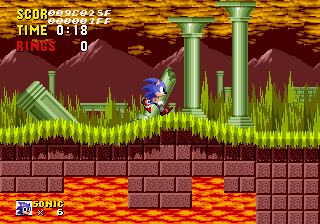
Sonic 1 Bugfixes & Act Palettes
0 4 1
Sonic 1 Bugfixes & Act Palettes is a browser-based version of the classic Genesis platformer, perfect for fans of the original Sonic the Hedgehog. This version preserves the core gameplay while fixing bugs and allowing players to customize act color schemes. It’s a good way to revisit a beloved game without the technical issues or visual inconsistencies that sometimes popped up in early releases.
Getting Into Sonic 1 Bugfixes & Act Palettes
As a classic Genesis game, Sonic 1 Bugfixes & Act Palettes keeps the familiar feeling of speedy platforming, where you control Sonic racing through different zones to stop Dr. Robotnik. The gameplay relies on quick reflexes, accurate jumps, and exploring each level to find shortcuts and secrets. Progression is straightforward — moving from one zone to the next, with each act offering new challenges to test your timing and navigation skills.
This version runs right in your browser, so there’s no need to download anything. A typical session involves choosing a zone, running through its acts to gather rings and defeat enemies, then facing the boss at the end of each zone. It’s designed for quick play sessions, making it easy to pick up for casual gaming. The level design and mechanics stay true to the original, but with bug fixes that make gameplay smoother and reduce frustrations that some earlier versions might have caused.
Standout Features
The main visual update comes from the act palette options, letting you customize the color schemes of each level. This adds variety and lets players experiment with different looks or revert to the original colors if they want an authentic feel. The bug fixes help the game run more reliably, with fewer glitches or crashes that could ruin the experience on certain emulators or versions.
Playing through Sonic 1 Bugfixes & Act Palettes is simple — you move from zone to zone, unlocking new challenges and revisiting familiar levels with better stability. Its straightforward design encourages speed runs and mastering each act’s layout. Since it plays directly in your browser, it’s easy to access and revisit often, which makes it enjoyable for both newcomers and longtime fans alike.
Strategy and Tips
To succeed, quick reflexes and memory are key. Try to keep your speed high to maximize points and efficiency, but don’t rush blindly — slowing down in tricky spots can save you from losing rings or lives.
- Practice each act to memorize enemy locations and shortcuts.
- Collect rings regularly; they shield you from damage and boost your score.
- Use the palette options to keep the visuals fresh and help identify levels faster.
- Watch boss patterns; they usually follow predictable cycles that you can learn.
- Experiment with different routes to find faster paths through each level.
- If you get stuck, go back to earlier zones to practice and improve your timing without penalty.
Quick Questions
How do I get started with Sonic 1 Bugfixes & Act Palettes?
Just load the game in your browser and start playing — no downloads needed.
What’s a common mistake for beginners?
Rushing through levels without paying attention to enemies or hazards often leads to losing rings or lives early on.
Can I play on mobile or touch devices?
Yes, since it runs in your browser, it works on mobile devices with touch controls, though precision might not match a keyboard or controller.
Sonic 1 Bugfixes & Act Palettes provides a stable way to enjoy a classic Genesis platformer directly in your browser. The bug fixes and palette options make it a dependable choice for fans wanting a smooth, customizable experience of Sonic’s early adventures without any fuss.
Related games: you can also try Shadow of the Beast II (USA, Europe) and Balloon Boy (China) (Unl), or browse all other games in the Genesis category.
How to Play Sonic 1 Bugfixes & Act Palettes?
Run through levels as Sonic, jumping over enemies and collecting rings, aiming to reach the end of each zone while defeating bosses and exploring shortcuts.
Game Controls
Arrow keys move Sonic; space or designated keys jump and perform actions.
You may be interested in:
-
 Genesis
♥ 3
Zou! Zou! Zou! Rescue Daisakusen (Japan)
Genesis
♥ 3
Zou! Zou! Zou! Rescue Daisakusen (Japan) -
 Genesis
♥ 6
Zoom! (World)
Genesis
♥ 6
Zoom! (World) -
 Genesis
♥ 9
Zool – Ninja of the ‘Nth’ Dimension (USA)
Genesis
♥ 9
Zool – Ninja of the ‘Nth’ Dimension (USA) -
 Genesis
♥ 11
Zombies Ate My Neighbors (USA)
Genesis
♥ 11
Zombies Ate My Neighbors (USA) -
 Genesis
♥ 9
Zombies (Europe)
Genesis
♥ 9
Zombies (Europe) -
 Genesis
♥ 1
Zombie High (USA) (Proto)
Genesis
♥ 1
Zombie High (USA) (Proto) -
 Genesis
♥ 1
Zhuagui Dashi – Ghost Hunter (China) (Unl)
Genesis
♥ 1
Zhuagui Dashi – Ghost Hunter (China) (Unl) -
 Genesis
♥ 1
Zero Wing (Japan)
Genesis
♥ 1
Zero Wing (Japan)
Comments (0)
No comments yet. Be the first to comment!