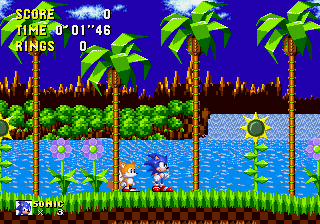
Sonic 1 in Sonic 3 (S.C.E. Version)
0 8 0
Sonic 1 in Sonic 3 (S.C.E. Version) is a browser-based recreation of a classic Genesis game that combines levels and gameplay elements from two well-loved titles. Designed for fans of platformers and Sega’s iconic blue hedgehog, this game offers a nostalgic run through familiar zones with a few twists. It’s a straightforward, fun experience that keeps the core mechanics of the original intact, making it perfect for quick play sessions or revisiting a piece of the Genesis era without needing any downloads or setup.
Getting Into Sonic 1 in Sonic 3
The game plays out as a traditional side-scrolling platformer where players control Sonic as he speeds through levels filled with obstacles, enemies, and rings. The main idea is running, jumping, and collecting rings to keep Sonic safe while aiming for the level’s end. Levels are designed with multiple paths, encouraging exploration even when speed is a priority. You can choose to take your time or push for faster completion to beat your best times.
This version is a single-player experience that emphasizes quick reflexes and memorization. Usually, a session involves choosing a stage, navigating through its layout, avoiding hazards, and gathering rings. The challenge comes from timing jumps and attacks just right while managing the risk of losing rings or lives. The controls respond well, and the game is optimized to start quickly in your browser, so you can jump in and out without any hassle.
Standout Features
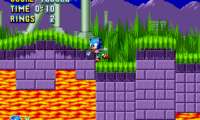
The visuals combine the pixel art style of the Genesis with the familiar look of Sonic’s classic worlds. Even though it’s an emulation, the graphics stay true to the original, with bright colors and smooth animations that bring back memories. The game has a progression system based on completing levels, with replay value coming from trying to beat your best times or finding hidden routes. It also keeps the variety in level design, from speedy sections to more intricate parts, encouraging multiple runs.
Players can enjoy the layered challenge: mastering each level’s layout, timing jumps carefully, and avoiding enemies. Since it combines elements from two Sonic titles, it offers a unique experience compared to playing just one game in the series. Being able to replay levels and improve your speed makes it appealing whether you’re casual or a dedicated Sonic fan. Plus, because it runs directly in your browser, you can play it anytime and anywhere, without any setup.
Strategy and Tips
Getting familiar with each level’s layout helps you finish quickly. Practice your jumps and learn enemy patterns to avoid losing rings or lives. Remember, collecting rings not only boosts your score but also gives you extra lives, so grab them when it’s safe. Use speed boosts wisely—sometimes slowing down to navigate tricky spots can save you from losing rings or lives.
- Keep Sonic’s speed controlled in tight spots to avoid falling or hitting enemies.
- Look for alternate routes to find hidden areas or shortcuts that save time.
- Time your jumps over gaps and spikes carefully to keep your momentum.
- Use rings strategically: don’t rush through levels blindly—collect rings in safe zones to stay alive longer.
- Pay attention to enemy placements and patterns to avoid damage.
Quick Questions
How do I start playing Sonic 1 in Sonic 3?
The game loads instantly in your browser, so just click to start and pick a level to play.
What’s a common mistake for new players?
Many rush without learning the level layouts, which can lead to falls or taking damage. Taking time to observe enemy patterns and the level flow helps a lot.
Can I play Sonic 1 in Sonic 3 on mobile or touch devices?
Yes, since it runs right in your browser, it works on mobile devices with touch controls, although using a keyboard might give more precision.
This version of Sonic 1 in Sonic 3 offers a simple way to enjoy a piece of Genesis history. Its faithful look and easy controls make it a solid choice for fans wanting a quick Sonic experience right in their browser.
Related games: you can also try Sonic 1 – Galaxy Edition and Battle Mania Daiginjou (Japan, Korea) [En by MIJET v20061029] (~Trouble Shooter Vintage), or browse all other games in the Genesis category.
How to Play Sonic 1 in Sonic 3 (S.C.E. Version)?
Control Sonic to run through levels, jump over obstacles, and collect rings while avoiding enemies. Complete each stage quickly and find hidden paths to beat your best times.
Game Controls
Arrow keys for movement; jump and attack are mapped to keyboard buttons.
You may be interested in:
-
 Genesis
♥ 5
Sonic 1 Orlando Magic Edition
Genesis
♥ 5
Sonic 1 Orlando Magic Edition -
 Genesis
♥ 2
Sonic 1 Open World Experiment
Genesis
♥ 2
Sonic 1 Open World Experiment -
 Genesis
♥ 102
Sonic 1 No-Name
Genesis
♥ 102
Sonic 1 No-Name -
 Genesis
♥ 13
Sonic 1 Mixed Beta1.1
Genesis
♥ 13
Sonic 1 Mixed Beta1.1 -
 Genesis
♥ 8
Sonic 1 Mixed Beta 1.3.1
Genesis
♥ 8
Sonic 1 Mixed Beta 1.3.1 -
 Genesis
♥ 22
Sonic 1 Mixed Beta 1.2
Genesis
♥ 22
Sonic 1 Mixed Beta 1.2 -
 Genesis
♥ 4
Sonic 1 Mania Edition Green Hill Encore
Genesis
♥ 4
Sonic 1 Mania Edition Green Hill Encore -
 Genesis
♥ 67
Sonic 1 Mania Edition
Genesis
♥ 67
Sonic 1 Mania Edition
Comments (0)
No comments yet. Be the first to comment!