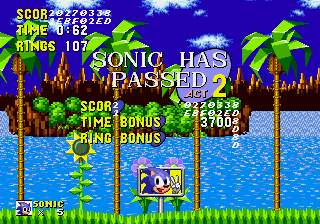
Sonic 1 Reversed Frequencies
0 8 3
Sonic 1 Reversed Frequencies is a browser-based version of the classic Genesis game, giving fans a chance to revisit Sonic’s early adventures without needing to download anything. It stays true to the original, so it’s easy to pick up and play, making it accessible whether you’re new to Sonic or have been following him for years. The game keeps the nostalgic feel of the original while running smoothly right in your browser, offering a simple way to enjoy Sonic’s speedy platforming whenever you want.
What Is Sonic 1 Reversed Frequencies?
This is a platformer where your main task is to guide Sonic through levels packed with obstacles, enemies, and rings. The goal is to reach the end of each stage quickly, avoiding hazards and collecting rings along the way. The game offers the familiar side-scrolling action that fans of the original remember, with a twist — the sound frequencies are reversed, giving it a distinct audio feel that makes the gameplay both familiar and a little different.
The focus is on speed and accuracy. Quick reactions and knowledge of the levels help you succeed. Each level is designed to be completed in a few minutes, making it suitable for short gaming sessions. The core gameplay remains simple: run fast, jump over platforms, and dodge enemies. It’s straightforward enough to enjoy casually without complicated mechanics or gimmicks getting in the way.
What Keeps You Coming Back
Part of the appeal is the tight controls and familiar level design, which encourage trying again to beat your best times. The reversed sound adds an unusual layer that keeps the experience feeling fresh even if you’ve played the original many times. Its simplicity means you can jump right in and start playing without a steep learning curve, but there’s still room to improve by mastering each level.
Trying to beat your own times and learn the layout keeps the game interesting. The short levels make it easy to replay without a big time commitment, perfect for quick gaming sessions. Its straightforward design appeals to players of all ages, offering a nostalgic but slightly altered Sonic experience that you can enjoy casually or competitively, trying to beat your best scores.
Handy Tips
If you’d like to get better at running through the levels or just enjoy it more, here are some helpful hints:
- Learn the level layout to reduce hesitation and go faster.
- Jump carefully to avoid falling or hitting enemies, especially in tricky spots.
- Gather rings when you can for safety and points, but stay focused on your route.
- Practice each level to remember enemy positions and find the best routes.
- Pay attention to the reversed sound cues; they can hint at upcoming obstacles or secrets.
Player FAQ
Is Sonic 1 Reversed Frequencies easy for new players to pick up?
Yes, the controls are simple and the mechanics are familiar, so it’s accessible for players of all skill levels, including those new to Sonic or platformers.
Can younger players enjoy Sonic 1 Reversed Frequencies?
Definitely. Its straightforward gameplay and cartoonish visuals make it suitable for children, and the reversed audio adds a quirky twist that older players can enjoy too.
Do I need an internet connection to play Sonic 1 Reversed Frequencies?
No, it runs directly in your browser, so once the page loads, you don’t need to be online to play. It’s a quick way to experience Sonic’s classic gameplay anytime.
Playing Sonic 1 Reversed Frequencies offers a familiar but slightly altered take on the legendary platformer. Its simple design and quick levels make it a good choice if you’re looking for a fast Sonic fix without any fuss.
Related games: you can also try Flashback – The Quest for Identity (USA) (Alt) and Golden Axe II (World) (Beta), or browse all other games in the Genesis category.
How to Play Sonic 1 Reversed Frequencies?
Guide Sonic through levels quickly by running, jumping, and avoiding obstacles to reach the end while collecting rings. Replay to beat your best times and improve your skills.
Game Controls
Arrow keys control movement; spacebar jumps; other keys handle actions.
You may be interested in:
-
 Genesis
♥ 12
Sonic 1: Contemporary
Genesis
♥ 12
Sonic 1: Contemporary -
 Genesis
♥ 4
Sonic 1: Black and White Edition V2.5
Genesis
♥ 4
Sonic 1: Black and White Edition V2.5 -
 Genesis
♥ 34
Sonic 1: Back 2 The Future
Genesis
♥ 34
Sonic 1: Back 2 The Future -
 Genesis
♥ 3
Sonic 1 Valentines Day Edition
Genesis
♥ 3
Sonic 1 Valentines Day Edition -
 Genesis
♥ 6
Sonic 1 Ultimate SSRG Demo
Genesis
♥ 6
Sonic 1 Ultimate SSRG Demo -
 Genesis
♥ 37
Sonic 1 Tokyo Toy Show Remake v0.6.2.1
Genesis
♥ 37
Sonic 1 Tokyo Toy Show Remake v0.6.2.1 -
 Genesis
♥ 14
Sonic 1 Tokyo Toy Show 1990 Recreation
Genesis
♥ 14
Sonic 1 Tokyo Toy Show 1990 Recreation -
 Genesis
♥ 93
Sonic 1 Tag Team Adventure By Jdpense
Genesis
♥ 93
Sonic 1 Tag Team Adventure By Jdpense
Comments (0)
No comments yet. Be the first to comment!