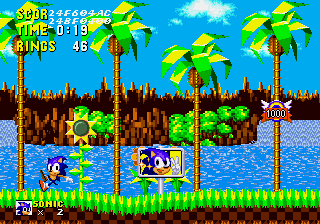
Sonic 1 SMS Edition
0 4 0
Sonic 1 SMS Edition is a browser-based version of the classic Genesis platformer, letting fans enjoy the game without downloads or installations. It stays true to the original, giving players a familiar yet accessible way to experience one of Sega’s most well-loved titles. With simple controls and a faithful recreation, it offers a nostalgic trip into early 1990s platforming, focusing on speed, precision, and exploration.
Sonic 1 SMS Edition: Gameplay Overview
The game has you controlling Sonic the Hedgehog as he speeds through levels filled with obstacles, enemies, and hidden areas. The main mechanics involve quick movement and accurate jumps. Collecting rings serves as both health and points. The design encourages flowing motion and quick reactions, with levels built to reward momentum and smart navigation.
As you progress, you’ll see different terrains—from lush green fields to industrial zones—each requiring different tactics. The goal is to finish levels quickly while gathering rings and finding secret pathways. Power-ups and extra lives are hidden throughout, encouraging exploration. Mastering Sonic’s speed and control is key to doing well in this classic platformer.
Levels, Modes, and Progression
The game features a series of levels that get trickier as you go along, each with its own environment and enemy placements. The levels are short, making it easy to try again and improve your time and score. There aren’t multiple game modes, but the game offers a straightforward progression that ends with boss battles testing your control and timing.
It encourages replaying through high scores and time trials. Hidden areas and alternate routes reward thorough exploration. While it doesn’t have branching stories or many modes, the variety of level layouts and the challenge of perfect runs keep players engaged, especially those into speedrunning and platforming.
Winning Strategies
Focus on keeping Sonic moving steadily through levels—slowing down can cause missed shortcuts and more danger. Collect rings often; they act as a safety net if you get hit. Learning each level’s layout helps you find shortcuts and secret spots to boost your score.
- Use jumps carefully to clear obstacles and reach hidden places, but don’t jump unnecessarily if it slows you down.
- Practice controlling Sonic’s speed to avoid overshooting platforms or falling into traps.
- Watch for speed boosts and rings to keep your velocity high through levels.
- Explore thoroughly to discover alternate routes and extra rings, which can help you finish faster.
- Time your jumps well to avoid enemies and hazards efficiently.
Common Questions About Sonic 1 SMS Edition
How does the difficulty change as you go?
Levels get tougher gradually, with later stages introducing more complex layouts, faster enemies, and tighter timing. Early stages help you practice, while later ones demand precise control and quick thinking.
Are there different modes or difficulty settings?
This version sticks to a simple setup, with no extra modes or difficulty options. It follows the style of early 1990s platformers, focusing on quick level completion and high scores.
How much replay value does it have?
You can replay to beat your times and scores, or explore hidden areas. Since levels are short but packed with secrets, players often spend time trying to improve runs or find everything, making it appealing for speedrunners and casual fans alike.
Playing Sonic 1 SMS Edition here offers a quick way to enjoy a beloved Genesis classic, capturing the fast-paced action that made early platformers exciting. Its simplicity and challenge help keep things interesting, especially for those looking to sharpen their speed and control skills.
Related games: you can also try Big's Fishing Derby and Brutal – Paws of Fury (Europe), or browse all other games in the Genesis category.
How to Play Sonic 1 SMS Edition?
Control Sonic to run through levels, avoiding obstacles and enemies while collecting rings and finding secret paths. Finish each level quickly and improve your score through exploration and speed.
Game Controls
Arrow keys move Sonic; jump and action keys are used for jumps and interactions.
You may be interested in:
-
 Genesis
♥ 3
Zou! Zou! Zou! Rescue Daisakusen (Japan)
Genesis
♥ 3
Zou! Zou! Zou! Rescue Daisakusen (Japan) -
 Genesis
♥ 6
Zoom! (World)
Genesis
♥ 6
Zoom! (World) -
 Genesis
♥ 9
Zool – Ninja of the ‘Nth’ Dimension (USA)
Genesis
♥ 9
Zool – Ninja of the ‘Nth’ Dimension (USA) -
 Genesis
♥ 11
Zombies Ate My Neighbors (USA)
Genesis
♥ 11
Zombies Ate My Neighbors (USA) -
 Genesis
♥ 9
Zombies (Europe)
Genesis
♥ 9
Zombies (Europe) -
 Genesis
♥ 1
Zombie High (USA) (Proto)
Genesis
♥ 1
Zombie High (USA) (Proto) -
 Genesis
♥ 1
Zhuagui Dashi – Ghost Hunter (China) (Unl)
Genesis
♥ 1
Zhuagui Dashi – Ghost Hunter (China) (Unl) -
 Genesis
♥ 1
Zero Wing (Japan)
Genesis
♥ 1
Zero Wing (Japan)
Comments (0)
No comments yet. Be the first to comment!