Sonic 1 – The Next Level
0 11 3
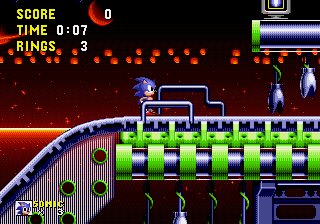
Sonic 1 – The Next Level is a browser-based version of a classic Genesis game, giving fans a chance to enjoy Sonic’s fast-paced platforming directly in their browser. Ideal for those who remember the original or newcomers curious about the franchise, it offers the familiar gameplay and bright visuals that made Sonic memorable. No downloads or installations are needed—just click and play a beloved title from the Genesis collection.
Getting Into Sonic 1 – The Next Level
The main idea is controlling Sonic through side-scrolling stages full of loops, spikes, and rings. The goal is to finish each level quickly while gathering rings and dodging hazards. Memorizing level layouts can help speedruns, but quick reflexes and accurate jumps also matter. Players typically choose a level, learn its layout, and aim for high scores or fast clear times.
This game keeps things simple—select a stage, and you’re off. Its quick sessions make it perfect for casual play or short bursts of fun. The difficulty gradually increases, challenging your timing and route choices without overwhelming newcomers. The controls are tight and responsive, which helps when you’re trying to keep up with the game’s fast pace.
Standout Features
The visuals stay true to the bright, pixel-perfect look of the original Genesis game. Its colorful sprites and backgrounds reflect the style of the era, making each level feel lively and distinct. The vivid palette and smooth animations help convey Sonic’s speed and momentum. While the music isn’t covered here, it complements the visuals with energetic tunes that keep the pace lively.
Progression is straightforward—move through levels, gather rings, and aim for the best times or scores. You can replay to beat your personal bests, try different routes, or master jump timing. The design encourages repeated play, whether for faster runs or finding hidden secrets, if the emulator supports those features. It stays true to the original gameplay loop, making each session engaging and satisfying.
Strategy and Tips
Getting started is easy, but improving takes focus. Here are some tips:
- Keep your rings safe; losing all your rings costs a life, so avoid unnecessary risks when your rings are low.
- Use the spin dash to build speed quickly, especially on straight paths or before hazards.
- Learn each level’s layout to find shortcuts and faster routes.
- Jump carefully to clear obstacles and grab rings, but don’t overdo it—over-jumping can slow you down.
- Practice timing your jumps over spikes and enemies to keep your momentum going.
- Focus on a smooth run rather than stopping to explore every corner.
Quick Questions
How do I get started with Sonic 1 – The Next Level?
Just click to load the game in your browser, pick your level, and start running. No setup needed.
What’s a common mistake for beginners?
Many new players rush through levels without learning obstacle patterns, which often leads to unnecessary deaths. Take some time to memorize tricky parts.
Can I play it on mobile or touch devices?
Yes, since it runs directly in your browser, it works on most devices with a touch screen, though precise controls might need some getting used to.
Playing Sonic 1 – The Next Level here offers a faithful, instant taste of a Genesis classic. Its simple gameplay and nostalgic visuals make it a good pick for fans of retro platformers or anyone wanting a quick burst of Sonic speed right in their browser.
Related games: you can also try Hellfire Saga (SHC 2023 version) and Revenge of Shinobi, The (USA, Europe), or browse all other games in the Genesis category.
How to Play Sonic 1 – The Next Level?
Control Sonic through side-scrolling levels, collecting rings and avoiding hazards to finish quickly. Learn level layouts and time your jumps to improve your score and speed.
Game Controls
Arrow keys or WASD for movement; space or specific keys for jumping and actions.
You may be interested in:
-
 Genesis
♥ 3
Zou! Zou! Zou! Rescue Daisakusen (Japan)
Genesis
♥ 3
Zou! Zou! Zou! Rescue Daisakusen (Japan) -
 Genesis
♥ 6
Zoom! (World)
Genesis
♥ 6
Zoom! (World) -
 Genesis
♥ 9
Zool – Ninja of the ‘Nth’ Dimension (USA)
Genesis
♥ 9
Zool – Ninja of the ‘Nth’ Dimension (USA) -
 Genesis
♥ 11
Zombies Ate My Neighbors (USA)
Genesis
♥ 11
Zombies Ate My Neighbors (USA) -
 Genesis
♥ 9
Zombies (Europe)
Genesis
♥ 9
Zombies (Europe) -
 Genesis
♥ 1
Zombie High (USA) (Proto)
Genesis
♥ 1
Zombie High (USA) (Proto) -
 Genesis
♥ 1
Zhuagui Dashi – Ghost Hunter (China) (Unl)
Genesis
♥ 1
Zhuagui Dashi – Ghost Hunter (China) (Unl) -
 Genesis
♥ 1
Zero Wing (Japan)
Genesis
♥ 1
Zero Wing (Japan)
Comments (0)
No comments yet. Be the first to comment!