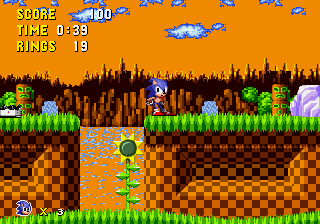
Sonic 100 – Sunset Hill Demo
0 1 1
Sonic 100 – Sunset Hill Demo is a classic Genesis game that runs right in your browser, giving you a taste of the legendary platforming hero. It’s easy to pick up, with simple controls and quick sessions, making it great for players of all skill levels. Whether you’re a long-time Sonic fan or trying it for the first time, this demo offers a compact and accessible experience without any downloads or installs.
What Is Sonic 100 – Sunset Hill Demo?
This side-scrolling platformer comes from the Genesis days, focusing on fast movement, jumping, and collecting items. The goal is to get through Sunset Hill, dodge obstacles and enemies, and aim for the best time or score. It captures the core of classic Sonic gameplay—speed, accuracy, and straightforward but fun level design.
The controls are simple, mainly running and jumping. It’s easy enough for newcomers but has enough challenge to keep experienced players interested. The demo shows a slice of the full game and highlights the mechanics that made Sonic a household name during the 16-bit era.
What Keeps You Coming Back
The tight controls and quick pace make each run exciting. Its straightforward design encourages trying to beat your best time or explore different routes through Sunset Hill. Since the demo is small, it’s easy to enjoy a quick session anytime, and the fun of beating your high score can keep you playing again and again.
Plus, Sonic 100 – Sunset Hill Demo’s simple setup makes it easy to learn but hard to master, especially when hunting for the fastest route or avoiding hazards. The pixel-perfect visuals and nostalgic sound effects bring back that classic Genesis feel, creating a gameplay loop that’s familiar yet challenging.
Handy Tips
A few quick tips to get the most out of the game:
- Keep your speed up; sharp turns or hesitations slow you down.
- Jump early to clear obstacles and enemies more easily.
- Try different routes to find the fastest way through Sunset Hill.
- Use momentum—stopping often isn’t necessary.
- Get the timing right on your jumps to avoid hazards and stay quick.
Player FAQ
Is Sonic 100 – Sunset Hill Demo easy for beginners?
Yes, it’s simple to pick up, with easy controls and quick play sessions that suit players of all ages.
Can I play Sonic 100 – Sunset Hill Demo offline or on mobile devices?
The demo runs straight in your browser, so you can enjoy it on any device with internet. Once loaded, it works offline too—no downloads needed.
Is Sonic 100 – Sunset Hill Demo good for young children?
Definitely. Its easy gameplay and lack of complicated mechanics make it suitable for younger players, especially those who like classic platformers.
Sonic 100 – Sunset Hill Demo offers a quick burst of retro Sonic fun right in your browser. Its simple gameplay and nostalgic feel make it perfect for casual players or anyone wanting to revisit a Genesis favorite without any fuss.
Related games: you can also try Sonic 1 Candy Edition and James Pond – Underwater Agent (USA, Europe), or browse all other games in the Genesis category.
How to Play Sonic 100 – Sunset Hill Demo?
Run through Sunset Hill, jump over obstacles, and collect rings while trying to beat your best time. Use speed and quick jumps to avoid enemies and hazards in this fast-paced platformer.
Game Controls
Arrow keys control movement; jump with a designated key; start and action buttons are mapped to specific keys.
You may be interested in:
-
 Genesis
♥ 5
Tom and Jerry – Frantic Antics (USA) (1994)
Genesis
♥ 5
Tom and Jerry – Frantic Antics (USA) (1994) -
 Genesis
♥ 3
Tom and Jerry – Frantic Antics (USA) (1993)
Genesis
♥ 3
Tom and Jerry – Frantic Antics (USA) (1993) -
 Genesis
♥ 8
Toki – Going Ape Spit (USA, Europe)
Genesis
♥ 8
Toki – Going Ape Spit (USA, Europe) -
 Genesis
♥ 9
Toei Sonic In Sonic 1
Genesis
♥ 9
Toei Sonic In Sonic 1 -
 Genesis
♥ 88
Toei Sonic 3 & Knuckles
Genesis
♥ 88
Toei Sonic 3 & Knuckles -
 Genesis
♥ 10
Toe Jam & Earl in Panic on Funkotron (USA)
Genesis
♥ 10
Toe Jam & Earl in Panic on Funkotron (USA) -
 Genesis
♥ 2
Toe Jam & Earl in Panic on Funkotron (Japan)
Genesis
♥ 2
Toe Jam & Earl in Panic on Funkotron (Japan) -
 Genesis
♥ 1
Toe Jam & Earl in Panic on Funkotron (Europe)
Genesis
♥ 1
Toe Jam & Earl in Panic on Funkotron (Europe)
Comments (0)
No comments yet. Be the first to comment!