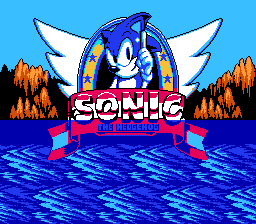
Sonic 3D Blast 5 (Unl)
0 9 4
Sonic 3D Blast 5 (Unl) is a browser-based version of a classic NES game, great for anyone interested in retro titles from the 8-bit days. As a platformer from that era, it offers simple gameplay and nostalgic visuals, making it accessible for both longtime fans and newcomers who want to enjoy a vintage gaming experience without downloading anything. The game runs directly in your browser—just load the page and start playing right away.
Getting Into Sonic 3D Blast 5
In Sonic 3D Blast 5, the goal is to move through side-scrolling levels filled with obstacles, enemies, and hidden secrets. You control the main character, collecting items and avoiding dangers. Success depends on timing and precision, so learning each level’s layout and enemy patterns helps you move smoothly. Each session usually involves completing a stage or searching for secrets, with difficulty that reflects the NES style—challenging but fair.
There are no elaborate modes or branching paths. Instead, each level presents a contained challenge that builds on skills you’ve already learned. The game is designed for quick play sessions, so you can pick it up and put it down easily. Controls are straightforward, mainly involving directional movement and a single action button, which helps you focus on timing and memorizing levels. This simplicity keeps the game accessible while still offering enough challenge to make you want to improve your scores or beat your best time.
Standout Features
The visuals keep the pixelated charm of the NES, with colorful backgrounds and sprite animations that bring back memories. While not as detailed as modern games, the graphics clearly show level design and enemy placement, helping you anticipate challenges. Moving through levels feels rewarding, with different themes and layouts to keep things interesting each time you play.
Playing again and again makes you better at the game, especially if you aim to improve your scores or complete levels faster. Finding hidden areas and mastering enemy patterns reward players who like to hone their skills. Its simple design lets you focus on improving your run time, making it good for quick gaming breaks or longer sessions. The straightforward setup also encourages trying different routes or strategies in each level.
Strategy and Tips
To get the most out of Sonic 3D Blast 5, spend some time learning the layouts and enemy behaviors early on. Patience and good timing can help you avoid damage and finish levels more quickly.
- Pay attention to enemy movements to plan your actions and stay safe.
- Explore each level thoroughly to find hidden items or shortcuts.
- Collect power-ups and extra lives scattered around stages.
- Take your time learning the layout—rushing can lead to mistakes.
- Focus on finishing levels efficiently rather than rushing blindly.
- Use checkpoints wisely so you don’t lose too much progress if you get hit.
Quick Questions
How do I start playing Sonic 3D Blast 5?
Just open the game in your browser, and it will start right away—no setup needed.
What’s a common mistake beginners make?
Many players rush through levels without learning enemy patterns or exploring enough, which results in unnecessary damage and longer times to finish.
Can I play Sonic 3D Blast 5 on mobile or touch devices?
Yes, it works well on mobile browsers, so you can enjoy it without needing a dedicated app or emulator download.
Sonic 3D Blast 5 is a straightforward, nostalgic platformer you can play right in your browser. It’s a good pick for fans of NES-style games or anyone looking for quick, satisfying gameplay. Its simple design and challenge keep it fun and worth revisiting whenever you’re in the mood for some vintage gaming.
Related games: you can also try Impossible Mission II (USA) (Unl) and Rockman 2020 New Year's Hack, or browse all other games in the NES category.
How to Play Sonic 3D Blast 5 (Unl)?
Move Sonic through side-scrolling levels, avoiding enemies and obstacles, collecting items, and finding secrets to complete each stage quickly and improve your score.
Game Controls
Arrow keys control movement; a single key performs the jump or action.
You may be interested in:
-
![Zombie Hunter (Japan) [En by KingMike v1.01]](https://www.playf2p.com/wp-content/uploads/zombie-hunter-japan-en-by-kingmike-v1-01-200x120.png) NES
♥ 2
Zombie Hunter (Japan) [En by KingMike v1.01]
NES
♥ 2
Zombie Hunter (Japan) [En by KingMike v1.01] -
 NES
♥ 1
Zombie Hunter (Japan)
NES
♥ 1
Zombie Hunter (Japan) -
 NES
♥ 1
Zoids Mokushiroku (Japan)
NES
♥ 1
Zoids Mokushiroku (Japan) -
 NES
♥ 2
Zoids 2 – Zenebas no Gyakushuu (Japan)
NES
♥ 2
Zoids 2 – Zenebas no Gyakushuu (Japan) -
 NES
♥ 1
Zoids – Chuuou Tairiku no Tatakai (Japan)
NES
♥ 1
Zoids – Chuuou Tairiku no Tatakai (Japan) -
 NES
♥ 11
Zippy Race (Japan)
NES
♥ 11
Zippy Race (Japan) -
 NES
♥ 1
Zhen Ben Xi You Ji (Asia) (Unl)
NES
♥ 1
Zhen Ben Xi You Ji (Asia) (Unl) -
 NES
♥ 1
Zenbei!! Pro Basket (Japan)
NES
♥ 1
Zenbei!! Pro Basket (Japan)
Comments (0)
No comments yet. Be the first to comment!