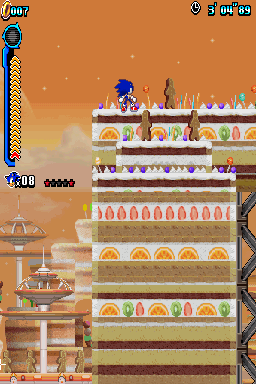
Sonic Colors DS Customisation Widescreen
0 27 2
Sonic Colors DS Customisation Widescreen is a browser-based version of the classic Nintendo DS game. It gives fans a chance to experience this platformer in a wider format without needing any hardware. As a nostalgic title from the DS era, it appeals to players who enjoyed Sonic’s speedy adventures and want to see the game with clearer visuals. Since it runs directly in your browser, there’s no need to download or install anything, making it easy to jump right in.
Getting Into Sonic Colors DS Customisation Widescreen
The game sticks to the familiar gameplay of Sonic platformers, with fast movement and precise jumps. You control Sonic as he races through levels filled with obstacles, enemies, and collectibles. The goal is to reach the end of each stage while gathering rings and avoiding hazards. It’s straightforward, focusing on arcade-style action rather than complex mechanics or storylines.
Playing usually means selecting a level and guiding Sonic through timed challenges. It’s linear but encourages replaying to beat your best times or collect more rings. Sessions can be quick or longer, depending on how much you want to explore or improve your runs. The controls are the same as the original, so it’s easy for newcomers to pick up, but experienced players will find enough to keep them engaged.
Standout Features
The visuals are bright and lively, taking advantage of the wider display to show more of the environment at once. The art style remains cartoony and familiar but feels less constrained than the DS screen. This makes platforming easier and more comfortable to play.
Levels are designed to challenge your reflexes and timing. Replayability comes from trying to beat your best times, collecting all rings, or exploring different paths. Since it’s a browser game, it’s perfect for quick sessions—whether you want to practice or just enjoy a fast run. While it doesn’t add new content, the widescreen view makes the familiar stages feel fresh.
Strategy and Tips
Getting the most out of this game means understanding each level’s layout and focusing on moving quickly while avoiding hazards. Practice tricky sections to improve your timing and learn shortcuts that can save time during speed runs. Collecting rings early helps keep your health intact longer, and using Sonic’s momentum wisely can help you clear gaps or dodge enemies more easily.
- Try to find shortcuts or hidden rings to boost your score.
- Sometimes a slower, more careful approach works better than rushing.
- Pay attention to visual cues that hint at upcoming obstacles or enemies.
Quick Questions
How do I get started with Sonic Colors DS Customisation Widescreen?
Just load the game in your browser and pick a level. No downloads or setup needed.
What do beginners often get wrong?
Many rush through levels without noticing hazards or enemies, leading to losing rings or lives early on.
Can I play this on mobile or touchscreen devices?
Yes, since it runs in your browser, it works on mobile devices. Some controls might take a bit of getting used to, though.
The browser version of Sonic Colors DS Customisation Widescreen makes it easy to enjoy this classic game with a wider view. Whether you’re revisiting the game or trying it out for the first time, it’s a simple way to have quick, fun platforming sessions right in your browser.
Related games: you can also try 1500 DS Spirits Vol. 10 – Igo (Japan) and Gokujou!! Mecha Mote Iinchou – MM Town de Miracle Change! (Japan), or browse all other games in the Nintendo DS category.
How to Play Sonic Colors DS Customisation Widescreen?
Guide Sonic through levels, avoiding hazards, collecting rings, and reaching the end as fast as possible. Replay to beat your best times and find hidden shortcuts.
Game Controls
Arrow keys control movement; space or specific keys handle jumps and actions.
You may be interested in:
-
 Nintendo DS
♥ 1
Casper’s Scare School – Classroom Capers (USA)
Nintendo DS
♥ 1
Casper’s Scare School – Classroom Capers (USA) -
 Nintendo DS
♥ 1
Zunou Nouryoku Koujou Machine – Touch de Zunoo DS (Japan)
Nintendo DS
♥ 1
Zunou Nouryoku Koujou Machine – Touch de Zunoo DS (Japan) -
 Nintendo DS
♥ 1
Zunou ni Asekaku Game Series! Vol. 1 – Cool 104 Joker & Setline (Japan)
Nintendo DS
♥ 1
Zunou ni Asekaku Game Series! Vol. 1 – Cool 104 Joker & Setline (Japan) -
 Nintendo DS
♥ 9
Zuma’s Revenge (USA)
Nintendo DS
♥ 9
Zuma’s Revenge (USA) -
 Nintendo DS
♥ 1
Zubo (USA) (En,Fr,Es)
Nintendo DS
♥ 1
Zubo (USA) (En,Fr,Es) -
 Nintendo DS
♥ 1
Zubo (Europe) (En,Fr,De,Es,It,Nl,Sv)
Nintendo DS
♥ 1
Zubo (Europe) (En,Fr,De,Es,It,Nl,Sv) -
 Nintendo DS
♥ 1
Zorro – Quest for Justice (USA) (En,Fr,De,Es,It)
Nintendo DS
♥ 1
Zorro – Quest for Justice (USA) (En,Fr,De,Es,It) -
 Nintendo DS
♥ 1
Zorro – Quest for Justice (Europe) (En,Fr,De,Es,It)
Nintendo DS
♥ 1
Zorro – Quest for Justice (Europe) (En,Fr,De,Es,It)
Comments (0)
No comments yet. Be the first to comment!