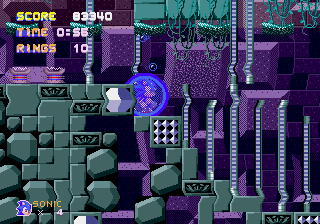
Sonic Into The Void SHC 2015 Demo
0 13 3
Sonic Into The Void SHC 2015 Demo is a browser-based version of a classic Genesis game that captures the fast-paced platforming fans remember from the 16-bit era. It offers a nostalgic look back at a time when Sonic the Hedgehog was known for speedy, side-scrolling action. The experience is simple and direct, emphasizing speed, precision, and timing—great for a quick burst of retro fun without needing downloads or installations.
Playing Sonic Into The Void SHC 2015 Demo introduces you to a pixel-perfect recreation of Genesis-style platforming. Its visuals stay true to the original’s bright colors and simple sprite animations, bringing back the charm of early Sonic titles. The atmosphere is lively but straightforward, with smooth scrolling and tight controls that reward practice. The level design encourages quick reflexes and memorizing routes, making it engaging for those who enjoy precise platforming. Despite its simplicity, the game feels authentic enough to satisfy fans of the Genesis Sonic games while being accessible for newcomers curious about the roots of the franchise.
Why Sonic Into The Void SHC 2015 Demo Is Worth Playing
The real strength is how well it captures the Genesis platforming style, giving players a true sense of Sonic’s speed and momentum. The controls are tight and responsive, which is key for a game that needs quick reflexes and accurate jumps. The visuals, while minimal, evoke the classic Sonic look with vibrant backgrounds and clear sprite work, offering a nostalgic yet clean appearance on modern browsers. Short play sessions make it perfect for quick breaks, but developing mastery over routes and timing can keep players coming back. The straightforward design focuses on delivering pure Sonic action without unnecessary distractions.
Tips to Get Ahead
- Keep your momentum going with quick, continuous presses to maintain speed and dodge obstacles.
- Familiarize yourself with the levels through trial and error to discover the fastest routes and shortcuts.
- Work on your jumping timing to clear gaps and avoid hazards efficiently.
- Use the environment—bounce off walls or use platform edges to gain extra speed.
- Watch upcoming obstacles and plan your moves ahead of time for smoother navigation.
- Stay patient; careful timing often leads to higher scores and better progression.
Things to Know Before You Start
What is the difficulty level of Sonic Into The Void SHC 2015 Demo?
The game offers a moderate challenge typical of Genesis platformers, requiring precise timing for jumps and obstacle avoidance. It’s accessible for casual players but also offers a challenge for those aiming for high scores or quick finishes.
How long does a session last?
Sessions tend to be brief—just a few minutes per run—making it ideal for quick breaks or practicing specific sections. It’s designed for short, satisfying bursts rather than long gaming sessions.
Is Sonic Into The Void SHC 2015 Demo suitable for all ages?
Yes, the game is family-friendly, focusing on platforming mechanics without violence or mature themes. Its straightforward gameplay appeals to both younger players and nostalgic adults.
Can I play Sonic Into The Void SHC 2015 Demo offline or on mobile?
This version runs directly in your browser, so no downloads are needed, and it’s best played on a desktop. Compatibility with mobile devices isn’t guaranteed, but using a mouse or keyboard usually gives the best control.
Try Sonic Into The Void SHC 2015 Demo now and enjoy a faithful slice of Genesis Sonic action right in your browser. Its responsive controls and nostalgic visuals make it a fun choice for fans of retro platformers or anyone interested in classic Sonic gameplay.
Related games: you can also try Sonic 2 But keep Tails or else and Bad Omen (Japan), or browse all other games in the Genesis category.
How to Play Sonic Into The Void SHC 2015 Demo?
Run and jump through levels as Sonic, avoiding obstacles and collecting rings. Use quick reflexes to maintain speed, clear gaps, and reach the end of each stage.
Game Controls
Arrow keys control movement; jump is performed with a designated key; other actions are mapped to specific keys.
You may be interested in:
-
 Genesis
♥ 3
Zou! Zou! Zou! Rescue Daisakusen (Japan)
Genesis
♥ 3
Zou! Zou! Zou! Rescue Daisakusen (Japan) -
 Genesis
♥ 6
Zoom! (World)
Genesis
♥ 6
Zoom! (World) -
 Genesis
♥ 9
Zool – Ninja of the ‘Nth’ Dimension (USA)
Genesis
♥ 9
Zool – Ninja of the ‘Nth’ Dimension (USA) -
 Genesis
♥ 11
Zombies Ate My Neighbors (USA)
Genesis
♥ 11
Zombies Ate My Neighbors (USA) -
 Genesis
♥ 9
Zombies (Europe)
Genesis
♥ 9
Zombies (Europe) -
 Genesis
♥ 1
Zombie High (USA) (Proto)
Genesis
♥ 1
Zombie High (USA) (Proto) -
 Genesis
♥ 1
Zhuagui Dashi – Ghost Hunter (China) (Unl)
Genesis
♥ 1
Zhuagui Dashi – Ghost Hunter (China) (Unl) -
 Genesis
♥ 1
Zero Wing (Japan)
Genesis
♥ 1
Zero Wing (Japan)
Comments (0)
No comments yet. Be the first to comment!