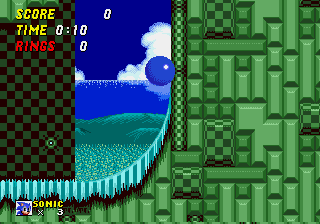
Sonic the Hedgehog 2Z
0 10 11
Sonic the Hedgehog 2Z is a browser-based version of the classic Genesis game that introduced many players to the speedy blue hedgehog. Fans of retro platformers will appreciate the fast-paced action and colorful levels that made the original a staple on the Sega Genesis. You can jump right into the game here without any downloads or complicated setups—just open your browser and start playing a piece of 16-bit gaming history.
Getting Into Sonic the Hedgehog 2Z
The game is all about controlling Sonic as he speeds through side-scrolling levels filled with obstacles, enemies, and power-ups. The main idea is to run fast, jump over gaps, dodge foes, and collect rings to stay alive. Each level combines platforming challenges and enemies that test your reflexes. Skilled players are rewarded with faster completion times and higher scores.
There aren’t any complex modes or branching stories—just continuous levels that get trickier as you go. Usually, you’ll pick a level, guide Sonic through it, avoid hazards, and aim for the finish line. The game encourages memorizing level layouts and timing your moves just right, making it perfect for quick sessions or longer, more focused runs. Despite being old, it still feels fresh thanks to its tight controls and addictive gameplay.
Standout Features
The visuals stay true to the bright, lively style of the original Genesis game. The pixel art is crisp and colorful, and Sonic’s animation emphasizes his speed and agility. The soundtrack, even simplified for browser play, keeps the energetic vibe that makes you want to keep moving. The visual and audio style sparks nostalgia but still looks clear and appealing on modern screens.
The game progression is simple: beat levels to move forward, with each stage bringing new challenges and layouts. Replay value is high because players often return to improve their times, find hidden routes, or just enjoy the thrill of fast-paced platforming. Learning the levels and mastering the controls makes it easy to get hooked for a quick game or longer sessions.
Strategy and Tips
If you’re new to Sonic the Hedgehog 2Z, focus on mastering the controls and familiarizing yourself with the level layouts. Here are some tips to help you play better:
- Keep Sonic moving fast but slow down for tricky sections or tight turns.
- Jump carefully to avoid enemies and gaps; timing is key.
- Gather rings whenever you can—they can save you if you get hit.
- Check out hidden paths or shortcuts; they can save time and give you extra rings or power-ups.
- Practice tough sections repeatedly to build muscle memory and improve your times.
- Watch out for hazards like spikes or moving platforms that can surprise you.
Quick Questions
How do I get started with Sonic the Hedgehog 2Z?
Just load the game in your browser and start playing. No downloads needed. Use the arrow keys to control Sonic and jump right into the action.
What’s a common mistake for beginners?
Many players try to go full speed all the time, which can cause missed jumps or hits from enemies. Learning when to slow down makes a big difference.
Does Sonic the Hedgehog 2Z work well on mobile or touch devices?
Yes, it runs smoothly in browsers on smartphones and tablets, and controls are designed for touch, so playing without extra software is easy.
Playing Sonic the Hedgehog 2Z offers a simple, fun experience that captures the spirit of the original Genesis platformer. Its quick levels and challenging gameplay make it a good choice for anyone wanting to enjoy Sonic’s speed right in their browser.
Related games: you can also try Skitchin (USA, Europe) and Sonic Acceleration, or browse all other games in the Genesis category.
How to Play Sonic the Hedgehog 2Z?
Control Sonic to run through levels, jumping over obstacles, avoiding enemies, and collecting rings to reach the end as quickly as possible.
Game Controls
Arrow keys act as the D-pad; Enter is Start; on-screen mapped keys handle the action buttons.
You may be interested in:
-
 Genesis
♥ 1
Sonic The Hedgehog AGX (S1 Hack)
Genesis
♥ 1
Sonic The Hedgehog AGX (S1 Hack) -
 Genesis
♥ 5
Sonic The Hedgehog Adventure
Genesis
♥ 5
Sonic The Hedgehog Adventure -
 Genesis
♥ 131
Sonic The Hedgehog 4
Genesis
♥ 131
Sonic The Hedgehog 4 -
 Genesis
♥ 23
Sonic the Hedgehog 3C (prototype 0517)
Genesis
♥ 23
Sonic the Hedgehog 3C (prototype 0517) -
 Genesis
♥ 16
Sonic The Hedgehog 3 Unlocked
Genesis
♥ 16
Sonic The Hedgehog 3 Unlocked -
 Genesis
♥ 38
Sonic The Hedgehog 3 Smeiden
Genesis
♥ 38
Sonic The Hedgehog 3 Smeiden -
 Genesis
♥ 9
Sonic the Hedgehog 3 Plus
Genesis
♥ 9
Sonic the Hedgehog 3 Plus -
 Genesis
♥ 5
Sonic The Hedgehog 3 Limited Edition (1994-05-17)
Genesis
♥ 5
Sonic The Hedgehog 3 Limited Edition (1994-05-17)
Comments (0)
No comments yet. Be the first to comment!