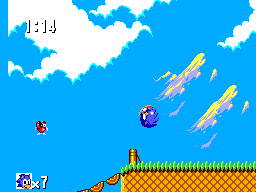
Sonic The Hedgehog Challenge Mode
0 1 1
Sonic The Hedgehog Challenge Mode is a browser-based version of a classic Master System game, made for players who enjoy quick, skillful platforming. It simplifies the original Sonic gameplay into a focused, tough challenge that tests your reflexes and mastery. If you like the nostalgic feel of the platform and want something straightforward without a lot of extras, this game offers a solid dose of old-school Sonic in your browser.
Getting Into Sonic The Hedgehog Challenge Mode
The game revolves around a simple but demanding loop: guide Sonic through increasingly tricky stages filled with obstacles and enemies, aiming for the best time or score. Unlike the main Sonic games, Challenge Mode is about quick, intense runs that you can finish in a few minutes. You control Sonic to jump over gaps, dodge hazards, and grab rings, trying to reach the end without losing lives.
This isn’t about playing as different characters or following a story. Instead, it’s a series of timed or score-based challenges you can repeat. Your progress depends on how much you improve your times or scores, not unlocking new levels. Each session is short, making it easy to pick up and practice or compete for your best results whenever you have a few minutes.
Standout Features
The visuals stay true to the Master System’s pixel art, giving a nostalgic touch. The sprites and backgrounds reflect the limited color palette of the era, but everything remains clear and smooth. The sound effects and music are simple but familiar, capturing that vintage Sonic vibe. The visuals and sound keep the focus on gameplay and your skill as a player.
Progress mainly comes from beating your previous best times or high scores. The challenge varies enough to keep you coming back, whether to beat your own records or compete with friends. Its replay value lies in quick, repeatable runs—great if you want to sharpen your reflexes or squeeze in a quick Sonic session. Since it runs directly in the browser, it’s accessible on any device, encouraging casual, frequent play without needing to install anything.
Strategy and Tips
If you want to get better at Sonic Challenge Mode, focus on precise timing. Here are some tips:
- Learn each stage’s layout so you can anticipate obstacles and move efficiently.
- Practice your jump timing to clear gaps and hazards smoothly without losing speed.
- Be patient during tricky sections—rushing often causes mistakes.
- Use rings wisely; collecting enough can help you recover from errors without losing a life.
- Memorize enemy patterns for smoother navigation.
- Adjust your approach depending on whether the challenge tracks time or score—prioritize speed or accuracy as needed.
Quick Questions
How do I start playing Sonic The Hedgehog Challenge Mode?
The game loads instantly in your browser, so you can jump right in without any downloads or setup.
What’s a common mistake beginners make?
Many rush through stages without noticing obstacle patterns, leading to mistakes and lost time.
Does it work well on mobile or touch devices?
Yes, since it runs directly in the browser, you can play on mobile devices with touch controls, though accuracy might vary compared to keyboard or controller.
Overall, Sonic the Hedgehog Challenge Mode offers a straightforward, skill-focused experience that stays true to the original Master System style. Its quick rounds and emphasis on reflexes make it a fun option for Sonic fans and newcomers alike wanting a quick, nostalgic test right in their browser.
Related games: you can also try Comical Machine Gun Joe (Japan) and James Bond 007 – The Duel (Brazil), or browse all other games in the Master System category.
How to Play Sonic The Hedgehog Challenge Mode?
Guide Sonic through fast-paced levels by jumping over obstacles, avoiding hazards, and collecting rings to beat your best time or score. Complete each run quickly and improve your previous results.
Game Controls
Arrow keys control movement; jump and action buttons are mapped to keyboard keys.
You may be interested in:
-
 Master System
♥ 6
Zool – Ninja of the ‘Nth’ Dimension (Europe)
Master System
♥ 6
Zool – Ninja of the ‘Nth’ Dimension (Europe) -
 Master System
♥ 2
Zillion II – The Tri Formation (World)
Master System
♥ 2
Zillion II – The Tri Formation (World) -
 Master System
♥ 3
Zillion (USA) (v1.1)
Master System
♥ 3
Zillion (USA) (v1.1) -
 Master System
♥ 1
Zillion (Japan, Europe) (En,Ja)
Master System
♥ 1
Zillion (Japan, Europe) (En,Ja) -
 Master System
♥ 1
Zillion (Europe) (v1.2)
Master System
♥ 1
Zillion (Europe) (v1.2) -
 Master System
♥ 1
Zaxxon 3-D (World) (Beta)
Master System
♥ 1
Zaxxon 3-D (World) (Beta) -
 Master System
♥ 1
Zaxxon 3-D (World)
Master System
♥ 1
Zaxxon 3-D (World) -
 Master System
♥ 1
Xenon 2 – Megablast (Europe) (Virgin)
Master System
♥ 1
Xenon 2 – Megablast (Europe) (Virgin)
Comments (0)
No comments yet. Be the first to comment!