Speed Racer (USA)
0 3 0
Getting Into Speed Racer
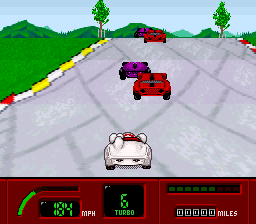
Speed Racer (USA) is a classic SNES game that combines racing and adventure elements, offering a quick, action-filled experience straight from the 16-bit era. It’s designed for players who enjoy fast-paced driving with a touch of exploration. Because it runs directly in your browser, you can start playing right away without downloads or setup, making it easy for both casual players and enthusiasts.
The main gameplay involves steering a racing vehicle through different courses, aiming to finish as fast as possible while dodging obstacles. The pace is fast, with sharp turns and sudden hazards that require attention. During a typical race, you’ll pick a track and control your vehicle on a scrolling route, making split-second decisions to accelerate, brake, or steer. Sometimes, you’ll choose different routes or face tough opponents, which adds variety and encourages replaying. Races are usually short, just a few minutes, but mastering each track can keep you coming back for more.
Standout Features
This SNES title features visuals that reflect the bright, cartoon-like style of the original series, with colorful backgrounds and lively sprites that bring the racing world to life. Although the graphics are simple, typical of the era, the animation is smooth and clear during high-speed moments. The game’s progression is straightforward—win races to unlock new tracks and challenges—and it encourages players to improve their skills and beat their best times. Its simple mechanics make it easy to pick up but challenging to master, offering plenty of replay value for those who want to sharpen their reflexes.
With multiple tracks and route variations, players can keep coming back to beat their best times and find shortcuts. The difficulty level matches SNES standards: accessible enough for newcomers but still challenging for experienced players. Its straightforward gameplay combined with the excitement of racing helps Speed Racer stay enjoyable, whether you’re playing in quick bursts or longer sessions.
Strategy and Tips
If you’re just starting out, try to memorize the course layouts and spot where sharp turns or hazards appear. Timing your acceleration and braking helps keep your speed without crashing. Keep an eye on upcoming obstacles so you can react early. Practice is key—improving your reaction time and route choices can save precious seconds. Replaying tracks helps you learn the best lines and shortcuts. Watching your past runs or comparing your times with others can give you ideas for improvements.
- Be alert for sudden obstacles and adjust your speed as needed.
- Practice each track to memorize turns and hazards.
- Use gentle steering at high speeds for better control.
- Focus on smooth acceleration rather than full throttle all the time.
- Try different routes to find shortcuts or safer paths.
- Take breaks if you keep making the same mistakes to stay sharp.
Quick Questions
How do I start a race in Speed Racer?
Just pick a race from the menu, and the game will load into a new track ready for you.
What’s a common mistake for beginners?
Many new players accelerate too much into sharp turns and end up crashing. Easing off the throttle before turns helps a lot.
Can I play Speed Racer on mobile or touch devices?
The game runs right in your browser, so you can play on a phone or tablet with a touch screen, though controls might be trickier than using a keyboard or controller.
Speed Racer offers a simple racing experience rooted in its SNES origins, perfect for quick plays and those who enjoy classic driving challenges. Its easy gameplay and colorful visuals make it a fun way to enjoy a nostalgic speed racing adventure right in your browser.
Related games: you can also try Chinhai (Japan) and Operation Logic Bomb (USA), or browse all other games in the SNES category.
How to Play Speed Racer (USA)?
Drive your car through courses as fast as possible, avoiding obstacles and taking shortcuts to beat your best times. Learn each track’s layout to improve your speed and reactions.
Game Controls
Arrow keys control steering and acceleration; other keys handle braking and actions.








Comments (0)
No comments yet. Be the first to comment!