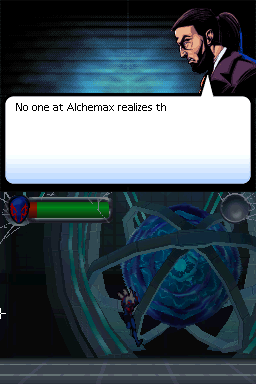
Spider-Man – Edge of Time (USA) (En,Fr)
0 21 1
Spider-Man – Edge of Time (USA) (En,Fr) is a Nintendo DS classic that brings the web-slinging hero into your portable gaming lineup. It combines action and adventure with a storyline that moves across different timelines, giving fans of superhero games and handheld adventures a fun experience. If you’ve played earlier Spider-Man titles or enjoy platformers that test your reflexes, this game is worth trying in your browser.
Getting Into Spider-Man – Edge of Time
The game has a simple core gameplay loop focused on exciting sequences and puzzle-solving. You control Spider-Man as he moves through levels filled with enemies, obstacles, and environmental hazards. The missions require quick reactions, smart use of abilities, and timing to move forward. On this browser-based version, the game runs smoothly, so you can jump in for quick sessions or longer playthroughs.
The structure usually involves completing objectives within a level, defeating enemies, and solving minor environmental puzzles to unlock the next area. Fast combat and agility are key, often requiring you to switch between different gameplay styles to overcome challenges. The game is designed for single-player sessions that can last from 20 minutes to over an hour, depending on your familiarity with the mechanics and puzzle difficulty.
Standout Features
The visuals in this Nintendo DS game reflect the comic book style with stylized character designs and vibrant backgrounds. Although limited by the handheld’s hardware, the graphics are clear and animated well enough to keep your attention. The progression system encourages replay by offering different difficulty settings and optional challenges, which reward you with extra content or achievements.
The story advances through completing levels and missions, with cutscenes that deepen the plot. While it’s not open-world, the levels feel dynamic and varied, helping prevent gameplay from becoming monotonous. Its short length and variety of challenges make it suitable for quick gaming bursts or longer sessions, especially since the browser version runs instantly without any setup needed.
Strategy and Tips
Getting started is simple, but mastering attack timing and evasions is essential. Learn enemy attack patterns early to avoid taking damage. Use the environment to your advantage, like hiding behind cover or triggering traps against enemies. Pay attention to your mission goals and don’t rush—exploring sometimes reveals shortcuts or hidden items.
- Practice timing your attacks to deal more damage and avoid getting hit.
- Use environmental objects such as walls or debris to block enemy fire or gain strategic advantages.
- Save your special abilities for tougher enemies or boss fights.
- Watch your health and replenish it with pickups or safe zones when possible.
- Revisit levels to improve your score or find secrets you might have missed.
Quick Questions
How do I get started with Spider-Man – Edge of Time?
Just load the game in your browser, choose your difficulty if prompted, and follow the instructions to start the first level.
What’s a common mistake beginners make?
Many rush through levels without paying attention to enemy attack patterns, which can lead to unnecessary damage. Take your time to learn how enemies behave.
Can I play Spider-Man – Edge of Time on mobile or touch devices?
Yes, the browser version supports touch controls, so you can play on mobile devices. For the best experience, a mouse or keyboard works better.
Spider-Man – Edge of Time offers a classic handheld experience that captures the core action of the Nintendo DS version. Its quick sessions and engaging gameplay make it a good choice whenever you want a superhero adventure in your browser without needing to download anything.
Related games: you can also try Kore de Haji o Kakanai – Ashita Tsukaeru DS Business Manner (Japan) and Eiyuu Senki – Laevatein (Japan), or browse all other games in the Nintendo DS category.
How to Play Spider-Man – Edge of Time (USA) (En,Fr)?
Control Spider-Man to complete levels by fighting enemies, solving puzzles, and avoiding hazards. Use quick reactions and strategic movement to progress through different missions.
Game Controls
Arrow keys for movement; other keys for actions like jumping and attacking, mapped to the emulator's keyboard.
You may be interested in:
-
 Nintendo DS
♥ 1
Casper’s Scare School – Classroom Capers (USA)
Nintendo DS
♥ 1
Casper’s Scare School – Classroom Capers (USA) -
 Nintendo DS
♥ 1
Zunou Nouryoku Koujou Machine – Touch de Zunoo DS (Japan)
Nintendo DS
♥ 1
Zunou Nouryoku Koujou Machine – Touch de Zunoo DS (Japan) -
 Nintendo DS
♥ 1
Zunou ni Asekaku Game Series! Vol. 1 – Cool 104 Joker & Setline (Japan)
Nintendo DS
♥ 1
Zunou ni Asekaku Game Series! Vol. 1 – Cool 104 Joker & Setline (Japan) -
 Nintendo DS
♥ 9
Zuma’s Revenge (USA)
Nintendo DS
♥ 9
Zuma’s Revenge (USA) -
 Nintendo DS
♥ 1
Zubo (USA) (En,Fr,Es)
Nintendo DS
♥ 1
Zubo (USA) (En,Fr,Es) -
 Nintendo DS
♥ 1
Zubo (Europe) (En,Fr,De,Es,It,Nl,Sv)
Nintendo DS
♥ 1
Zubo (Europe) (En,Fr,De,Es,It,Nl,Sv) -
 Nintendo DS
♥ 1
Zorro – Quest for Justice (USA) (En,Fr,De,Es,It)
Nintendo DS
♥ 1
Zorro – Quest for Justice (USA) (En,Fr,De,Es,It) -
 Nintendo DS
♥ 1
Zorro – Quest for Justice (Europe) (En,Fr,De,Es,It)
Nintendo DS
♥ 1
Zorro – Quest for Justice (Europe) (En,Fr,De,Es,It)
Comments (0)
No comments yet. Be the first to comment!