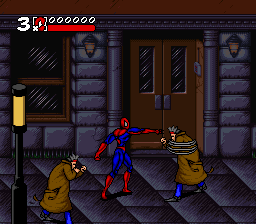
Spider-Man & Venom – Maximum Carnage (USA)
0 35 3
Spider-Man & Venom – Maximum Carnage (USA) is a classic SNES action-brawler that captures the excitement of fighting crime as two of Marvel’s most iconic heroes. Originally released during the SNES era, this game offers a straightforward yet engaging experience that’s easy for newcomers to pick up and enjoy. It runs smoothly in your browser, so you don’t need to download anything or fiddle with complicated setups. Fans of old-school beat ’em ups will find plenty to enjoy in its fast-paced combat and cooperative feel.
What Is Spider-Man & Venom – Maximum Carnage?
This game is a side-scrolling action brawler built around the classic superhero genre. Your main goal involves battling waves of enemies across different levels, using punches, kicks, and special moves to clear the screen. The controls are simple, and the combat uses combos, making it accessible for players of all skill levels. As you go along, you’ll face various enemy types and bosses that require quick reflexes and smart use of your moves.
Though it’s rooted in the beat ’em up style typical of the SNES, Spider-Man & Venom offers a cooperative mode, letting two players team up. The focus on smooth combat, enemy variety, and level progression keeps things lively. Its straightforward gameplay means you can jump right in with minimal effort, making it a good choice for casual players and Marvel fans alike.
What Keeps You Coming Back
The game’s bright sprite work and familiar Marvel characters bring a nostalgic feeling that encourages multiple playthroughs. Its level design features distinct stages, each with unique enemies and challenges, which encourages trying different strategies for each section. The cooperative mode adds a social element, letting friends join the fight and making replaying more fun.
Beyond the core gameplay, the game rewards familiarity with enemy patterns and boss fights, giving players reasons to improve their skills and aim for higher scores. The simple combat system means quick sessions can be satisfying, and mastering timing and combos offers more depth for those looking to perfect their approach. All in all, the mix of accessible action and multiplayer fun makes it easy to keep coming back.
Handy Tips
To get the most out of the game, keep these tips in mind:
- Learn enemy patterns early to predict their attacks and counter more effectively.
- Use cooperative moves with a partner to maximize damage against bosses.
- Keep moving to avoid getting overwhelmed by large groups of enemies.
- Save your special moves for tougher enemies or bosses to turn the tide of battle.
- Practice timing jumps and dodges to evade attacks more reliably.
- Focus on clearing screens quickly to stop enemies from piling up, especially in later levels.
Player FAQ
Is Spider-Man & Venom – Maximum Carnage easy for beginners?
Yes, thanks to its simple controls and clear objectives, it’s accessible for new players, though mastering combos can add some depth.
Can younger players enjoy this game?
Definitely. The cartoonish visuals and Marvel characters make it suitable for a younger crowd, with no complex mechanics involved.
Do I need an internet connection to play this game?
Since it runs directly in your browser, no internet connection is needed once it loads, making it perfect for quick sessions anytime.
Spider-Man & Venom – Maximum Carnage remains a fun, accessible SNES classic that captures the essence of superhero brawling. Its cooperative gameplay and simple mechanics make it a good choice for casual players and fans of retro action games alike, all playable free in your browser today.
Related games: you can also try Kevin Keegan's Player Manager (Europe) and Fever Pitch Soccer (Europe) (Beta), or browse all other games in the SNES category.
How to Play Spider-Man & Venom – Maximum Carnage (USA)?
Control Spider-Man and Venom to fight waves of enemies across levels using punches, kicks, and special moves. Work alone or with a friend to defeat bosses and clear stages.
Game Controls
Arrow keys act as the D-pad; Enter is Start; action buttons are on-screen mapped keys.








Comments (0)
No comments yet. Be the first to comment!