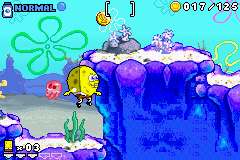
SpongeBob SquarePants – Revenge of The Flying Dutchman (U)(Venom)
0 16 1
SpongeBob SquarePants – Revenge of The Flying Dutchman (U)(Venom) is a classic Game Boy Advance game that runs right in your browser, bringing back nostalgic action, adventure, and platforming gameplay for fans of the franchise and retro gaming alike. As a well-loved title from the GBA era, it features colorful visuals and simple mechanics, making it easy to pick up and enjoy for players of all ages. No downloads or setups are necessary—just click and start playing.
Getting Into SpongeBob SquarePants – Revenge of The Flying Dutchman
The main gameplay involves navigating through levels filled with obstacles, enemies, and collectibles, typical of early 2000s platformers. You control SpongeBob as he explores underwater environments, completing tasks that often require precise timing and hazard avoidance. The game combines action with exploration, with each level designed to test your reflexes and puzzle-solving skills.
Most sessions involve exploring themed levels, gathering items, and defeating small enemies. There aren’t many menus or modes—your focus is on progressing through stages that are fairly short but packed with platforming challenges. It’s meant to be played in short bursts, with each level offering a self-contained challenge and a sense of progress as you unlock new areas and encounter different enemies.
Standout Features
The visuals stay true to the cartoon’s vibrant style, with colorful sprites and lively backgrounds that capture Bikini Bottom’s charm. The graphics are bright and clear, making hazards and items easy to spot during gameplay. Its straightforward design keeps it accessible for younger players but still offers enough challenge for older fans who enjoy precise jumps and timing.
The game progresses in a linear fashion, unlocking the next level once you finish the current one. You might find replay value in beating your best times or collecting all items in each stage. The platforming combined with action segments creates varied gameplay that encourages players to improve skills and revisit levels to find secrets or boost scores.
Strategy and Tips
Getting started is simple—spend some time learning each level’s layout and enemy patterns. Patience helps when timing jumps or avoiding hazards. Here are some pointers:
- Familiarize yourself with each level before rushing through it.
- Use the environment to your advantage—look for safe spots to pause and plan your next move.
- Collect all items in each stage to increase replay value and unlock extra content.
- Pay attention to enemy movements to find safe moments to attack or pass by.
- Practice your jumps for better accuracy, especially in narrow or moving hazards.
- If you get stuck, try replaying earlier levels to sharpen your skills or gather more items.
Quick Questions
How do I get started playing?
The game loads instantly in your browser, and you control SpongeBob directly on the screen—simply navigate and jump through levels as they appear.
What’s a common mistake beginners make?
Many players rush through levels without paying attention to enemy patterns or hazards, which can lead to unnecessary retries or losses.
Can I play this on mobile or touch devices?
Yes, it works on any device with a browser, including smartphones and tablets. You can enjoy it without any extra setup, wherever you are.
This vintage adventure offers a fun way to experience SpongeBob’s underwater escapades right in your browser. SpongeBob SquarePants – Revenge of The Flying Dutchman captures the charm and challenge of the original Game Boy Advance game, ready whenever you want to play.
Related games: you can also try Pro Mahjong Tsuwamono Advance (J)(Supplex) and Speedball 2 (E)(Eurasia), or browse all other games in the Game Boy Advance category.
How to Play SpongeBob SquarePants – Revenge of The Flying Dutchman (U)(Venom)?
Guide SpongeBob through underwater levels by jumping, avoiding hazards, defeating enemies, and collecting items to complete each stage.
Game Controls
Arrow keys control movement; action buttons are mapped to keyboard keys for jumping and interacting.
You may be interested in:
-
 Game Boy Advance
♥ 2
Zooo (J)(Rising Sun)
Game Boy Advance
♥ 2
Zooo (J)(Rising Sun) -
 Game Boy Advance
♥ 4
Zooo (E)(Trashman)
Game Boy Advance
♥ 4
Zooo (E)(Trashman) -
 Game Boy Advance
♥ 2
ZooCube (U)(Mode7)
Game Boy Advance
♥ 2
ZooCube (U)(Mode7) -
 Game Boy Advance
♥ 1
ZooCube (E)(Blizzard)
Game Boy Advance
♥ 1
ZooCube (E)(Blizzard) -
 Game Boy Advance
♥ 1
Zone of the Enders – The Fist of Mars (U)(Mode7)
Game Boy Advance
♥ 1
Zone of the Enders – The Fist of Mars (U)(Mode7) -
 Game Boy Advance
♥ 1
Zone of the Enders – The Fist of Mars (E)(Cezar)
Game Boy Advance
♥ 1
Zone of the Enders – The Fist of Mars (E)(Cezar) -
 Game Boy Advance
♥ 1
Zoku Bokura no Taiyou – Taiyou Shounen Django (J)(Independent)
Game Boy Advance
♥ 1
Zoku Bokura no Taiyou – Taiyou Shounen Django (J)(Independent) -
 Game Boy Advance
♥ 7
Zoku Bokura no Taiyou – Taiyou Shounen Django (J)(Caravan)
Game Boy Advance
♥ 7
Zoku Bokura no Taiyou – Taiyou Shounen Django (J)(Caravan)
Comments (0)
No comments yet. Be the first to comment!