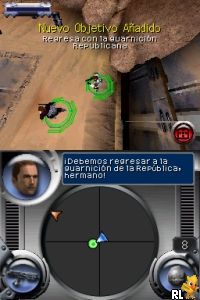
Star Wars – Battlefront – Elite Squadron (Europe) (Es,It)
0 1 0
Star Wars – Battlefront – Elite Squadron (Europe) (Es,It) is a classic Nintendo DS game that captures the essence of the iconic sci-fi universe. Its simple gameplay makes it approachable for those new to the series, letting players jump right into the star battles. This portable shooter provides a compact, accessible experience on the Nintendo DS, perfect for quick sessions or long gaming marathons.
What Is Star Wars – Battlefront – Elite Squadron?
Star Wars – Battlefront – Elite Squadron is a third-person shooter centered around large-scale battles across well-known locations from the Star Wars universe. The game focuses on team-based combat, giving players the choice between Rebels and Empire. You’ll participate in missions involving combat, objectives, and vehicle control. Its multiplayer options and campaign missions combine to create a well-rounded Star Wars experience on the Nintendo DS.
The gameplay mixes ground combat with vehicle control, offering a variety of weapons and character classes to try out. The design aims to mimic the chaos and strategy of Star Wars battles, with controls suited for handheld play. Missions are structured to deliver quick, engaging encounters, making it a good pick for gaming on the go.
What Keeps You Coming Back
One reason players stick with it is the variety of characters and factions, which adds to replay value. Whether you’re playing through the campaign or battling friends, each session feels different depending on your choices and tactics. The combat mechanics are simple but satisfying, keeping encounters fresh and interesting.
Plus, the game offers different mission types and vehicle sections that keep things lively. Switching between infantry and vehicle combat adds depth, while the familiar Star Wars locations boost the immersion. With quick sessions and multiple modes, it’s easy to enjoy different scenarios without feeling repetitive—great for fans of portable shooters and Star Wars alike.
Handy Tips
If you’re just starting out, it helps to get comfortable with the basic controls early on—this makes both campaign and multiplayer easier. Picking a character class that suits your style can really influence how you perform in battles. Use cover to stay safe; standing out in the open makes you an easy target. Trying out vehicle combat can add variety and help you control key areas.
- Focus on completing mission objectives quickly to earn higher scores and unlock more content.
- Keep an eye on your ammo and health — managing resources during fights keeps you prepared.
- Experiment with different factions and characters to see which ones fit your approach best.
- Use vehicles wisely to control important spots, but don’t rely on them alone.
Player FAQ
Is Star Wars – Battlefront – Elite Squadron easy for newcomers?
Yes, the controls are straightforward, making it accessible for players new to the series or younger audiences.
Can I play Star Wars – Battlefront – Elite Squadron offline?
Yes, the game is designed for single-player campaigns and local multiplayer on the Nintendo DS, so no internet connection is needed.
Is the game suitable for all ages?
Generally, yes. Its simple mechanics and the familiar Star Wars universe make it appropriate for a wide range of players, though younger audiences should be aware of mild combat elements.
Playing Star Wars – Battlefront – Elite Squadron on this site gives instant access to a classic Nintendo DS experience without any downloads. Its easy pick-up-and-play style makes it a good choice for quick battles or longer campaigns in your browser. The straightforward design means fans of Star Wars and newcomers can enjoy it without hassle.
Related games: you can also try Henry Hatsworth in the Puzzling Adventure (Europe) (En,Fr,De,Es,It) and Smurfs 2, The (USA) (En,Fr,Es), or browse all other games in the Nintendo DS category.
How to Play Star Wars – Battlefront – Elite Squadron (Europe) (Es,It)?
Choose your faction, complete missions by fighting enemies and controlling vehicles, and finish objectives to progress through the campaign or multiplayer matches.
Game Controls
Arrow keys move; action buttons mapped to keyboard keys; use them to shoot, jump, and interact.
You may be interested in:
-
 Nintendo DS
♥ 1
Casper’s Scare School – Classroom Capers (USA)
Nintendo DS
♥ 1
Casper’s Scare School – Classroom Capers (USA) -
 Nintendo DS
♥ 1
Zunou Nouryoku Koujou Machine – Touch de Zunoo DS (Japan)
Nintendo DS
♥ 1
Zunou Nouryoku Koujou Machine – Touch de Zunoo DS (Japan) -
 Nintendo DS
♥ 1
Zunou ni Asekaku Game Series! Vol. 1 – Cool 104 Joker & Setline (Japan)
Nintendo DS
♥ 1
Zunou ni Asekaku Game Series! Vol. 1 – Cool 104 Joker & Setline (Japan) -
 Nintendo DS
♥ 9
Zuma’s Revenge (USA)
Nintendo DS
♥ 9
Zuma’s Revenge (USA) -
 Nintendo DS
♥ 1
Zubo (USA) (En,Fr,Es)
Nintendo DS
♥ 1
Zubo (USA) (En,Fr,Es) -
 Nintendo DS
♥ 1
Zubo (Europe) (En,Fr,De,Es,It,Nl,Sv)
Nintendo DS
♥ 1
Zubo (Europe) (En,Fr,De,Es,It,Nl,Sv) -
 Nintendo DS
♥ 1
Zorro – Quest for Justice (USA) (En,Fr,De,Es,It)
Nintendo DS
♥ 1
Zorro – Quest for Justice (USA) (En,Fr,De,Es,It) -
 Nintendo DS
♥ 1
Zorro – Quest for Justice (Europe) (En,Fr,De,Es,It)
Nintendo DS
♥ 1
Zorro – Quest for Justice (Europe) (En,Fr,De,Es,It)
Comments (0)
No comments yet. Be the first to comment!