Star Wars – The Empire Strikes Back (Japan)
0 1 0
Getting Into Star Wars – The Empire Strikes Back
Star Wars – The Empire Strikes Back is a classic NES action game that puts players right in the middle of the famous space saga. Originally made for the Nintendo Entertainment System, this game offers a simple yet tough experience based on the gameplay style of its time. If you like action games that focus on shooting, dodging, and quick reflexes, this title provides a nostalgic challenge you can enjoy right in your browser.
The game features different stages, each representing parts of the story or battles from the film. You control a character navigating enemy-filled environments, defeating foes and avoiding hazards. To progress, you need to complete levels by reaching the end or defeating certain enemies, with each stage getting a bit harder. Play sessions tend to be short but demanding, making it perfect for quick playthroughs or practice. As a game that focuses purely on action, it emphasizes timing, positioning, and resource management, without complex story mechanics or RPG features.
Standout Features
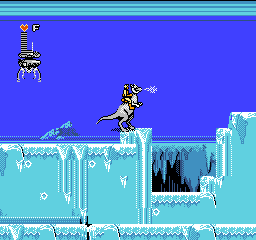
The visuals stick with the pixel art style typical of the NES, using simple yet recognizable designs that evoke the Star Wars universe. Enemy sprites and backgrounds are colorful and straightforward, making it easy to tell friend from foe. Despite the hardware limitations, the graphics do a good job of showing space combat and adventure, keeping each encounter clear and engaging.
The game follows a linear path, with a set number of stages that get tougher as you go. The real challenge is mastering enemy patterns and learning the level layouts. Replayability comes from trying to beat your high score or finish stages faster, as well as experimenting with different routes or strategies. Its simple design makes it accessible for newcomers, but it’s tough enough to reward players who stick with it. Since there are no save points, each run tests your skill in one sitting, encouraging repeated attempts and practice.
Strategy and Tips
Focusing on recognizing enemy patterns and timing will help you move forward. Practice helps with understanding enemy movements and projectile timings.
- Try to avoid enemy fire rather than rushing through levels. Patience pays off.
- Learn the layout of each level to anticipate where enemies will appear and how they attack.
- Manage your resources carefully and don’t take unnecessary risks—sometimes pulling back is the best move.
- Clear one area at a time before moving on; rushing can cause mistakes and lost lives.
- Keep track of your remaining lives and plan your approach to make the most of each run.
Quick Questions
Is Star Wars – The Empire Strikes Back easy for newcomers?
The game can be tough since it requires memorizing enemy patterns, but with practice, it gets easier.
How long does a typical session last?
Most games last around 10-20 minutes, depending on your skill level and how many retries you need.
Can I play this on mobile or touch devices?
Yes, because it runs right in your browser. You can play on a mobile device with a touchscreen, but controlling it precisely might be a bit tricky compared to using a keyboard or controller.
Closing
Star Wars – The Empire Strikes Back is a solid example of NES action gaming. It offers a quick but tough challenge suited for fans of the series and classic platformers alike. Its simple design and pixel art style make it a fun way to experience a slice of gaming history directly in your browser. Whether you’re aiming for a high score or just want to see how far you can get, it’s a game that encourages repeated tries and practice.
Related games: you can also try Galg (Japan) and R.B.I. Baseball (USA), or browse all other games in the NES category.
How to Play Star Wars – The Empire Strikes Back (Japan)?
Move through levels, shoot enemies, and dodge hazards to reach the end of each stage. Focus on timing, pattern recognition, and resource management to complete the game.
Game Controls
Arrow keys control movement; action buttons are mapped to keyboard keys for shooting and other actions.
You may be interested in:
-
![Zombie Hunter (Japan) [En by KingMike v1.01]](https://www.playf2p.com/wp-content/uploads/zombie-hunter-japan-en-by-kingmike-v1-01-200x120.png) NES
♥ 2
Zombie Hunter (Japan) [En by KingMike v1.01]
NES
♥ 2
Zombie Hunter (Japan) [En by KingMike v1.01] -
 NES
♥ 1
Zombie Hunter (Japan)
NES
♥ 1
Zombie Hunter (Japan) -
 NES
♥ 1
Zoids Mokushiroku (Japan)
NES
♥ 1
Zoids Mokushiroku (Japan) -
 NES
♥ 2
Zoids 2 – Zenebas no Gyakushuu (Japan)
NES
♥ 2
Zoids 2 – Zenebas no Gyakushuu (Japan) -
 NES
♥ 1
Zoids – Chuuou Tairiku no Tatakai (Japan)
NES
♥ 1
Zoids – Chuuou Tairiku no Tatakai (Japan) -
 NES
♥ 11
Zippy Race (Japan)
NES
♥ 11
Zippy Race (Japan) -
 NES
♥ 1
Zhen Ben Xi You Ji (Asia) (Unl)
NES
♥ 1
Zhen Ben Xi You Ji (Asia) (Unl) -
 NES
♥ 1
Zenbei!! Pro Basket (Japan)
NES
♥ 1
Zenbei!! Pro Basket (Japan)
Comments (0)
No comments yet. Be the first to comment!