Starship Hector (USA)
0 1 0
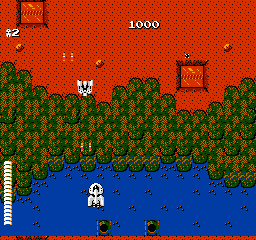
Starship Hector (USA) is a classic NES action shooter that tasks players with piloting a spaceship through a series of challenging, enemy-filled levels. As a well-made arcade-style game from the NES era, it appeals to fans of fast-paced shooting action and simple gameplay. If you like old-school console shooters that test your reflexes and pattern recognition, this game runs right in your browser—no downloads needed.
Getting Into Starship Hector
In Starship Hector, your main goal is to control a spaceship and clear each level of enemies while avoiding projectiles and obstacles. The gameplay keeps going as you navigate scrolling stages, defeat enemy ships, and try to survive until the end of each level. It’s mostly about action—moving your ship across the screen, dodging fire, and shooting back at enemies. There’s no complex story or branching paths; just pure shooting fun.
Most sessions involve learning enemy patterns, timing your movements, and conserving your lives. Levels are designed to be finished quickly, so you can jump in for a quick round or replay for a higher score. The difficulty increases as you progress, requiring quick reactions and precise positioning. Over time, you’ll start recognizing enemy patterns, which makes success easier and encourages you to keep playing.
Standout Features
The pixel art style of Starship Hector stays true to NES visuals, with colorful sprites and simple but distinctive enemy designs. The backgrounds are minimal but effective, putting the focus on the fast-paced action. Each level introduces new enemy formations and tougher challenges, keeping gameplay interesting without becoming overwhelming.
The replay value comes from trying to beat your high scores and mastering enemy patterns. The short levels mean you can start again right after failing, encouraging multiple attempts. While it doesn’t include upgrades or branching paths, its focus on shooting skill makes it satisfying for those who enjoy refining their reflexes and pattern recognition. The straightforward design means you can get into the action immediately—no extra modes or content to unlock.
Strategy and Tips
Getting started is easy, but getting good takes practice. Here are some tips to help improve your game:
- Prioritize dodging enemy fire over just shooting—staying alive is the first step.
- Learn enemy movement patterns through repeated plays to better anticipate attacks.
- Keep moving to avoid getting trapped or overwhelmed.
- Focus on taking out the biggest threats early on.
- Always be aware of your ship’s position relative to incoming projectiles.
- Build muscle memory by practicing early levels to handle tougher stages later.
Quick Questions
How do I start playing Starship Hector here?
Just load the game in your browser—there’s no need to download or install anything. Use your keyboard or device controls to get started right away.
What’s a common mistake beginners make?
Many players tend to stay still or move too slowly, making it easier for enemies or projectiles to hit them. Moving constantly and learning enemy patterns helps avoid this.
Can I play Starship Hector on a mobile device or touchscreen?
Yes, the game runs directly in your browser and works with touch controls, so you can play on your phone or tablet without any extra setup.
Starship Hector offers a compact but tough shooting experience inspired by NES classics. Its straightforward gameplay and increasing difficulty make it a good pick for fans of retro shooters. Playing here means you can enjoy a bit of NES history anytime, right in your browser.
Related games: you can also try Rainbow Islands – The Story of Bubble Bobble 2 (USA) and Adventures of Captain Comic, The (USA) (Unl), or browse all other games in the NES category.
How to Play Starship Hector (USA)?
Control your spaceship to shoot enemies and dodge their fire across scrolling levels. Clear each stage by defeating enemies while avoiding obstacles and surviving as long as possible.
Game Controls
Arrow keys move the ship; action buttons fire and activate in-game functions.
You may be interested in:
-
![Zombie Hunter (Japan) [En by KingMike v1.01]](https://www.playf2p.com/wp-content/uploads/zombie-hunter-japan-en-by-kingmike-v1-01-200x120.png) NES
♥ 2
Zombie Hunter (Japan) [En by KingMike v1.01]
NES
♥ 2
Zombie Hunter (Japan) [En by KingMike v1.01] -
 NES
♥ 1
Zombie Hunter (Japan)
NES
♥ 1
Zombie Hunter (Japan) -
 NES
♥ 1
Zoids Mokushiroku (Japan)
NES
♥ 1
Zoids Mokushiroku (Japan) -
 NES
♥ 2
Zoids 2 – Zenebas no Gyakushuu (Japan)
NES
♥ 2
Zoids 2 – Zenebas no Gyakushuu (Japan) -
 NES
♥ 1
Zoids – Chuuou Tairiku no Tatakai (Japan)
NES
♥ 1
Zoids – Chuuou Tairiku no Tatakai (Japan) -
 NES
♥ 11
Zippy Race (Japan)
NES
♥ 11
Zippy Race (Japan) -
 NES
♥ 1
Zhen Ben Xi You Ji (Asia) (Unl)
NES
♥ 1
Zhen Ben Xi You Ji (Asia) (Unl) -
 NES
♥ 1
Zenbei!! Pro Basket (Japan)
NES
♥ 1
Zenbei!! Pro Basket (Japan)
Comments (0)
No comments yet. Be the first to comment!